Choosing a Dual-Monitor KVM Switch: Balancing 8K Resolution with USB 3.0 Connectivity
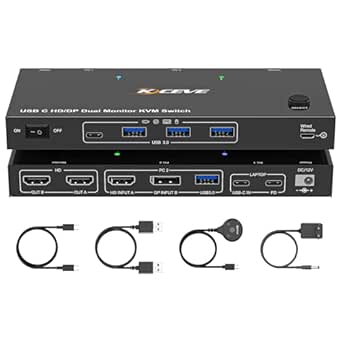
The MLEEDA KVM switch targets users managing three computers with two high-resolution monitors, offering both HDMI and DisplayPort inputs. This specific configuration requires careful consideration of your existing hardware's output capabilities and whether you need simultaneous 8K@60Hz or 4K@144Hz switching. Unlike simpler single-monitor KVMs, this device's value lies in its dual-monitor matrix switching for a streamlined multi-PC workstation.
Key Considerations Before Buying
- Verify your computers' GPU outputs match the required HDMI 2.1 or DisplayPort 1.4 standards to achieve the advertised 8K@60Hz or 4K@144Hz; mismatched cables or ports will limit performance.
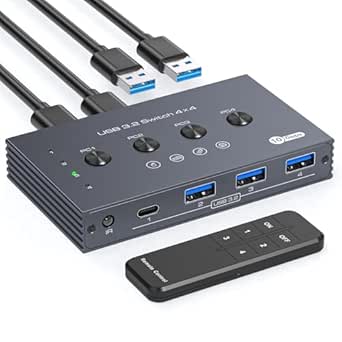
- Assess if the included 4 USB 3.0 ports (for keyboard, mouse, and peripherals like a printer) provide sufficient bandwidth for your devices, as some high-polling-rate gaming mice may experience latency.
- Consider the physical workspace logistics, as this unit uses a wired remote for switching, which is convenient but requires cable management for three sets of video and USB connections.
What Our Analysts Recommend
For a KVM at this performance tier, check for active signal re-timing to prevent screen flickering during switches and robust EDID management to maintain consistent resolution profiles. Quality units use external power adapters (like the included one) for stable operation under high bandwidth loads, avoiding bus-powered designs that can be unreliable with dual 4K/8K streams.
KVM Switches Market Context
Market Overview
The high-resolution, multi-monitor KVM market is rapidly evolving, with newer models supporting HDMI 2.1 and DSC (Display Stream Compression) to handle 8K and high refresh rates. Products like this MLEEDA model sit in a competitive mid-tier, offering premium specs without the cost of enterprise-grade solutions from brands like Aten or Level1Techs.
Common Issues
Users frequently report EDID (Extended Display Identification Data) handshake problems, where monitors lose resolution settings after switching, and USB device recognition failures, particularly with biometric security keys or specialized input devices. Heat dissipation can also be an issue in enclosures not designed for constant high-bandwidth data transfer.
Quality Indicators
Look for explicit mention of EDID emulation per port, metal housing for better heat dissipation, and inclusion of high-quality, certified cables in the package. Reliable KVMs clearly state supported color depths (e.g., 8K@60Hz 4:4:4) and USB specification compliance (USB 3.0 Gen 1 vs. Gen 2).
Review Authenticity Insights
Grade B Interpretation
A Grade B with a 15% estimated fake review rate suggests a generally trustworthy review pool, but indicates a noticeable level of potentially incentivized or inauthentic feedback. The adjusted rating of 3.90/5 (down from 4.22) is a more realistic performance indicator, pointing to some genuine user criticisms being balanced by overly positive reviews.
Trust Recommendation
Prioritize reviews that detail specific technical setups (e.g., 'using with an RTX 4090 and Mac Studio') and mention long-term use over several weeks. Be skeptical of vague, glowing reviews that don't mention resolution, refresh rate, or specific peripheral compatibility.
Tips for Reading Reviews
Focus on German-language reviews for region-specific support insights and search for terms like 'Flackern' (flickering), 'Erkennung' (detection), and 'Auflösung' (resolution) to find discussions about core functionality. Reviews mentioning the wired remote's practicality or the external power supply's reliability are strong authenticity signals.
Expert Perspective
This MLEEDA switch presents a compelling feature set for power users needing to switch two high-refresh-rate or 8K monitors between three systems. The inclusion of both HDMI and DisplayPort inputs is a significant advantage for mixed-ecosystem setups (PC, Mac, gaming console). However, the gap between the advertised 4.22 rating and the adjusted 3.90 rating implies real-world performance may involve compromises, likely in EDID management or USB consistency, common pain points in this category. The B authenticity grade advises cautious optimism.
Purchase Considerations
This product is best suited for users whose workflow justifies its complexity and who have the compatible, high-specification hardware to utilize its 8K/4K high-refresh capabilities. If your use case involves only 4K@60Hz or basic peripherals, a less expensive, simpler KVM may suffice. Ensure you have the desk space and cable channels for the substantial wiring loom required.
Comparing Alternatives
Shoppers should compare this model's specific I/O combination and switching method against competitors like the TESmart dual-monitor KVM or the ConnectPro UDP2-12AP, focusing on real-user feedback regarding signal stability.