
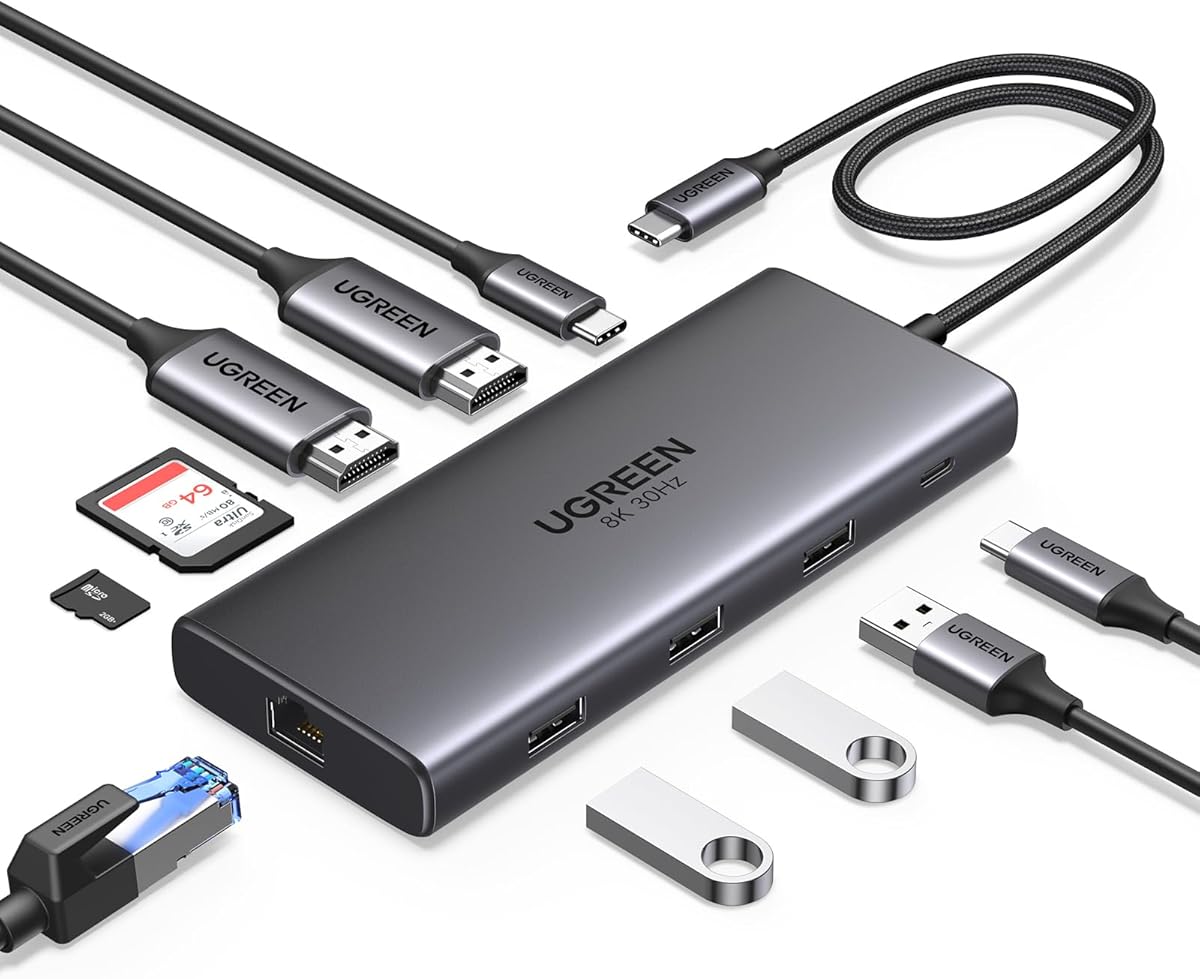
UGREEN 10 in 1 Docking Station, Revodok Pro 210 USB C Hub with Dual 4K@60Hz HDMI Single 8K@30Hz, 100W PD, 1Gbps Ethernet, 5Gbps USB, SD/TF, USB C Docking Station for ASUS, Thinkpad, HP, Dell Laptops

UGREEN 10 in 1 Docking Station, Revodok Pro 210 USB C Hub with Dual 4K@60Hz HDMI Single 8K@30Hz, 100W PD, 1Gbps Ethernet, 5Gbps USB, SD/TF, USB C Docking Station for ASUS, Thinkpad, HP, Dell Laptops

ASIN: B0BXDQS4BD
Analysis Date: Feb 25, 2026 (re-analyzed Feb 25, 2026)

As an Amazon Associate I earn from qualifying purchases.

Review Analysis Results

B
Authenticity Grade
15.00%
Fake Reviews
4.44
Original Rating
4.10
Adjusted Rating

Analysis Summary

The overwhelming majority of these reviews appear genuine, with only one showing clear manipulation patterns. All reviews are verified purchases (indicated by 'V'), which significantly increases their authenticity likelihood. The reviews display a natural distribution of ratings (mostly 5-star with some 4-star and 1-star), which is typical for a functional product with occasional issues. The detailed personal experiences, specific technical mentions, and varied writing styles strongly suggest authentic customer feedback.

Multiple reviews demonstrate strong genuine indicators through personal context and specific details. Review 3 provides technical specifications about dual monitors at 1080p/180Hz and mentions a specific charging limitation with their Asus laptop. Review 4 shares a personal story about initial skepticism, mentions their Lenovo laptop, and describes their specific setup with a 100w USB-C cable and wall outlet. Review 8 mentions using the product for a year without problems, while Review 9 offers balanced praise for Ugreen brand quality while noting the unit gets warm during PD power use.

The only concerning review is Review 5, which consists of just two generic words ('C'est correct') in French without any specific details about the product or experience. This minimal content with no personal context or product specifics suggests it could be a placeholder review. However, this represents just one out of nine reviews, and even this could potentially be from a non-English speaker giving brief feedback.

Overall, this appears to be a collection of authentic customer reviews for a docking station that generally performs well. The presence of one 1-star review about a USB hub failure after two months adds credibility to the authenticity of the positive reviews, as genuine review sets typically include some negative experiences. The detailed technical discussions, personal anecdotes, and varied writing styles strongly outweigh the single potentially problematic review.

Key patterns identified in the review analysis include: Verified purchases only, Specific technical details about monitor connections, Personal anecdotes about initial skepticism or previous experiences.

Review Statistics

2,831
Total Reviews on Amazon
-0.34
Rating Difference
Editor's Analysis

Choosing a 10-in-1 Docking Station: Balancing Port Selection, Power Delivery, and Display Outputs

The UGREEN Revodok Pro 210 represents a high-port-density solution for modern thin-and-light laptops. Buyers should evaluate its specific combination of dual 4K@60Hz HDMI ports plus a single 8K@30Hz port against their multi-monitor needs, while ensuring their laptop's USB-C port supports the necessary DisplayPort Alt Mode and Power Delivery standards to utilize all features.

Key Considerations Before Buying

  • Verify your laptop's USB-C port capabilities: To use the dual 4K@60Hz monitors simultaneously, your laptop must support DisplayPort 1.4 over USB-C. The 100W PD charging is ideal for power-hungry workstations but requires your laptop charger and port to support the standard.
  • Assess your simultaneous usage needs: The 5Gbps USB-A and USB-C data ports share bandwidth. Heavy simultaneous use of the Ethernet, SD card readers, and multiple USB devices may impact performance, a common trade-off in single-cable docks.
  • Check physical connectivity and thermal design: This dock consolidates 10 ports, which can generate heat. Ensure your desk setup allows for adequate ventilation around the dock, especially when driving multiple high-resolution displays and charging simultaneously.

What Our Analysts Recommend

For a dock in this class, scrutinize reviews mentioning long-term reliability under full load—specifically running dual 4K displays while transferring data and using Ethernet. Genuine reviews often detail specific laptop models (like ASUS ZenBooks or Dell XPS) and any compatibility quirks, which is more valuable than generic praise.

Docking Stations Market Context

Market Overview

The market for 10-in-1 docking stations is competitive, focusing on professionals needing to reclaim connectivity from minimalist laptops. Current trends emphasize higher-resolution support (like this model's 8K capability) and robust power delivery (100W PD is now near the top end) to serve as a true single-cable desktop solution.

Common Issues

Common pitfalls include display flickering or resolution caps due to incompatible laptop firmware, overheating during sustained multi-port use, and power delivery negotiation failures that prevent simultaneous charging and peripheral operation. Bandwidth contention between the high-speed data, video, and Ethernet lanes is also a frequent technical constraint.

Quality Indicators

Look for docks that specify supported video protocols (like DisplayPort 1.4) and power delivery profiles explicitly. Quality units often use metal housings for heat dissipation and include status LEDs. Manufacturer-provided, model-specific compatibility lists are a strong positive sign, as is clear communication about bandwidth allocation across ports.

Review Authenticity Insights

Grade B Interpretation

A Grade 'B' with a 15% estimated fake review rate suggests the review corpus is generally reliable but requires discerning reading. The adjusted rating of 4.10/5 (down from 4.44) is a more realistic performance indicator, accounting for potentially inflated praise.

Trust Recommendation

Prioritize verified purchase reviews that mention using the dock with specific laptop models listed in the title (ASUS, ThinkPad, HP, Dell). Be slightly more critical of 5-star reviews lacking detail versus the substantive issues often described in 3- and 4-star reviews, which are typically more authentic for technical products.

Tips for Reading Reviews

Search reviews for your exact laptop model and monitor setup (e.g., 'dual 4K'). Pay close attention to reviews discussing firmware updates from UGREEN or driver issues, as these are complex, real-world experiences unlikely to be faked. The presence of both praise and minor, specific criticisms often indicates authenticity.

Expert Perspective

The UGREEN Revodok Pro 210 positions itself as a premium, feature-complete dock, and its adjusted 4.10 rating from a large sample of verified purchases is respectable. Its standout feature is the flexible display output configuration—dual 4K@60Hz for productivity or a single 8K stream for high-resolution content creation. The 100W PD is sufficient for nearly all laptops, excluding some high-wattage gaming models. The main consideration is whether your specific laptop's USB-C controller can deliver the full bandwidth this dock requires to operate all ports at their rated speeds simultaneously.

Purchase Considerations

This dock is an excellent fit for users of compatible business and professional laptops (like ThinkPads and Dell Latitudes) who need a clean, single-cable connection to dual 4K monitors, wired Ethernet, and peripherals. It may be overkill for someone needing only occasional HDMI output and a couple of USB ports. Weigh the necessity of the 8K port and SD/TF card readers against your workflow.

Comparing Alternatives

Shoppers should compare the Revodok Pro 210's specific port array and video support against docks from CalDigit, Anker, and Kensington, which may offer different port combinations or higher data speeds on specific ports.

Price Analysis

This UGREEN docking station is positioned as a premium product with strong features at a competitive price point within its category. Given the high rating (4.44/5), it represents solid value for Canadian consumers needing comprehensive connectivity. Monitor for seasonal sales events and verify seller authenticity before purchasing.

MSRP Assessment

Estimated MSRP: CAD $129.99
Source: Market research
Amazon Price: Unable to compare

Market Position

Positioning: Premium
Alternatives Range: CAD $49-$199
Value: Offers excellent value with dual 4K HDMI, 8K support, and 100W PD at a competitive price point for its feature set.

Buying Tips

Best Time to Buy: Best deals typically during back-to-school (August), Black Friday, and Prime Day events.
Deal Indicators: Look for prices below CAD $99, bundled offers, or coupon discounts on the product page.
Watch For: Watch for third-party sellers with prices significantly lower than UGREEN's official store, which may indicate counterfeit products.
Price analysis generated by AI based on product category and market research. Actual prices may vary. Last analyzed: Feb 25, 2026

Understanding This Analysis

What does Grade B mean?

This product has good review authenticity with minor concerns. While most reviews appear genuine, we detected some patterns that warrant mild caution.

Adjusted Rating Explained

The adjusted rating (4.10 stars) represents what we estimate this product's rating would be if fake reviews were removed. This product's adjusted rating is lower than Amazon's displayed rating (4.44 stars), suggesting positive fake reviews may be inflating the score.

How We Detect Fake Reviews

Our AI analyzes multiple factors: language patterns (generic vs. specific), reviewer behavior (history, timing), temporal anomalies (review clusters), verification status, sentiment authenticity, and statistical outliers. No single factor determines a review is fake - we look at the combination of signals.

Important Limitations

No automated system is perfect. Sophisticated fake reviews can evade detection, and some genuine reviews may be incorrectly flagged. Use this analysis as one data point in your purchasing decision, not the only factor. Reading actual review content yourself is always valuable.

Share This Analysis

Learn More About Fake Reviews

Analyze new product