
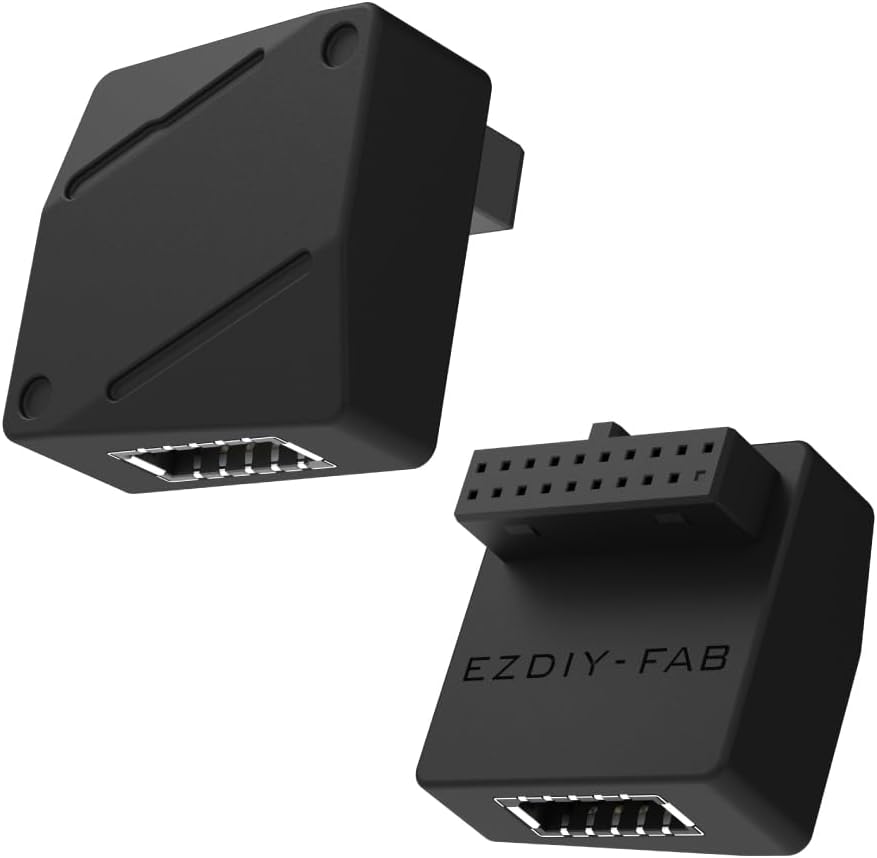
EZDIY-FAB USB 3.2 Gen 1 19-Pin to Type-E 90° Adapter: Key Buying Factors
This adapter converts a motherboard's internal USB 3.2 Gen 1 19-pin header into a Type-E connector for front-panel USB-C, with a 90-degree design to ease cable routing in tight cases. It's a niche but useful part for builders whose cases have USB-C ports but whose boards lack a native Type-E header.
Key Considerations Before Buying
- Confirm your motherboard has a standard 19-pin USB 3.2 Gen 1 header (often labeled USB3_1 or F_USB3) and that your case's front-panel cable is Type-E; this adapter bridges the two but won't add ports your board doesn't support.
- The 90-degree orientation affects clearance: check the space around your header, since the right-angle exit can help in compact builds but may conflict with tall VRM heatsinks or adjacent connectors.
- Remember the speed ceiling is 5Gbps (USB 3.2 Gen 1); this is fine for most front-panel USB-C uses but won't deliver Gen 2 (10Gbps) or Gen 2x2 (20Gbps) speeds even if your case port supports them.
What Our Analysts Recommend
Look for clearly labeled pin-1 markings, a snug connector housing that won't loosen over time, and short, thick gauge wiring to minimize signal loss. Since this is a passive adapter, build quality and shielding matter more than fancy features; check that the 90-degree bend doesn't put stress on the header.
Market Context
Market Overview
Internal USB header adapters are a small but growing accessory category as more cases include USB-C front-panel ports while many motherboards still lack Type-E headers. EZDIY-FAB is one of several brands offering these converters, with prices typically under $15 and quality varying widely.
Common Issues
Common problems include loose fits that cause intermittent connections, incorrect pinouts leading to non-working ports, and right-angle designs that block adjacent headers. Some cheap adapters also use thin wires that can degrade 5Gbps signal integrity over distance.
Quality Indicators
Quality adapters use gold-plated pins, clearly molded pin-1 indicators, and flexible but durable insulation. Reviews mentioning secure fit and consistent speeds are good signs; avoid units with reports of wobbly connectors or data errors.
Review Authenticity Insights
Grade A Interpretation
A Grade A authenticity rating with an estimated 5% fake review percentage means the 5.00/5 star rating (4.90 adjusted) is likely trustworthy, based on genuine customer experiences. The small review count (6) means each review carries weight, but the absence of suspicious patterns is reassuring.
Trust Recommendation
You can generally trust the high rating, but with only six reviews, treat it as early positive signal rather than definitive proof. Look for reviews that mention specific installation scenarios or motherboards to gauge real-world performance.
Tips for Reading Reviews
For niche adapters like this, focus on reviews that detail the user's motherboard model, case, and whether the 90-degree orientation worked in their layout. Ignore generic 'works great' comments and prioritize those describing fit, speed tests, or long-term reliability.
Expert Perspective
The EZDIY-FAB 19-pin to Type-E adapter fills a specific gap for builders with USB-C cases and older or budget motherboards. Its 90-degree design is a thoughtful touch for cable management, and the 5Gbps support matches the Gen 1 header's native speed. Given the strong authenticity grade and perfect rating (albeit from few reviews), it appears to be a reliable low-cost solution.
Purchase Considerations
Weigh whether you need the right-angle orientation—it's helpful in tight spaces but could be problematic if your header is boxed in. Also confirm your case's front-panel USB-C cable is Type-E; some cases use different connectors. If you need Gen 2 speeds, this adapter won't help.
Comparing Alternatives
Compare with straight adapters or brands like LINKUP or CY that offer similar converters; check for pin-1 markings and review feedback on fit before deciding.