
Choosing a Triple-Monitor KVM Switch for High-Resolution Gaming and Productivity
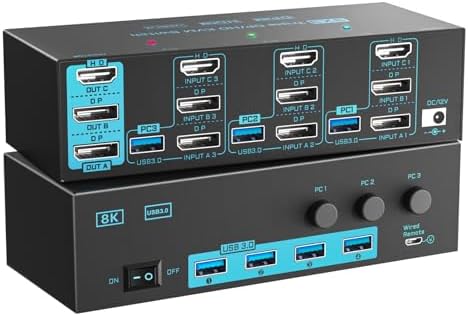
This specific 8K/4K KVM switch is engineered for users managing three computers across three high-refresh-rate monitors. Its hybrid port configuration—featuring two DisplayPort 1.4 and one HDMI 2.1—creates a unique setup where not all monitors will have identical performance ceilings, a critical detail for gamers and content creators.
Key Considerations Before Buying
- Understand the performance split: The two DisplayPort 1.4 ports max out at 8K@30Hz or 4K@144Hz, ideal for PC gaming rigs, while the single HDMI 2.1 port supports 8K@60Hz, better suited for next-gen consoles or media PCs.
- Assess your USB 3.0 peripheral needs: This switch shares a single USB hub between computers; verify the bandwidth is sufficient for your webcam, external drives, and input devices without lag.
- Plan for cable management: A wired remote is convenient, but running three sets of video cables (DP/HDMI) plus USB 3.0 for each computer requires significant cable organization behind your desk.
What Our Analysts Recommend
For this tier of KVM, scrutinize reviews for mentions of signal integrity at 4K@120Hz+ and hotkey reliability. A quality indicator is consistent performance across all three monitor outputs without signal drop, especially when switching under load. The wired remote should feel sturdy, not like a flimsy afterthought.
KVM Switches Market Context
Market Overview
The market for multi-monitor, high-bandwidth KVM switches is niche but growing, driven by hybrid workstations and gamers with multiple systems. Products like this one, which mix DP 1.4 and HDMI 2.1, represent a cost-effective compromise to support both PC and console without needing all ports to be the latest standard.
Common Issues
Common pitfalls include EDID (Extended Display Identification Data) emulation failures causing resolution mismatches, USB peripheral disconnects during switching, and insufficient power delivery to the hub. Inadequate cooling can also lead to thermal throttling during prolonged 4K high-refresh-rate use.
Quality Indicators
Look for explicit mention of EDID management in the manual, robust metal housing for heat dissipation, and branded chipsets (like VMM or Asmedia) in teardown reviews. A clear, detailed manual addressing multi-monitor setup is a strong sign of manufacturer support.
Review Authenticity Insights
Grade B Interpretation
A 'Grade B' with an 11% estimated fake review rate indicates a generally trustworthy review pool. This suggests most feedback reflects real-world use, though a small portion of reviews may be incentivized. The adjusted rating of 4.00/5, down from 4.22/5, is a more reliable performance benchmark.
Trust Recommendation
Prioritize reviews from verified purchasers that detail specific setup configurations (e.g., 'using with two 4K@144Hz monitors and a PS5'). Be slightly more skeptical of 5-star reviews lacking technical detail, as they may constitute the estimated 11% less-authentic portion.
Tips for Reading Reviews
For this technical product, focus on reviews that mention specific monitor models, resolutions, and refresh rates achieved. Long-term usage reports (1+ month) are more valuable than first-impression posts, as they can reveal issues with firmware stability or durability.
Expert Perspective
This KVM switch presents a compelling, specification-rich solution for a very specific user: someone with a triple-monitor setup who needs to switch between three high-performance sources. The hybrid DP 1.4/HDMI 2.1 design is pragmatic, catering to both high-refresh-rate PC gamers and console/Media PC users. The strong adjusted rating of 4.00/5 from a largely authentic review pool suggests it delivers on its core promises for most buyers. However, the complexity of managing EDID and bandwidth across three monitors means success is highly dependent on cable quality and precise configuration.
Purchase Considerations
You should purchase this if your setup perfectly matches its I/O (2x DP computers, 1x HDMI computer) and you need simultaneous triple-monitor switching. Consider alternatives if you require uniform 8K@60Hz across all ports or need more than one USB 3.0 peripheral hub. The wired remote is a plus for desk-mounted control but limits flexibility.
Comparing Alternatives
Shoppers should compare this model's specific port mix and refresh rate caps against KVMs with three identical ports (all HDMI 2.1 or all DP 1.4) to see which aligns with their source devices.


