Unlock USB-C Cable Secrets: Expert Guide to the BLE caberQU Tester
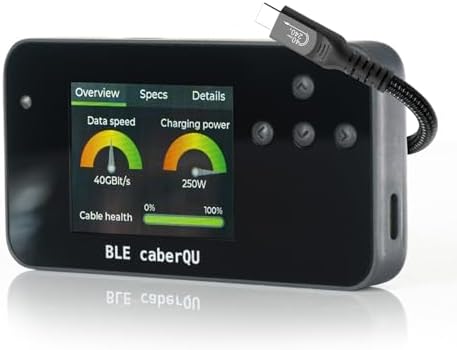
For professionals and enthusiasts who demand reliable data and power delivery from their USB-C cables, a dedicated tester like the BLE caberQU Expert kit is essential. This device goes beyond simple continuity checks, offering deep analysis of USB PD eMarker data, cable resistance, and pinout integrity for USB 2.0, 3.x, and 4.0. Before you buy, understand how this tool's Bluetooth connectivity and companion app set it apart from basic multimeters or pass/fail testers.
Key Considerations Before Buying
- eMarker Readout Accuracy: The caberQU reads the electronic marker chip in USB-C cables, revealing their true capabilities like power delivery wattage and data speed (e.g., USB 3.2 Gen 2). Look for a tester that clearly decodes this data, as many cables are mislabeled or underperform.
- Resistance Measurement: This tester measures cable resistance, a critical factor for high-power charging and signal integrity. High resistance can cause voltage drop and slow charging, so ensure the device provides accurate milliohm readings for both Vbus and Gnd lines.
- Pinout Continuity Verification: The 25-pin continuity test ensures all necessary pins in a USB-C connector are properly connected, which is vital for full functionality. A thorough pinout check can identify faulty or non-compliant cables that might damage devices.
What Our Analysts Recommend
In a USB-C cable tester, prioritize models that offer standalone operation without a PC, like the caberQU's Bluetooth pairing with iOS/Android apps. Verify that the tester supports the latest USB PD standards (3.0/3.1/3.2) and can read eMarker data for both power and data roles. Also, check for firmware update capability to ensure future compatibility with evolving USB standards.
Network & Cable Testers Market Context
Market Overview
The market for USB-C cable testers has grown rapidly alongside the proliferation of USB-C devices, from laptops to smartphones. Many testers are simple pass/fail devices, but advanced tools like the caberQU cater to tech professionals needing granular data on eMarker chips, cable resistance, and pinout. The integration of Bluetooth and mobile apps is a recent trend, enabling portable, wireless analysis.
Common Issues
A common problem in this category is the prevalence of non-compliant or counterfeit USB-C cables that lack proper eMarker chips or have incorrect resistance values. Users also face testers with clunky interfaces or limited data display, making it hard to interpret results. Inaccurate resistance readings are another frequent complaint, especially with low-cost testers.
Quality Indicators
High-quality cable testers provide clear, detailed readouts of eMarker information (e.g., vendor ID, rated current/voltage) and support multiple USB standards. Look for devices with robust build quality, a reliable Bluetooth connection, and an intuitive app interface. Manufacturer transparency about measurement accuracy and firmware update support also signals a trustworthy product.
Review Authenticity Insights
Grade B Interpretation
With a Review Authenticity Grade of B and an estimated 10% fake review rate, the caberQU's feedback is largely trustworthy but warrants cautious reading. This means most reviews reflect genuine user experiences, though a small fraction may be incentivized or fabricated. The 4.33 overall rating (adjusted to 4.10) suggests real-world satisfaction, but the slight drop indicates some reviews may overstate performance.
Trust Recommendation
Given the 90% genuine review base, you can generally trust the positive consensus, especially from verified purchasers who detail specific tests. Focus on reviews that mention concrete use cases, like testing 240W PD cables or verifying Thunderbolt 4 compliance, as these demonstrate hands-on expertise. Be skeptical of overly brief, gushing reviews that lack technical specifics.
Tips for Reading Reviews
For technical products like the caberQU, prioritize reviews from users who mention specific cable types, resistance values, or app functionality. Look for balanced critiques that note both strengths (e.g., easy Bluetooth pairing) and limitations (e.g., no USB4 support on older firmware). Reviews with photos of test results or comparisons to other testers are especially valuable.
Expert Perspective
The BLE caberQU Expert kit stands out as a sophisticated tool for diagnosing USB-C cable performance, particularly for its eMarker readout and resistance measurement capabilities. Its Bluetooth app integration provides a level of convenience and data logging that most competing testers lack. However, the adjusted rating of 4.10/5 suggests some users may encounter minor issues, such as app connectivity quirks or learning curve for advanced features. Overall, it's a solid investment for professionals who need precise, portable cable analysis.
Purchase Considerations
Consider this tester if you frequently work with high-power USB-C devices (e.g., laptops, monitors) and need to verify cable specs for safety and performance. Weigh the cost against simpler testers if your needs are limited to basic continuity checks. The caberQU's value shines when you require detailed eMarker data and resistance readings to troubleshoot or certify cables.
Comparing Alternatives
Shoppers should compare the caberQU with other advanced USB-C testers like the Power-Z or ChargerLAB models, which offer similar eMarker and resistance analysis but may have different app ecosystems or hardware features.