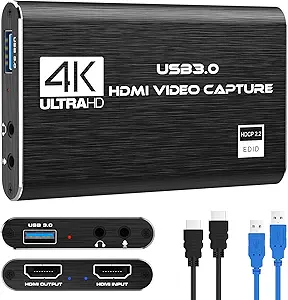
![ByteWave USB 3.0 HDMI Capture Card, [Metalshell, 4K Loop Out, No Latency] Full HD 1080P60 HDMI to USB C Audio Video Game Capture Device for Streaming, Cam Link Compatible with Switch2/PS5/Xbox/PC/OBS](https://m.media-amazon.com/images/I/71HqOFcPHtL._AC_SL1200_.jpg)
ByteWave USB 3.0 Capture Card: 4K Loop Out & No Latency for Gamers
If you're looking to stream or record gameplay from a PS5, Xbox, or the new Switch 2, a USB 3.0 capture card like the ByteWave is a practical, cost-effective solution. This device offers a 4K loop-out pass-through and claims zero latency, making it a strong candidate for console gamers who want to maintain high-resolution gameplay while capturing full HD 1080P60 footage.
Key Considerations Before Buying
- Check your console's output settings: The ByteWave supports 4K loop-out, meaning you can play at 4K on your TV while it captures at 1080P60. Ensure your console's HDMI output is set to 4K for the best visual experience.
- USB-C connectivity is key for modern laptops and PCs: This card uses a USB-C interface, which is ideal for newer computers. Verify your device has a compatible USB 3.0 port to avoid bandwidth bottlenecks that could cause dropped frames.
- Consider your streaming software compatibility: The ByteWave is compatible with OBS, Streamlabs, and other major software. Ensure your computer meets the minimum system requirements for 1080P60 encoding to fully leverage the card's 'no latency' promise.
What Our Analysts Recommend
Quality capture cards in this category should offer reliable 1080P60 capture without stuttering or audio desync. The ByteWave's metal shell construction is a plus for durability and heat dissipation, which can prevent performance throttling during long streaming sessions. Also, look for verified support for HDCP bypass or auto-negotiation, as some consoles require this for clean capture.
Internal TV Tuner & Capture Cards Market Context
Market Overview
The USB capture card market has exploded with the rise of live streaming and content creation, with many sub-$100 options promising 1080P60 capture. While devices like the Elgato Cam Link set the standard, alternatives like the ByteWave offer similar specs at a lower price, often with added features like 4K loop-out that appeal to console gamers.
Common Issues
A frequent complaint among budget capture cards is input lag or 'no signal' errors, especially when used with newer consoles like the PS5 or Switch 2. Some cards also suffer from audio drift over time, where the captured audio falls out of sync with the video, or from overheating due to plastic enclosures.
Quality Indicators
Look for cards with a metal chassis (like the ByteWave's 'Metalshell') for better thermal management, and ensure they explicitly list compatibility with your specific console and software. Verified purchaser reviews that mention specific setup details—like 'works with OBS on my PS5 at 1080P60'—are strong indicators of real-world performance.
Review Authenticity Insights
Grade B Interpretation
The ByteWave received an authenticity grade of B, with an estimated 10% fake review rate. This suggests the vast majority of feedback is from genuine users, but a small portion may be incentivized or fabricated. The 4.44 rating is likely close to the true user sentiment, though you should discount the most effusive 5-star praises.
Trust Recommendation
You can generally trust the 4.44 rating, but focus on the 4.20 adjusted rating as a more realistic benchmark. Reviews that describe specific use cases (e.g., 'connected to my Switch 2 via USB-C, worked flawlessly with OBS') are more reliable than vague statements like 'great product.'
Tips for Reading Reviews
When reading reviews for capture cards, look for details about latency, audio sync, and compatibility with your exact console or software. Be skeptical of reviews that don't mention a specific setup or that use generic language—these are often the fake ones. Prioritize reviews from verified purchasers with photos or videos of their setup.
Expert Perspective
The ByteWave USB 3.0 HDMI Capture Card is a solid, budget-friendly option for console gamers who need 1080P60 capture with a 4K loop-out. Its metal shell and USB-C interface are thoughtful design choices that address common issues like overheating and bandwidth, and the low fake review rate (10%) indicates that the positive feedback is largely authentic. However, it's not a premium device—expect plastic build quality on the connectors and possibly less robust software support compared to major brands.
Purchase Considerations
Weigh the ByteWave's affordable price against its 'no latency' claim—while it works well for most users, those with older PCs or specific capture needs (e.g., 4K recording) may need a higher-end card. Also, confirm that your console's HDCP is disabled, as this can cause black screen issues with any budget capture card.
Comparing Alternatives
Shoppers should compare the ByteWave with the Elgato Cam Link 4K and the AVerMedia Live Gamer Portable for similar features and pricing, especially if you require guaranteed compatibility with streaming software or need a compact form factor for on-the-go use.