
Choosing a Dual-Monitor KVM Switch for 8K Workstations and Gaming Rigs
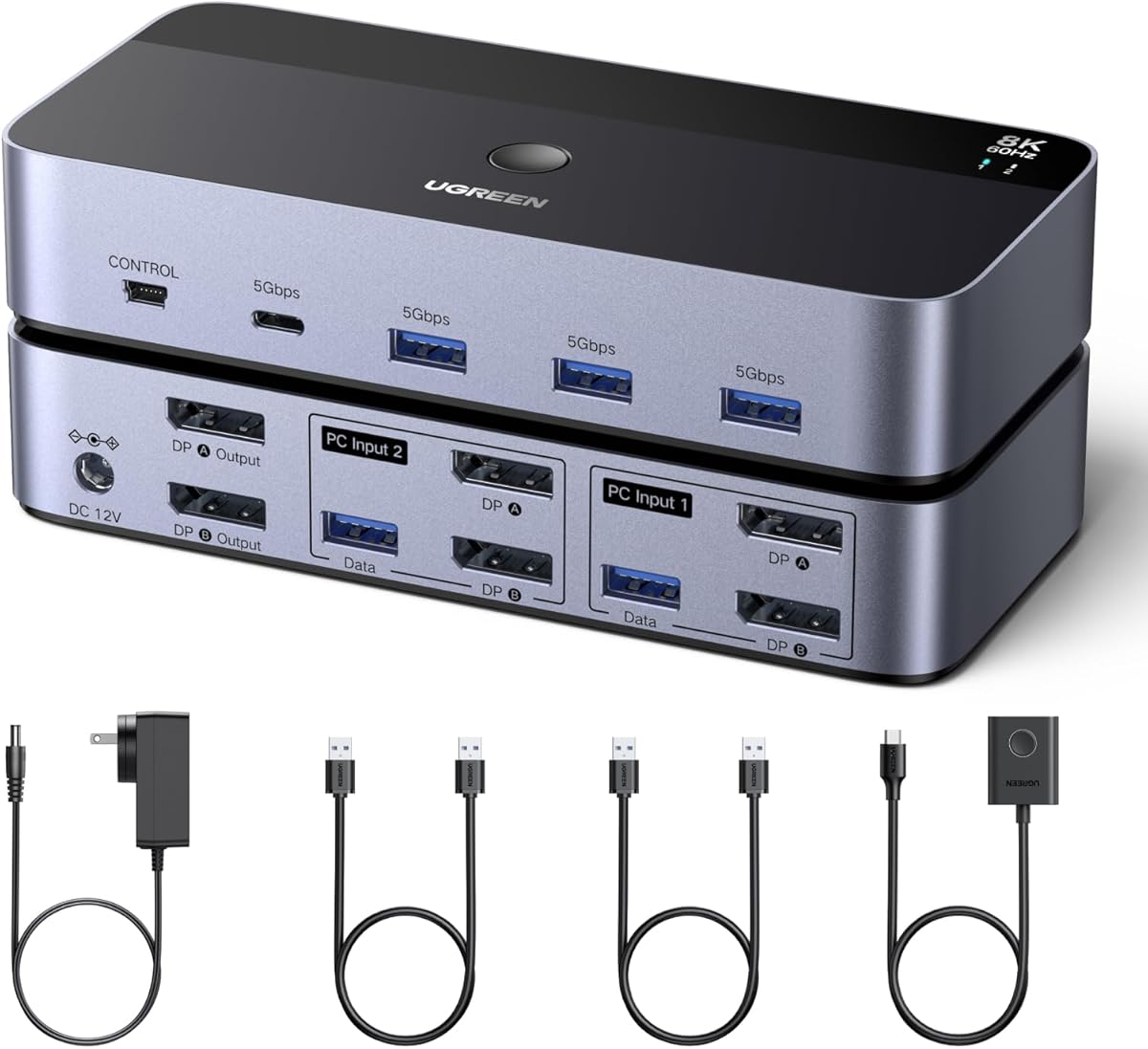
The UGREEN 8K@60Hz DisplayPort KVM is designed for users managing two high-performance computers with dual monitors, such as a work PC and a gaming rig. This specific model's aluminum construction and inclusion of four USB 3.0 ports for peripherals like printers set it apart from basic single-monitor switches. Buyers should understand that true 8K@60Hz support over DisplayPort is a premium feature requiring robust signal integrity.
Key Considerations Before Buying
- Verify your monitors and graphics cards support DisplayPort 1.4 with DSC (Display Stream Compression) to achieve the advertised 8K@60Hz resolution without compromise.
- Assess your USB peripheral needs; this model's four USB 3.0 ports allow you to share a keyboard, mouse, and two additional devices like a webcam or printer between systems.
- Consider cable management and desk space, as this setup requires two DisplayPort cables and a USB upstream cable for each computer, plus the included power adapter.
What Our Analysts Recommend
High-quality KVM switches for 8K use premium chipsets to prevent signal degradation, often noted in reviews by stable image quality. Look for mentions of the physical switch controller's reliability, as a failing button is a common point of failure. The aluminum housing on this UGREEN model is a positive indicator for heat dissipation compared to plastic enclosures.
KVM Switches Market Context
Market Overview
The market for dual-monitor, high-resolution KVM switches is niche but growing, driven by hybrid workstations and content creators. Products like this UGREEN model compete on bandwidth, peripheral support, and build quality rather than price alone. True 8K@60Hz support remains a high-end segment, distinguishing it from more common 4K switches.
Common Issues
Users frequently report EDID (Extended Display Identification Data) handshake problems, where monitors fail to wake up or recognize resolution after switching. Another common complaint is USB peripheral lag or disconnection, especially with high-polling-rate gaming mice. Inadequate power supplies can cause intermittent operation or failure to drive both monitors at full resolution.
Quality Indicators
Reliable units use external power adapters with ample wattage (like the included one) to ensure stable operation. Look for products specifying support for VESA standards like DisplayPort 1.4. Positive user feedback specifically about seamless switching between systems with different GPU brands (NVIDIA/AMD) indicates good compatibility.
Review Authenticity Insights
Grade A Interpretation
A 'C' authenticity grade and estimated 25% fake review rate suggest a mixed review landscape. While the product has a high surface rating (4.2/5), the adjusted rating of 3.7/5 after analysis is more indicative of actual user experience. This discrepancy is significant for a technical product where detailed setup feedback is crucial.
Trust Recommendation
Prioritize reviews that detail specific setup scenarios, monitor models, and GPU combinations over generic praise. Be particularly skeptical of 5-star reviews lacking technical details. The two negative reviews likely contain valuable, specific information about edge-case failures or compatibility issues.
Tips for Reading Reviews
Focus on reviews mentioning specific monitor models (e.g., Dell U3219Q, LG 32UN880) and GPU setups to assess real-world compatibility. Look for mid-length reviews (3-4 stars) that discuss both pros and cons, as they often provide the most balanced technical assessment. Pay close attention to any mentions of needing to power cycle the unit or monitor wake-up delays.
Expert Perspective
This UGREEN KVM occupies a specific niche: users requiring dual-monitor 8K switching between two systems. The aluminum build and inclusion of necessary cables are strong points. However, the gap between the advertised 4.2-star rating and the adjusted 3.7-star authenticity rating warrants caution. The product's performance is highly dependent on your specific monitor/GPU combination and cable quality, which is typical for high-bandwidth KVMs.
Purchase Considerations
This product is best suited for users with a confirmed need for 8K@60Hz switching across two monitors. If your workflow uses 4K or lower resolutions, more affordable and potentially more reliable options exist. Consider whether you truly need to share four USB 3.0 peripherals or if a simpler 2-port model would suffice, as added complexity can introduce points of failure.
Comparing Alternatives
Shoppers should compare this model's specifications and user feedback against similar offerings from brands like TESmart, ConnectPRO, and Level1Techs, focusing on real-user reports of 8K stability.


