
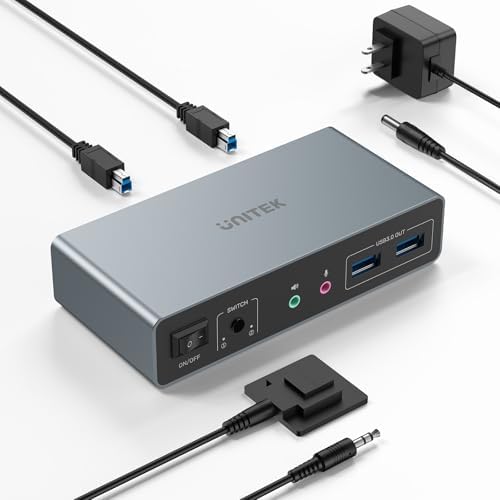
Dual-Monitor KVM Buying Guide: What to Know Before You Switch
A dual-monitor KVM like the Unitek 2-monitors-2-computers switch promises to let you run two displays and two PCs from one keyboard and mouse — but only if your ports, cables, and resolution needs line up. This guide covers what actually matters when shopping for a multi-display KVM.
Key Considerations Before Buying
- Confirm the exact port mix you need: this unit pairs HDMI and DisplayPort outputs, so your two monitors must match those connectors (or use adapters) and your two computers must supply the corresponding video outputs. A mismatch means buying extra adapters or returning the switch.
- Check your resolution and refresh rate targets against the switch's rated maximum — dual-monitor KVMs often cap bandwidth lower than a single-monitor model, and running 4K at high refresh across two screens can exceed cheaper switches' limits. If you game or do color-critical work, verify the spec sheet before buying.
- Think about how you'll switch: physical buttons, hotkeys, or a remote. Frequent switchers benefit from hotkey or remote control, while a desk-mounted button is fine for occasional toggling between a work laptop and a personal desktop.
What Our Analysts Recommend
Prioritize switches with clearly stated EDID handling, since poor EDID management causes monitors to re-detect or drop resolution every time you switch. Look for USB pass-through for peripherals (keyboard, mouse, and ideally a shared webcam or headset) and confirm the USB version, because USB 2.0 hubs limit transfer speeds for drives and docks.
KVM Switches Market Context
Market Overview
KVM switches have shifted from legacy VGA/PS2 enterprise gear to HDMI and DisplayPort models aimed at hybrid workers juggling a work laptop and a personal desktop. Dual-monitor models are a smaller, more demanding niche than single-monitor switches, and prices vary widely based on resolution support and USB capabilities.
Common Issues
The most frequent complaints in this category are monitors failing to wake after switching, resolution or refresh rate dropping unexpectedly, and USB peripherals disconnecting on toggle — usually caused by weak EDID emulation or insufficient power. Cable quality and length also matter more than buyers expect; cheap or overly long HDMI/DisplayPort cables can cause blank screens at higher resolutions.
Quality Indicators
A quality dual-monitor KVM specifies its maximum resolution and refresh rate per port, describes EDID management, and notes USB bandwidth. Strong user reviews tend to mention stable switching over weeks of use, no monitor re-detection, and responsive support — not just unboxing excitement.
Review Authenticity Insights
Grade A Interpretation
An A authenticity grade with an estimated 5% fake review rate is a strong signal: the 4.89 rating (4.80 adjusted) reflects largely genuine feedback, and the small adjustment suggests only minor noise. For a niche product like a dual-monitor KVM, that level of consistent positive sentiment is meaningful rather than suspicious.
Trust Recommendation
You can treat this product's rating as broadly reliable, but still read a sample of recent reviews to confirm the switch works with setups like yours. Pay attention to reviewers who describe their exact monitor and computer models, since compatibility is the main variable in KVM satisfaction.
Tips for Reading Reviews
Filter for reviews mentioning your monitor resolution and connection type, and look for comments about long-term reliability rather than first-day impressions. A handful of detailed negative reviews about specific compatibility issues is more useful than dozens of short five-star notes.
Expert Perspective
The Unitek dual-monitor KVM earns its high rating through a focused feature set: HDMI and DisplayPort support for two computers and two monitors, with USB peripheral sharing. With nearly 3,000 reviews and a verified-clean authenticity profile, it's one of the better-supported options in a category where compatibility complaints are common. The main caveat is that dual-monitor KVMs are inherently fussier than single-display models, so your success depends on matching your hardware to its specs.
Purchase Considerations
Weigh your resolution and refresh rate needs, your exact port types, and how often you'll switch before buying. If you need 4K at high refresh or Thunderbolt/USB-C docking, verify this model meets those specs or consider a higher-bandwidth alternative. Budget for quality cables, since they affect stability as much as the switch itself.
Comparing Alternatives
Shoppers should compare this Unitek against dual-monitor KVMs from brands like TESmart, UGREEN, and StarTech, especially if you need USB-C, higher refresh rates, or audio switching.


