
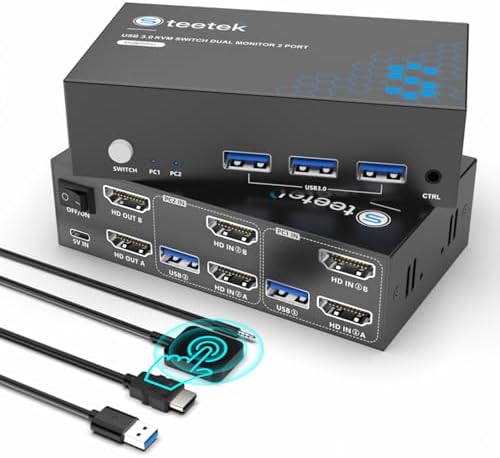
Hearvo S7232H2 KVM Switch: Dual-Monitor Sharing for Two Computers
If you manage two computers but want a single desk setup with dual monitors, the Hearvo S7232H2 KVM switch is a specialized solution. It supports 4K@60Hz output and USB 3.0 for peripherals like a keyboard, mouse, and printer, but its focus on dual-monitor sharing means you'll want to verify compatibility with your specific monitors and refresh-rate needs.
Key Considerations Before Buying
- Dual-monitor support: Unlike many KVM switches that share only one display, this model lets you toggle two monitors between two computers, which is ideal for multitaskers or creative professionals. Confirm your monitors' input types (HDMI) and that both computers can output the same resolution for seamless switching.
- USB 3.0 and peripheral sharing: The switch includes USB 3.0 ports for high-speed devices like printers or external drives, but note that only one printer or device can be active per computer at a time. Check if your printer requires constant connectivity, as switching may disrupt print jobs.
- EDID emulation: The built-in EDID (Extended Display Identification Data) helps maintain consistent display settings when switching, reducing screen flicker or resolution resets. This is crucial for stable dual-monitor operation, especially if you use different monitor brands or resolutions.
What Our Analysts Recommend
Quality in this KVM category hinges on EDID emulation reliability, USB speed consistency, and cable quality. Look for switches with metal housings for durability, and ensure included cables (like the two USB cables here) are long enough for your setup. Verified user feedback on switching latency and 4K@60Hz stability is more telling than generic specs.
KVM Switches Market Context
Market Overview
The KVM switch market is evolving with higher resolution demands, as 4K@60Hz becomes standard for office and creative work. Dual-monitor models like the Hearvo S7232H2 are niche but growing in popularity among users with multiple computers, yet many budget options lack reliable EDID support or USB 3.0 speeds.
Common Issues
Common problems include EDID miscommunication causing resolution drops, USB port incompatibility with older peripherals, and cable-induced signal loss over longer distances. Users also report difficulties with hotkey switching or controller responsiveness, which can disrupt workflow.
Quality Indicators
Quality indicators include robust EDID emulation (preventing display resets), gold-plated HDMI connectors for signal integrity, and a physical controller button for quick switching. Positive reviews that mention consistent performance over months of use are stronger signals than initial impressions.
Review Authenticity Insights
Grade B Interpretation
With a Grade B authenticity rating and an estimated 10% fake review rate, this product's reviews are mostly genuine but warrant cautious reading. The 3.63 overall rating (adjusted to 3.40) suggests real mixed experiences, not inflated scores, so you can trust the general sentiment but discount any overly perfect 5-star reviews without detailed context.
Trust Recommendation
Given the 10% fake rate, focus on verified purchase reviews with specific technical details, like 'EDID worked with my Dell monitors' or 'USB 3.0 speed dropped after switching.' Avoid reviews that lack personal setup descriptions, as they may be incentivized. The natural rating distribution (1 to 5 stars) supports overall authenticity.
Tips for Reading Reviews
For KVM switches, prioritize reviews that mention exact monitor models, computer types (e.g., Mac vs. PC), and use cases (gaming, office work). Look for comments on switching speed and whether the controller button works reliably. Ignore reviews that only praise 'easy setup' without specifics, as these are common in fake reviews.
Expert Perspective
The Hearvo S7232H2 is a functional dual-monitor KVM switch that meets basic needs for sharing two computers with 4K@60Hz output, but its 3.40 adjusted rating signals potential reliability concerns, particularly around EDID consistency and USB performance. The inclusion of two USB cables and a controller adds convenience, but users report occasional flickering or peripheral disconnects during switching. It's a decent mid-range option for budget-conscious buyers, but not a premium solution for demanding workflows.
Purchase Considerations
Weigh the need for dual-monitor sharing against potential setup complexity—ensure your monitors and computers support the same HDMI and USB specs. If you require flawless switching for time-sensitive tasks (e.g., video editing), consider spending more on a higher-rated model. The 10% fake review rate means real user feedback is available, but filter carefully.
Comparing Alternatives
Compare with other dual-monitor KVM switches in the same price range, such as those from IOGEAR or TESmart, which may offer better EDID support or longer cable lengths. Look for models with higher adjusted ratings and more detailed user reviews for a more reliable purchase.


