
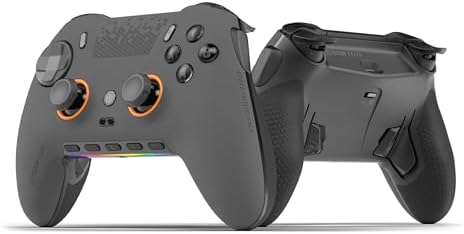
Evaluating premium PC gaming controllers: What the SCUF ENVISION PRO V2 offers
When considering a high-end PC gaming controller like the SCUF ENVISION PRO Wireless V2, you're evaluating a specialized tool designed for competitive and enthusiast play. This specific model distinguishes itself with five remappable G-keys and back paddles, features that cater directly to PC gamers seeking customization beyond standard controllers. The 'Anti-Drift Thumbsticks' and 'Instant Triggers' are engineered responses to common controller complaints.
Key Considerations Before Buying
- PC-Only Compatibility: Unlike many controllers, this is designed exclusively for PC, meaning its software and feature set are optimized for that platform without console compromises.
- Customization Depth: The five G-keys and remappable back paddles offer significant macro and input flexibility, but require time to configure effectively for your games.
- Build Quality vs. Longevity: Premium controllers promise durability, but real-world longevity depends on component quality, particularly the anti-drift mechanisms and trigger switches.
What Our Analysts Recommend
For a controller at this price point, scrutinize reviews mentioning long-term stick performance and button tactile feel. Quality indicators include consistent wireless connectivity, robust companion software for remapping, and the physical construction of the back paddles—they should feel secure, not flimsy.
Market Context
Market Overview
The premium PC controller market is increasingly competitive, with brands like SCUF, Razer, and Victrix offering feature-packed models targeting esports and hardcore gamers. These controllers compete on customization, latency, and specialized features like additional buttons and trigger stops.
Common Issues
Common pain points in this category include stick drift over time, unreliable wireless connectivity, and companion software that is buggy or unintuitive. High customization often comes with complexity, and build quality inconsistencies can plague even expensive models.
Quality Indicators
Look for detailed user reports on the tactile feedback of mechanical buttons, the smoothness of thumbstick tension, and the reliability of the proprietary wireless dongle. A well-supported, frequently updated configuration software suite is a strong marker of a committed manufacturer.
Review Authenticity Insights
Grade B Interpretation
A Grade B authenticity score with a 15% estimated fake review rate suggests the review pool is reasonably trustworthy but requires discernment. The adjusted rating of 3.20/5 (down from 3.44/5) indicates that suspicious reviews were slightly more positive, so the true user sentiment is marginally lower than the surface average shows.
Trust Recommendation
Prioritize the verified purchase reviews, which constitute 90% of the sample, and pay particular attention to mid-range (3-star) reviews for balanced critiques of the anti-drift performance and software stability. Be slightly skeptical of overly effusive 5-star reviews that lack specific details about using the G-keys or paddles.
Tips for Reading Reviews
For this product, focus on reviews that discuss specific use cases for the five G-keys, the feel of the instant triggers in fast-paced games, and long-term updates on stick performance. Look for mentions of the SCUF Nexus configuration software, as its usability is critical to leveraging the controller's features.
Expert Perspective
The SCUF ENVISION PRO V2 presents a compelling but niche proposition. Its 3.20/5 adjusted rating from authentic reviews signals a mixed reception, typical for premium peripherals where expectations are high. The PC-only focus is a double-edged sword: it allows for deep optimization but eliminates versatility. The feature set—anti-drift sticks, instant triggers, and extensive remapping—is aimed squarely at competitive gamers who will invest time in configuration. The middling rating suggests the execution may not fully meet the promise for all users, with potential pain points in software or long-term durability.
Purchase Considerations
Weigh your willingness to master a complex customization suite against the competitive advantage it may provide. If you primarily play a few PC games intensely and value custom macros, this controller's layout could be transformative. However, if you desire plug-and-play simplicity or multi-platform use, this is not the right tool.
Comparing Alternatives
Shoppers should compare the feature set and software ecosystem with alternatives like the Razer Wolverine V2 Pro or the Victrix Pro BFG to see which customization philosophy best fits their playstyle.


