
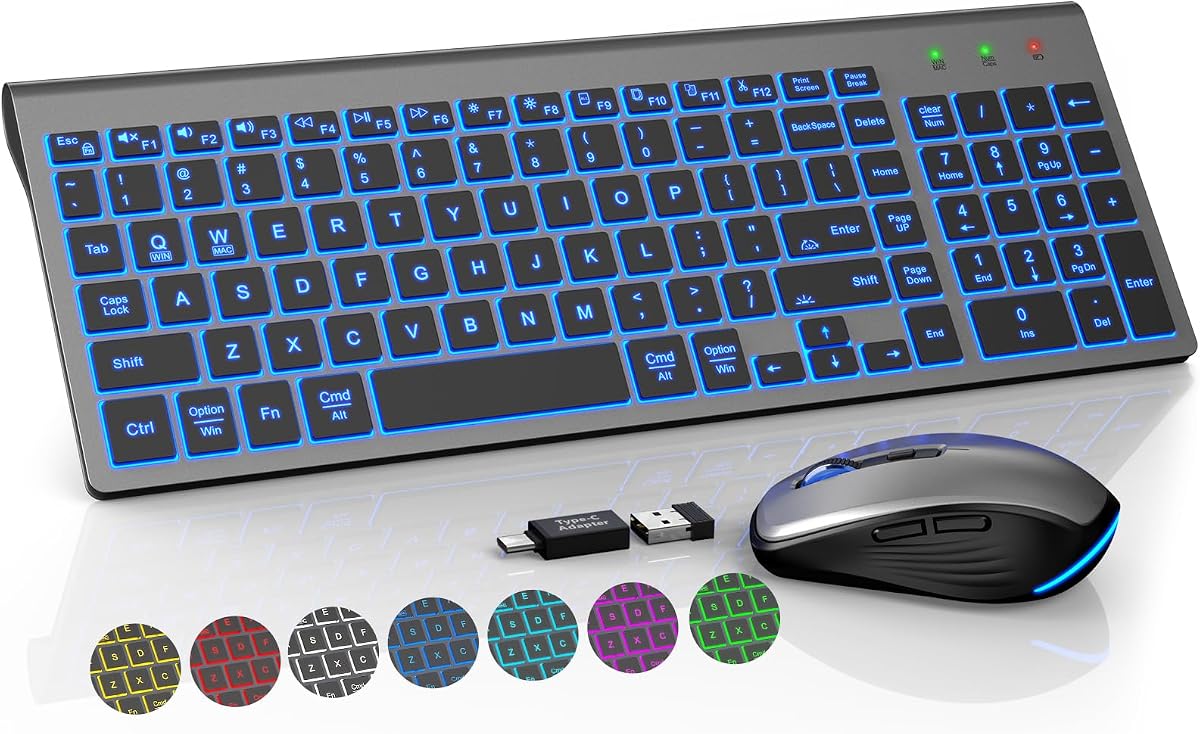
KM61PRO Review: Compact Backlit Combo That Balances Portability and Performance
When you're juggling a 16-inch laptop and a cramped desk, the KM61PRO's compact footprint—designed to match laptop widths—is a game-changer. This wireless combo pairs scissor-switch keys with a rechargeable battery and an RGB mouse, aiming to deliver quiet, comfortable typing without the cable clutter. Before you buy, here's what matters most in this category.
Key Considerations Before Buying
- Battery life and charging: With a rechargeable keyboard and mouse, check how long they last on a single charge and whether they use USB-C or micro-USB. The KM61PRO's auto-sleep feature helps conserve power, but you'll want to know the real-world runtime from user experiences.
- Wireless reliability: The 2.4GHz USB dongle offers a stable connection, but range and interference can vary. Look for reviews that mention dropouts or lag, especially if you use the combo in a busy office or with multiple wireless devices.
- Backlighting and visibility: The backlit keys are a key selling point, but not all backlights are created equal. Consider the brightness levels, color options, and whether the lighting is uniform across all keys—some users report uneven illumination on budget models.
What Our Analysts Recommend
In a compact combo like this, build quality and key feel are paramount. Scissor switches should have a snappy yet quiet response, and the keys should not wobble. Check the mouse's DPI settings and ergonomics—if it's too small for your hand, long sessions will be uncomfortable. Also, verify the auto-sleep wake-up time; a slow wake can be frustrating.
Keyboard & Mouse Combos Market Context
Market Overview
The keyboard and mouse combo market is crowded with options ranging from cheap, disposable sets to premium mechanical rigs. The KM61PRO sits in the middle, targeting users who want a slim, portable solution without sacrificing backlighting or wireless convenience. This niche has grown as more people work from hybrid setups and need gear that travels well.
Common Issues
Common complaints in this category include flimsy construction, poor battery life, and connectivity hiccups. Many budget combos also suffer from mushy keys or a mouse with erratic tracking. The KM61PRO's 4.22 rating suggests it avoids the worst pitfalls, but the 10% fake review rate warrants caution.
Quality Indicators
Look for consistent feedback on typing feel, battery longevity, and wireless stability. Authentic reviews often mention specific details like the keyboard's width relative to a laptop or the exact number of days between charges. Also, check if the seller offers firmware updates or responsive customer support—a good sign of long-term commitment.
Review Authenticity Insights
Grade B Interpretation
The Grade B and 10% estimated fake review rate mean the majority of feedback is genuine, but a small portion may be incentivized or fabricated. This is typical for popular electronics on Amazon, and it doesn't necessarily indicate a bad product—just that you should weigh reviews with a critical eye.
Trust Recommendation
Given the 4.22 average (adjusted to 4.00), the product likely performs adequately, but the gap suggests some inflated praise. Focus on reviews with verified purchase badges and those that mention specific pros and cons. If you see many 5-star reviews with generic language, discount them.
Tips for Reading Reviews
For a combo like this, read the 3-star reviews—they often highlight real issues like battery drain or key noise. Look for photos or videos that show the product in use, and pay attention to reviews that compare it to other brands. Also, check the date of reviews; recent ones may reflect firmware or build improvements.
Expert Perspective
The KM61PRO is a solid choice for users who need a compact, backlit combo for travel or small workspaces. Its scissor keys and quiet operation align with the advertised features, and the RGB mouse adds a bit of flair. However, the authenticity data suggests you should temper expectations—the real-world average rating is closer to 4.0, which is still respectable but not outstanding.
Purchase Considerations
Weigh the portability and backlighting against potential trade-offs in battery life and build durability. If you type for hours daily, consider whether the scissor switches will meet your ergonomic needs. Also, factor in the price—if it's significantly cheaper than competitors, there may be hidden compromises.
Comparing Alternatives
Shoppers should compare the KM61PRO with other compact combos from Logitech, Microsoft, or Anker, which often have more established track records. Don't settle on the first option—check recent reviews and warranty policies.


