Choosing a 1080p webcam: What Logitech's Brio 101 offers for basic video needs
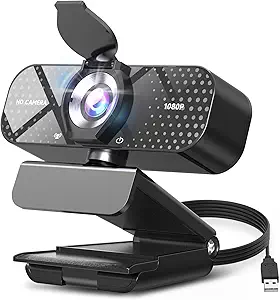
The Logitech Brio 101 represents an entry-level full HD webcam designed for users who need reliable video quality without premium features. This specific model includes a physical privacy shutter and USB-A connectivity, positioning it as a straightforward solution for desktop and laptop users. Buyers should understand that this webcam targets fundamental meeting and streaming requirements rather than advanced content creation.
Key Considerations Before Buying
- The 1080p resolution at 30fps is adequate for standard video calls but lacks the 60fps or 4K options found in higher-end webcams, which matters for smooth motion in gaming streams or professional presentations.
- Built-in dual omnidirectional microphones provide basic audio capture but won't match dedicated external mics for podcasting or high-quality recording scenarios.
- The physical privacy shutter addresses security concerns for home office users, though its manual operation differs from electronic shutters found on some competing models.
What Our Analysts Recommend
For this category, examine the lens specifications—the Brio 101 uses a fixed focus lens rather than autofocus, which affects how it handles movement during calls. Check compatibility details: while USB-A is universal, some newer laptops require adapters. The mounting mechanism's stability on various monitor thicknesses is another practical consideration often overlooked.
Webcams Market Context
Market Overview
The 1080p webcam market has become increasingly segmented, with basic models like the Brio 101 competing against smartphone-conversion kits and business-grade conference cameras. Logitech's position in this space leverages their brand recognition for reliability in peripheral devices. Current trends show consumer demand shifting toward hybrid features that serve both professional meetings and casual streaming.
Common Issues
Entry-level webcams frequently struggle with low-light performance, producing grainy images in dim home office environments. Built-in microphones often pick up keyboard noise and room echo, requiring software correction. Compatibility issues with video conferencing platforms' proprietary features (like background blur) can create unexpected limitations.
Quality Indicators
Look for consistent color reproduction across lighting conditions rather than just maximum resolution specs. A well-designed mounting system that accommodates laptop lids of varying thicknesses indicates thoughtful engineering. Software support through Logitech's Camera Settings app for exposure and white balance adjustments adds value beyond hardware alone.
Review Authenticity Insights
Grade U Interpretation
The 'U' authenticity grade with 0.00% estimated fake reviews indicates this product lacks sufficient review data for meaningful authenticity analysis—common for newly launched or low-volume items. This doesn't suggest the product is problematic, but rather that consumers have limited peer feedback to reference. The absence of reviews means you're evaluating this webcam primarily on manufacturer specifications rather than real-world performance reports.
Trust Recommendation
Given the lack of user reviews, prioritize purchasing from retailers with favorable return policies in case the webcam doesn't meet your specific needs. Cross-reference Logitech's official specifications against your technical requirements, particularly regarding system compatibility and minimum lighting conditions. Consider waiting for professional reviews that test the Brio 101's actual performance in varied scenarios.
Tips for Reading Reviews
When reviews eventually appear, focus on comments about the fixed focus lens performance at typical webcam distances (1-3 feet). Look for mentions of the microphone's noise cancellation effectiveness in home office environments. Pay attention to installation experiences, as some Logitech webcams have specific driver requirements for advanced features.
Expert Perspective
The Logitech Brio 101 appears positioned as a no-frills successor to basic 720p webcams, offering 1080p resolution and essential privacy features at what's likely a competitive price point. Its specifications suggest targeting users upgrading from built-in laptop cameras who value Logitech's reliability but don't require premium features like HDR or Windows Hello facial recognition. The inclusion of a physical shutter indicates awareness of privacy-conscious consumers, though the fixed focus lens represents a cost-saving measure that affects flexibility. This product likely serves as a practical choice for routine video calls rather than content creation.
Purchase Considerations
Evaluate whether your primary use involves static positioning (where fixed focus suffices) or frequent movement (where autofocus would be beneficial). Consider your lighting setup—entry-level sensors typically require adequate, consistent illumination. Assess whether USB-A connectivity aligns with your devices or if you'll need adapters for modern laptops with only USB-C ports.
Comparing Alternatives
Shoppers should compare the Brio 101 against similarly priced offerings from Razer, Anker, and Microsoft, particularly examining differences in field of view and low-light compensation technologies.