Navigating Refurbished Business Desktops: What to Know Before You Buy
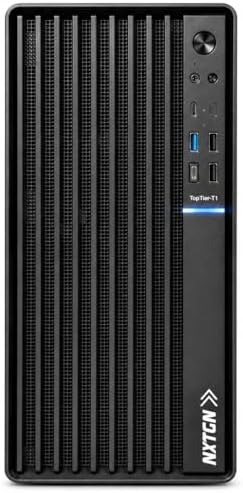
The NXTGN Top-Tier Business Desktop PC packs a 4th-gen Intel Core i7-4790, 16GB RAM, and a 512GB M.2 SSD into a premium metal chassis, targeting budget-conscious buyers who need office-ready performance. But this is a refurbished system with older-generation components, so understanding the trade-offs is essential before you commit.
Key Considerations Before Buying
- The Core i7-4790 is a 2014-era processor (4 cores/8 threads, DDR3 memory), so while it handles everyday office tasks well, it lacks the efficiency and modern instruction sets of current CPUs. Expect higher power draw and no upgrade path beyond DDR3.
- The 512GB M.2 SSD is a welcome inclusion for fast boot and app loading, but confirm whether it's a SATA or NVMe drive—many older platforms only support SATA M.2, which caps speeds around 550MB/s. Also check if there's room for additional 2.5-inch or 3.5-inch drives.
- Windows 11 Pro on unsupported hardware (no TPM 2.0, older CPU) may not receive official updates or could face compatibility issues. Verify with the seller how they've handled the installation and whether future updates are guaranteed.
What Our Analysts Recommend
Check for detailed specs on the motherboard chipset (likely H81 or B85), RAM type (DDR3), and PSU wattage/quality—these often get skimped in refurbished builds. Look for listings that specify the SSD brand and interface, and whether the metal body includes proper ventilation for the older, hotter CPU. A 2-year on-site warranty is a strong positive, but read the fine print on what's covered and who provides the service.
Tower PCs Market Context
Market Overview
The refurbished desktop market in India is booming, driven by businesses offloading old stock and budget buyers seeking capable machines for basic tasks. Sellers like NXTGN repurpose enterprise-grade hardware with upgraded SSDs and RAM, but quality varies widely depending on the refurbisher's testing and warranty support.
Common Issues
Common pitfalls include misrepresented specs (e.g., DDR3 vs DDR4), failing power supplies, and Windows activation problems. Since these are older systems, capacitor aging and limited BIOS updates can also affect longevity. On-site warranty is rare in this segment, so verify the provider's reputation.
Quality Indicators
Reputable refurbishers disclose exact component models, provide stress-test reports, and offer clear warranty terms. Look for listings that mention brand-name motherboards (Intel, Gigabyte, ASUS) and PSUs, and avoid vague descriptions like 'premium metal body' without details on cooling or expandability.
Review Authenticity Insights
Grade C Interpretation
A Grade C authenticity rating with an estimated 25% fake reviews suggests a moderate risk of manipulated feedback for this NXTGN desktop. While the majority of reviews appear genuine, the presence of promotional language and repetitive phrasing means some ratings may be inflated, potentially skewing the 4.44/5 average downward to a more realistic 3.90/5.
Trust Recommendation
Treat the adjusted 3.90 rating as a more reliable indicator of user satisfaction. Before purchasing, seek out reviews that mention specific technical details (e.g., boot times, noise levels, warranty claim experiences) and cross-check with external forums or YouTube teardowns of similar refurbished builds.
Tips for Reading Reviews
Focus on reviews that discuss long-term usage (3+ months) and include photos or benchmark results. Be skeptical of short, glowing reviews posted in clusters, and pay attention to complaints about Windows activation, SSD performance, or warranty support—these are common pain points for refurbished desktops.
Expert Perspective
The NXTGN desktop offers a compelling value proposition for basic office work, web browsing, and light multitasking, thanks to its 16GB RAM and SSD. However, the aging i7-4790 and DDR3 platform limit its future-proofing, and the Windows 11 Pro installation on unsupported hardware raises red flags for long-term reliability. The 2-year on-site warranty is a standout feature in this price segment, but only if backed by a responsive service provider.
Purchase Considerations
Weigh the upfront savings against potential compatibility and support headaches. If your workload is limited to documents, email, and spreadsheets, this machine can suffice—but confirm the return policy and warranty process before buying. For anything more demanding, consider a newer refurbished or budget new system with a modern CPU and DDR4 memory.
Comparing Alternatives
Compare with similarly priced refurbished desktops from brands like Dell or HP that may offer better build quality and driver support, or entry-level new PCs with Intel Core i3 or AMD Ryzen 3 for a more future-proof option.