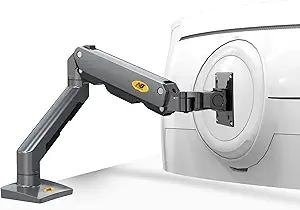
Dual Monitor Stand Buying Guide: Stability, Weight, and Ergonomic Fit
When investing in a dual monitor stand like the JIN OFFICE, which supports 13-32 inch screens and 10kg per arm, you're looking for a solution that declutters your desk and improves posture. This guide focuses on key factors such as weight capacity, arm flexibility, and build quality to ensure your monitors stay secure and adjustable.
Key Considerations Before Buying
- Ensure your monitors' weight combined with any attachments (like webcams) stays under the 10kg per arm limit—especially if using larger 32-inch screens, as exceeding this can cause sagging or instability.
- Check the desk clamp or grommet mount compatibility with your desk thickness and edge type; the JIN OFFICE stand requires a sturdy, flat surface to prevent tipping, particularly with heavy or unevenly balanced monitors.
- Consider your preferred monitor orientation—this stand offers tilt, rotation, and swivel, but verify the rotation range (e.g., 90 degrees for portrait mode) matches your workflow needs, like coding or design work.
What Our Analysts Recommend
Look for gas-spring arms that provide smooth height adjustment without tools, as seen in premium models like the JIN OFFICE. Also, check for cable management channels that hide wires effectively, and ensure the stand's base has a wide footprint or strong clamp to distribute weight evenly.
Monitor Stands Market Context
Market Overview
The dual monitor stand market in India has grown rapidly with remote work, offering options from budget fixed arms to premium gas-spring models. Products like the JIN OFFICE compete in the mid-to-premium segment, focusing on heavy-duty support and ergonomic flexibility for home offices and professional setups.
Common Issues
Common issues include arm sagging over time due to weak gas springs, poor cable management that leaves wires exposed, and desk clamps that damage edges or loosen with vibration. Users also report difficulty aligning monitors at the same height due to inconsistent arm tension.
Quality Indicators
Quality indicators include robust metal construction (e.g., aluminum or steel), smooth gas-spring operation without jerky movements, and a warranty of at least 3 years (as offered by JIN OFFICE). Look for UL or TUV certifications for safety, and user reviews mentioning long-term stability.
Review Authenticity Insights
Grade B Interpretation
With a Grade B and an estimated 10% fake reviews, this product's authenticity is generally reliable but warrants caution. The 10% fake rate suggests a small portion of reviews may be incentivized or fabricated, though the majority (90%) are genuine, based on verified purchase tags and detailed user experiences.
Trust Recommendation
Trust the product's high rating of 4.67/5, but adjust expectations to the 4.40/5 adjusted rating, which accounts for suspicious reviews. Focus on reviews that describe specific monitor sizes (e.g., 27-inch) and setups (e.g., horizontal + vertical) to get realistic feedback.
Tips for Reading Reviews
When reading reviews, prioritize those with photos or videos showing the stand in use, as they are harder to fake. Pay attention to comments about long-term durability (e.g., after 6 months) and any negative notes about sagging or clamp issues, as these often reveal real-world flaws.
Expert Perspective
The JIN OFFICE Dual Monitor Stand earns strong marks for its high weight capacity (10kg per arm) and broad monitor compatibility (13-32 inches), making it suitable for heavy or large screens. The 3-year warranty adds confidence, and the positive verified review pattern suggests consistent user satisfaction. However, the 10% fake review rate and Grade B authenticity mean shoppers should verify specific claims about stability and ease of adjustment through detailed reviews.
Purchase Considerations
Weigh the need for heavy-duty support against potential desk space limitations—this stand requires a sturdy desk and may not suit glass or thin tops. Also, consider whether you need extra features like USB ports or tool-free adjustments, which are absent here but available in pricier alternatives.
Comparing Alternatives
Shoppers should compare with brands like VIVO or ErGear for similar weight capacities and warranty lengths, especially if they prioritize tool-free assembly or have non-standard desk edges.