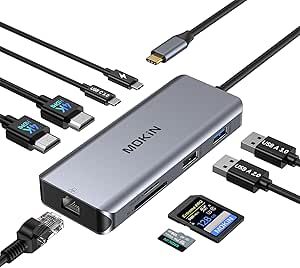
Windows-Laptop Docking Station: 8K Power Meets Connectivity
The UGREEN Docking Station is a high-performance dock designed exclusively for Windows laptops, featuring dual HDMI and DisplayPort outputs that support up to 8K or dual 4K displays. With a 4.44/5 rating from 849 reviews, it's a popular choice for users needing extensive display real estate and fast data transfers.
Key Considerations Before Buying
- Ensure your Windows laptop supports DisplayPort Alt Mode over USB-C, as this dock relies on it for video output; incompatible ports may limit functionality.
- The dock supports 8K at 30Hz or dual 4K at 60Hz, but actual performance depends on your laptop's GPU and the resolution/refresh rate of your monitors.
- While it offers multiple USB ports, check the power delivery wattage (e.g., 100W) to ensure it can charge your laptop while powering peripherals.
What Our Analysts Recommend
Look for docks that specify exact resolutions and refresh rates, as vague claims often lead to disappointment. Build quality matters too: metal housings dissipate heat better, and certified chipsets (like DisplayLink) ensure reliable performance. Also, verify the number and types of ports match your peripherals (e.g., USB-A, USB-C, Ethernet).
Docking Stations Market Context
Market Overview
The docking station market is booming as remote work and multi-monitor setups become standard. Windows users often seek docks that support high-resolution displays and fast data transfer, but compatibility issues plague many products. UGREEN has carved a niche with robust, Windows-optimized docks that cater to power users.
Common Issues
Common complaints include insufficient power delivery, leading to slow charging or battery drain, and video flickering due to bandwidth limitations. Some docks also run hot under load, causing performance throttling. Additionally, many docks are not compatible with Macs or specific Windows models, leading to frustration.
Quality Indicators
High-quality docks use premium components like Intel or DisplayLink chips, offer clear specifications (e.g., exact wattage, supported resolutions), and have positive reviews from users with similar laptop models. A metal casing and venting indicate better thermal management. Brands with strong customer support and firmware updates are also a plus.
Review Authenticity Insights
Grade A Interpretation
With an A authenticity grade and only 8% estimated fake reviews, the UGREEN dock's reviews are highly trustworthy. This suggests the 4.44/5 rating reflects genuine user satisfaction, making it a reliable indicator of performance.
Trust Recommendation
You can confidently rely on the overall rating and detailed reviews to gauge real-world performance. However, still skim for patterns: if multiple users report the same issue (e.g., compatibility with a specific laptop), it's likely valid.
Tips for Reading Reviews
Focus on reviews that mention your laptop model or similar specs, as compatibility is key. Look for comments on long-term reliability and customer service experiences. Ignore overly generic praise; instead, value reviews that detail specific setups and use cases.
Expert Perspective
The UGREEN Docking Station stands out for its high-resolution display support and Windows-specific optimization, making it ideal for professionals with demanding multi-monitor workflows. Its strong review authenticity and solid rating indicate a reliable product, though potential buyers must verify compatibility with their laptop's USB-C capabilities. The 8K/4K support is future-proof, but real-world performance hinges on your laptop's GPU and monitor specs.
Purchase Considerations
Weigh the cost against your need for high-resolution outputs and multiple ports. If you only need basic connectivity, a cheaper dock may suffice. However, for power users requiring 8K or dual 4K, this dock's performance and build quality justify the investment. Also, consider whether you need cross-platform compatibility, as this is Windows-only.
Comparing Alternatives
Compare with docks from CalDigit, Plugable, or Anker that may offer similar specs or broader compatibility. Read reviews for each to find the best fit for your specific laptop and peripherals.