USB-C Splitter Buying Guide: Power, Speed, and Compatibility
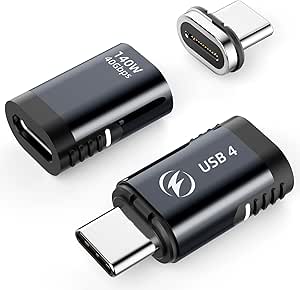
This MOGOOD USB-C splitter turns a single USB-C port into two, but its 60W Power Delivery and 480Mbps data rate mean you need to match it to your devices. Understanding how USB-C splitting works—and where it doesn't—will save you from a frustrating purchase.
Key Considerations Before Buying
- Power sharing is the biggest gotcha: with 60W PD passthrough, the splitter divides available wattage between connected devices, so charging a laptop and a phone simultaneously may leave the laptop with far less than its full charger output. Check your device's minimum charging requirement before relying on simultaneous use.
- Data speed is capped at 480Mbps (USB 2.0), which is fine for mice, keyboards, or audio interfaces but inadequate for external SSDs or high-resolution webcams. If you need fast file transfers, this splitter is the wrong tool.
- Not all USB-C ports support splitting—some laptops and phones only recognize one device at a time, and video output (DisplayPort Alt Mode) is not supported here. Verify your host device's USB-C capabilities before buying.
What Our Analysts Recommend
Look for explicit wattage ratings and data-speed specs rather than vague 'fast charging' claims. Quality splitters use reinforced connectors and clearly state which functions (power, data, video) are supported. A metal housing and strain relief at the cable joints are good signs of durability for daily plugging and unplugging.
USB to USB Adapters Market Context
Market Overview
USB-C splitters are a small but growing accessory niche as laptops and phones shed ports, yet most are passive hubs rather than true splitters. The market is flooded with unbranded options, and spec accuracy varies widely—many listings overstate charging wattage or omit data-speed limitations.
Common Issues
The most frequent complaints are slower-than-expected charging when both ports are used, devices not being recognized simultaneously, and flimsy cables that fail after a few months. Some users also discover too late that their device doesn't support dual USB-C operation at all.
Quality Indicators
Reliable splitters list precise PD wattage, data protocols, and compatibility caveats. Brands that publish clear technical documentation and respond to compatibility questions tend to be more trustworthy. Physical build quality—aluminum shell, thick cable, snug connectors—correlates with longevity in this category.
Review Authenticity Insights
Grade A Interpretation
A Grade A with an estimated 8% fake review rate is strong for this category, where inflated ratings are common. The 4.10 adjusted rating (down from 4.22) suggests the genuine reviews are largely positive but not uniformly glowing—consistent with a product that works well within its limits.
Trust Recommendation
You can generally trust the review consensus here, but read the critical reviews first: they likely highlight the 480Mbps limit and power-sharing behavior. The small fake-review percentage means the overall rating is a reliable signal, though not a guarantee for your specific use case.
Tips for Reading Reviews
Focus on reviewers who mention their specific devices (e.g., 'MacBook Air + iPhone') and whether simultaneous charging met their expectations. Reviews that only say 'works great' without device details are less useful. Look for patterns in complaints about charging speed or device recognition.
Expert Perspective
The MOGOOD USB-C splitter is a competent, honestly specified accessory for a narrow job: adding a second USB-C port for low-power peripherals or trickle charging. Its 60W PD and 480Mbps data rate are clearly stated, and the adjusted 4.10 rating from over 3,000 reviews suggests solid real-world satisfaction. It is not a solution for high-speed data or full-wattage dual charging, and buyers expecting those will be disappointed.
Purchase Considerations
Weigh whether you need simultaneous charging at full speed (you likely don't get it) and whether your devices support dual USB-C operation. If you're adding a mouse, keyboard, or charging a phone alongside a laptop at reduced wattage, this fits. For external drives or video output, look elsewhere.
Comparing Alternatives
Compare with powered USB-C hubs if you need full charging plus data, or with USB-C to USB-A adapters if your peripherals are older. Check whether a true splitter or a hub better matches your port count and power needs.