
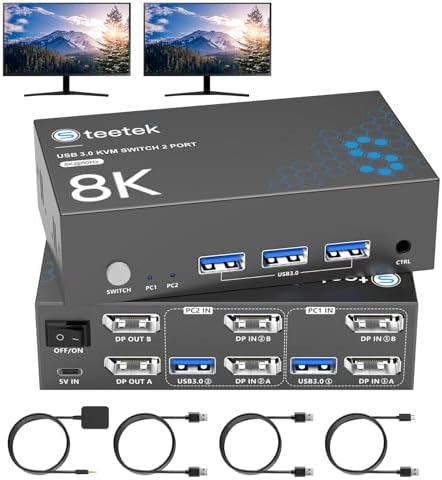
Choosing a High-Resolution Dual-Monitor KVM Switch for Modern Workstations
The S7230P2 KVM switch targets users managing two computers with dual high-resolution monitors, offering both 8K@60Hz and 4K@120Hz capabilities. Unlike basic KVMs, this model emphasizes DisplayPort connectivity and USB 3.0 peripheral support for modern setups, requiring careful compatibility verification with your specific monitors and graphics cards.
Key Considerations Before Buying
- Verify your monitors' maximum refresh rates at 4K resolution, as the switch's 120Hz support requires compatible displays and GPU outputs to function properly.
- Check that your computers have DisplayPort outputs matching the switch's requirements; HDMI-to-DisplayPort adapters often fail to maintain the advertised resolutions and refresh rates.
- Assess your peripheral needs—the single USB 3.0 hub supports keyboard, mouse, printer, and U disk, but may require additional hubs for more devices.
What Our Analysts Recommend
Quality indicators include robust EDID emulation to prevent monitor resolution handshake issues when switching, and proper cable inclusion—this model ships with two USB-C cables for peripheral connections. Genuine high-bandwidth DisplayPort cables (not included) are essential for achieving 8K/60Hz performance.
KVM Switches Market Context
Market Overview
The dual-monitor KVM market has shifted toward supporting 4K high-refresh-rate and 8K workflows, with DisplayPort becoming the standard for professional and gaming setups. Products like the S7230P2 compete on bandwidth management across two simultaneous monitor signals rather than simple single-display switching.
Common Issues
Users frequently encounter resolution scaling problems when switching between computers with different GPU capabilities, and USB peripheral recognition failures with certain keyboard/mouse combinations. Inadequate EDID management causes monitors to default to lower resolutions.
Quality Indicators
Look for explicit EDID adaptive technology that maintains consistent display profiles, metal housing for heat dissipation during sustained 8K operation, and clear documentation about supported DisplayPort versions (1.4 minimum for 8K/60Hz).
Review Authenticity Insights
Grade B Interpretation
A Grade B authenticity rating with 15% estimated fake reviews indicates generally reliable feedback with some promotional content. The adjusted 4.20/5 rating (down from 4.56) suggests genuine user experiences are slightly less enthusiastic than the overall average implies.
Trust Recommendation
Focus on reviews discussing specific technical setups—mentions of particular monitor models (like LG Ultragear or Dell Ultrasharp), GPU brands, or resolution/refresh rate testing provide more credible insights than generic praise. The 491-review volume offers substantial authentic feedback to analyze.
Tips for Reading Reviews
Prioritize reviews that detail multi-computer workflows (like PC/Mac or work/personal machine setups) and mention EDID functionality. Be skeptical of reviews lacking technical specifics about their monitor configurations or peripheral connections.
Expert Perspective
The S7230P2 addresses a specific niche: users requiring dual-monitor control between two computers at extreme resolutions. Its 4.20 adjusted rating from authentic reviews suggests it generally delivers on core promises, though achieving full 8K/60Hz or 4K/120Hz performance depends heavily on compatible downstream equipment. The inclusion of EDID adaptive technology is crucial for professional environments where consistent display profiles matter.
Purchase Considerations
This switch makes most sense for users with two high-end computers and dual premium monitors who value streamlined peripheral sharing. Consider your actual resolution needs—if you primarily work at 4K/60Hz, more affordable options exist. The USB 3.0 hub limitation means power users may need supplemental docking solutions.
Comparing Alternatives
Compare specifications against competing dual-monitor KVMs from brands like TESmart or ConnectPRO, particularly regarding EDID implementation methods and USB peripheral compatibility lists.


