
Choosing a Multi-Platform Travel Dock: What Switch and Handheld PC Owners Need to Know
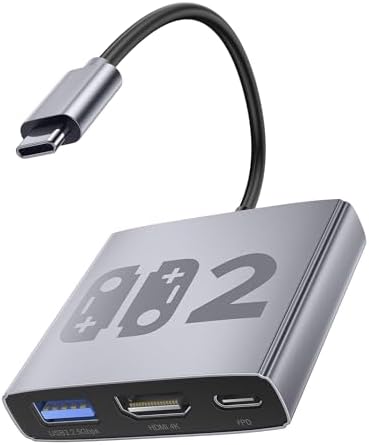
The Bemkiru Aluminum Alloy 3-in-1 Dock targets a specific niche: gamers who own a Nintendo Switch (or the anticipated Switch 2) and a Windows-based handheld like the ROG Ally or Legion Go. Unlike generic USB-C hubs, this product promises optimized compatibility for gaming devices, with features like HDMI 4K@60Hz output and 100W Power Delivery crucial for maintaining performance during extended TV play sessions.
Key Considerations Before Buying
- Verify the PD 100W charging spec is sufficient for your specific handheld PC; some devices may have peak power draws that benefit from higher wattage adapters.
- The aluminum alloy construction suggests better heat dissipation than plastic docks, which is vital for devices that get warm during docking, but check reviews for actual thermal performance notes.
- True '3-in-1' functionality here means HDMI, USB 3.2, and PD charging simultaneously—ensure this matches your need to connect accessories like wired controllers or storage while playing on a TV.
What Our Analysts Recommend
For travel docks, prioritize compact, sturdy builds with reinforced USB-C connectors to prevent port damage. Look for explicit mention of stable 4K@60Hz output in user reviews, as some cheaper adapters can introduce signal lag or drop resolution. The inclusion of USB 3.2 (not just 2.0) is key for fast data transfer if you use external storage with your Legion Go or ROG Ally.
Games Market Context
Market Overview
The market for third-party Switch docks exploded after Nintendo's original design was linked to console bricking issues, creating demand for safer, portable alternatives. This has now expanded to include handheld gaming PCs, creating a new sub-category of multi-platform travel docks that must handle different power profiles and video protocols.
Common Issues
Common failures include insufficient power delivery causing devices to drain battery while docked, HDMI handshake problems leading to 'no signal' errors on certain TVs, and fragile USB-C ports breaking from repeated travel use. Incompatibility with specific device firmware or aftermarket cables is also frequently reported.
Quality Indicators
Quality docks use premium chipsets from manufacturers like VLI or Realtek for stable video conversion, implement proper over-voltage/current protection circuits, and have clear compatibility lists. Look for products that specify supported resolutions and refresh rates precisely, not just '4K support.'
Review Authenticity Insights
Grade B Interpretation
A 'Grade B' with a 15% estimated fake review rate indicates generally trustworthy reviews but warrants cautious scrutiny. For this technical accessory, this suggests most feedback on performance is genuine, but a small portion of reviews might exaggerate compatibility or downplay issues.
Trust Recommendation
Focus on the 3.60 adjusted rating from authentic reviews rather than the displayed 3.89 average. Pay particular attention to verified purchase reviews that mention using it with the specific devices you own (e.g., 'ROG Ally' or 'Switch OLED'), as compatibility can vary.
Tips for Reading Reviews
Prioritize reviews that detail specific setup scenarios (e.g., 'used with my 4K LG TV and the original Switch charger'). Be skeptical of reviews that only praise generic 'build quality' without testing video output or charging under load, as these may be less substantive.
Expert Perspective
The Bemkiru dock presents a compelling value proposition for multi-device owners, but its middling 3.6/5 authentic rating signals notable trade-offs. The aluminum build and stated specs are competitive, yet the rating suggests some users experience the common pitfalls of this category—likely intermittent compatibility or power issues. Its attempt to serve both Switch and handheld PC markets is ambitious, as these devices can have different voltage negotiation requirements. The product's performance likely depends heavily on using the recommended power adapter.
Purchase Considerations
This dock is best suited for travelers who need a single, compact solution for both a Switch and a handheld PC and are comfortable troubleshooting potential HDMI or power quirks. If you primarily dock one device type or require flawless plug-and-play reliability, a device-specific dock might be a safer investment.
Comparing Alternatives
Shoppers should compare this with docks from established brands like Genki or JSAUX, which may offer more refined firmware at a higher price point.


