
Choosing a 5K Monitor: Balancing Resolution, Refresh Rate, and Mac Compatibility
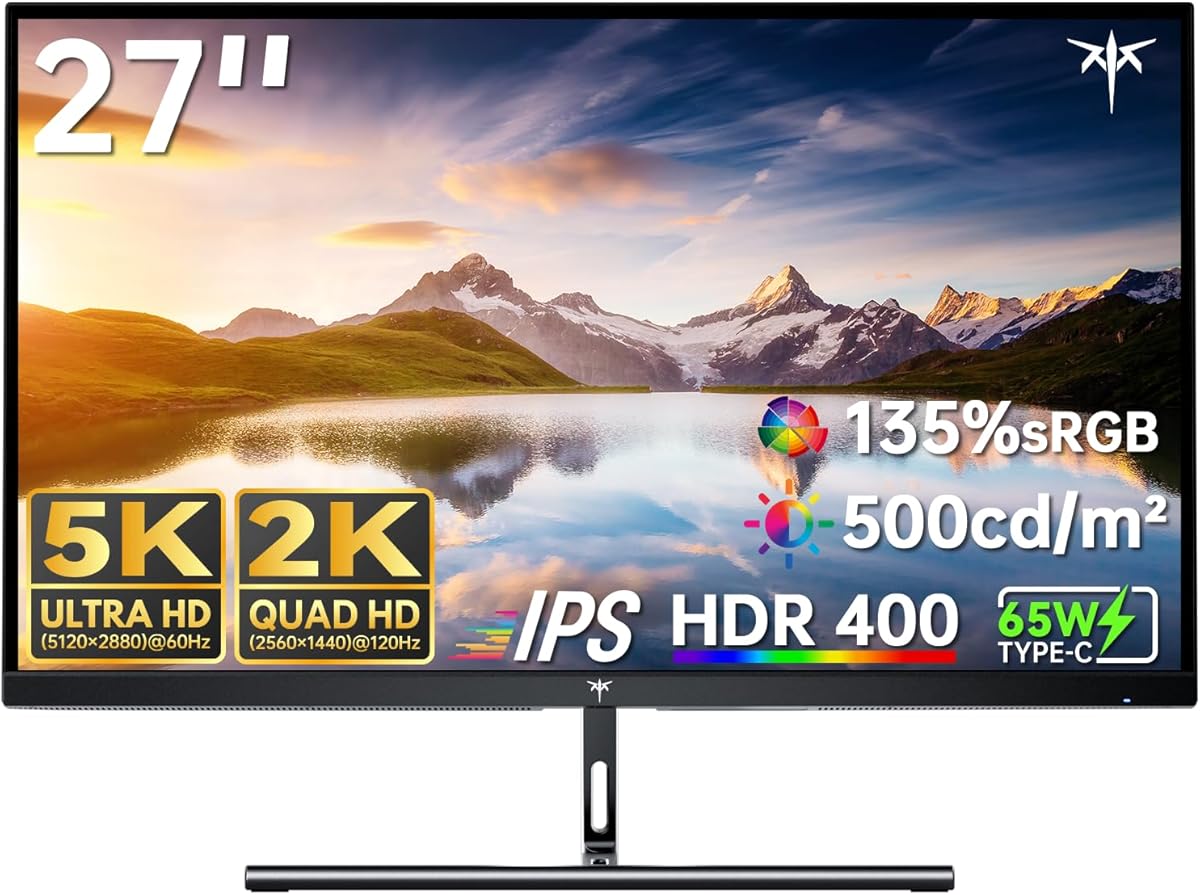
The KTC H27P3 presents a unique proposition in the monitor market with its dual-mode functionality, offering both 5K resolution for creative work and high refresh rates for gaming. Buyers should understand that this monitor targets users who want both pixel density for productivity and smooth motion for entertainment, requiring careful consideration of which mode they'll use most frequently. The specific 99% DCI-P3 color coverage and ΔE<2 color accuracy make it particularly relevant for photo/video editors and designers.
Key Considerations Before Buying
- The dual-mode operation means you must choose between 5K@60Hz for maximum detail or 2K@160Hz for smoother motion—you cannot have both simultaneously, which affects workflow and gaming experiences.
- The 65W USB-C power delivery is sufficient for most laptops but may not charge high-power workstations, making compatibility with your specific Mac or PC crucial to verify.
- HDR400 certification provides basic high dynamic range but lacks the brightness and local dimming of premium HDR displays, so temper expectations for cinematic HDR experiences.
What Our Analysts Recommend
For monitors with dual-resolution capabilities like this KTC model, examine the switching mechanism between modes—some require manual input changes while others detect content automatically. Quality indicators include consistent color calibration across both resolution modes and minimal input lag when switching between the 5K productivity and 2K gaming profiles. The Type-C implementation should provide stable video signal alongside charging without intermittent disconnections.
Monitors Market Context
Market Overview
The 5K monitor market has expanded beyond Apple's Studio Display, with several manufacturers now offering more affordable alternatives that maintain compatibility with Mac's Retina scaling. These displays typically target creative professionals who need precise color reproduction for design work, with gaming capabilities as a secondary consideration. The KTC H27P3 enters this niche by combining professional color specs with gaming-oriented refresh rates in a single panel.
Common Issues
Many 5K monitors struggle with macOS compatibility issues, particularly with font rendering and scaling when not using native Apple displays. Single-cable USB-C solutions sometimes experience handshake problems when connecting to various Mac models, requiring repeated reconnections. Additionally, HDR400 implementations often disappoint with minimal actual dynamic range improvement over standard content.
Quality Indicators
Look for monitors that maintain color accuracy (ΔE<2) across different brightness levels and viewing angles, not just at optimal settings. Genuine 99% DCI-P3 coverage should be verifiable through hardware calibration reports, not just marketing claims. Quality USB-C implementations provide stable connections that don't drop when transitioning between laptop power states or sleep modes.
Review Authenticity Insights
Grade B Interpretation
The Grade B authenticity rating indicates generally reliable reviews with moderate verification confidence, while the 15% estimated fake review percentage suggests some manipulation exists but doesn't dominate the feedback. This means most experiences described are genuine, though you should be slightly more critical of extremely positive or negative outliers. The adjusted rating dropping from 4.44 to 4.10 after filtering suggests some inflated reviews were removed from the calculation.
Trust Recommendation
Focus on reviews that specifically mention using both the 5K and high refresh rate modes, as these demonstrate actual testing of the dual functionality. Verified purchase reviews discussing Mac compatibility issues or color calibration experiences carry more weight than generic praise. Be particularly skeptical of reviews that don't mention which mode they primarily use or that praise both resolution and refresh rate simultaneously without acknowledging the trade-off.
Tips for Reading Reviews
Look for technical details like specific Mac models tested (Mac mini, MacBook Pro generations), color calibration experiences with hardware tools, and descriptions of the mode-switching process. Reviews discussing the 65W charging capability with their specific laptop model provide practical insights. Pay attention to mentions of text clarity in 5K mode versus motion smoothness in 160Hz mode to understand real-world performance differences.
Expert Perspective
The KTC H27P3 represents a compelling hybrid solution for users who want both creative workspace and gaming capability in one display, though with necessary compromises. The 4.10 adjusted rating from verified authentic reviews suggests solid satisfaction among users who properly understand the dual-mode limitations. This monitor particularly shines for Mac users seeking affordable 5K alternatives to Apple's premium displays, offering comparable color accuracy at a lower price point while adding gaming functionality not available on most professional displays. The inclusion of both HDMI and DisplayPort alongside USB-C provides flexible connectivity that accommodates various setups.
Purchase Considerations
Consider whether your workflow truly benefits from switching between 5K productivity and 2K gaming, or if you'd be better served by a dedicated display for each purpose. The 27-inch size at 5K resolution provides exceptional pixel density (approximately 218 PPI) that matches Apple's Retina displays, making it ideal for design work but potentially excessive for general office tasks. Evaluate if the 65W USB-C charging meets your laptop's needs, as some higher-power MacBook Pros require more wattage for optimal charging during intensive use.
Comparing Alternatives
Shoppers should compare this against dedicated 5K productivity monitors like Dell's UltraSharp series and dedicated high-refresh gaming monitors to determine if the hybrid approach suits their needs better than specialized alternatives.






