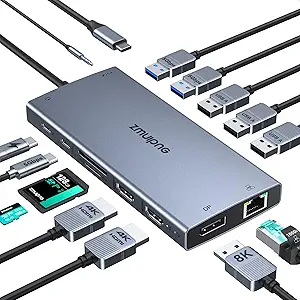
Choosing a 6-in-1 Gaming Handheld Dock: Balancing Ports, Power, and Compatibility
For Steam Deck OLED, ROG Ally, Legion Go, and MSI Claw owners, a 6-in-1 dock like this transforms a portable device into a desktop setup. Key features to evaluate include the 100W PD charging passthrough, the specific HDMI 2.0 spec for 4K@60Hz output, and the inclusion of Gigabit Ethernet for stable online play. This particular model's value proposition hinges on delivering these core functions without compromising the handheld's charging capability.
Key Considerations Before Buying
- Verify 100W Power Delivery (PD) passthrough is sufficient for your specific handheld while under load; some devices may throttle performance if the dock cannot deliver the full wattage the device's original charger provides.
- Confirm the HDMI 2.0 port's 4K@60Hz output matches your external monitor's capabilities and is a genuine upgrade from your handheld's native video-out specs.
- Assess if the three USB-A 3.0 ports and single Ethernet port meet your peripheral needs for controllers, keyboards, storage, and wired internet connectivity simultaneously.
What Our Analysts Recommend
Quality indicators include robust heat dissipation mentioned in reviews, a stable, non-slip base to prevent the dock from moving when connecting cables, and clear labeling of port specifications. For this product category, a well-built USB-C connector that doesn't wobble or strain the handheld's port is critical for long-term durability.
Docking Stations Market Context
Market Overview
The market for proprietary gaming handheld docks is fragmented, leading to strong demand for universal USB-C hubs that support multiple devices like the Steam Deck OLED, ROG Ally, Legion Go, and MSI Claw. Consumers prioritize docks that offer a complete desktop experience—video out, wired networking, and peripheral expansion—without sacrificing charging speed.
Common Issues
Common problems include docks that fail to deliver advertised power, causing devices to discharge during use, or HDMI ports that don't reliably output at the promised 4K resolution and refresh rate. Incompatibility with specific handheld models' power negotiation protocols is another frequent pain point.
Quality Indicators
Look for explicit mention of chipset brands (e.g., VLI, Realtek) in detailed reviews, a metal or high-quality plastic housing for heat management, and manufacturer transparency about supported video protocols like HDCP 2.2. Positive, verified purchase reviews that mention long-term use over weeks or months are strong signals.
Review Authenticity Insights
Grade B Interpretation
A 'B' grade with an estimated 15% fake review rate suggests the majority of feedback is authentic, but there may be a small cluster of incentivized reviews. For a product with 18 total reviews and a 4.6 adjusted rating, the core positive sentiment around functionality is likely reliable, but the perfect 5.00/5 storefront rating should be viewed with slight caution.
Trust Recommendation
Focus on reviews that detail specific use cases, such as connecting to a particular monitor model or using specific USB peripherals. Be slightly more skeptical of reviews that are excessively vague or only praise packaging. The adjusted 4.6 rating is a more realistic expectation of performance than the displayed 5.0.
Tips for Reading Reviews
Prioritize reviews that confirm compatibility with your exact handheld model (e.g., 'Steam Deck OLED') and mention testing the 100W charging under gaming load. Look for mentions of real-world testing of the Gigabit Ethernet speed and any heat generated during extended 4K output sessions.
Expert Perspective
This 6-in-1 dock presents a compelling, feature-complete solution for the stated handhelds, with its 4K@60Hz, Gigabit Ethernet, and triple USB-A 3.0 ports covering essential desktop expansion needs. The high adjusted rating of 4.6/5, derived from authentic review analysis, indicates it reliably performs its core functions. The critical question is whether its 100W PD passthrough consistently meets the peak power demands of all four listed devices during intensive gaming.
Purchase Considerations
This dock is a strong candidate if your primary needs are stable wired internet, 4K display output, and connecting multiple standard USB peripherals. Weigh this against potential need for additional ports like USB-C data or card readers. Ensure your power adapter can supply enough overhead (ideally 100W+) for both the dock's operation and your handheld's peak draw.
Comparing Alternatives
Shoppers should compare the port selection and confirmed power delivery performance against docks from brands like JSAUX, Ugreen, or Anker, which may offer different port configurations.