Thunderbolt 5 Docks: What to Know About 120Gbps Transfer and 140W Power Delivery
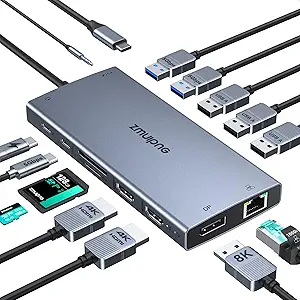
The WAVLINK Intel Certified Thunderbolt 5 Dock represents the cutting edge of connectivity, offering 120Gbps bandwidth that's triple Thunderbolt 4's capacity. This specific 12-in-1 model combines high-speed data transfer with 140W laptop charging, making it ideal for power users who need to connect multiple high-resolution displays and peripherals simultaneously. Buyers should understand that true Thunderbolt 5 compatibility requires specific laptop hardware and operating systems.
Key Considerations Before Buying
- Verify your laptop has Thunderbolt 5 ports—this dock's full 120Gbps bandwidth is only accessible with TB5 laptops, though it's backward compatible with Thunderbolt 4 at reduced speeds.
- The 140W Power Delivery can charge most high-performance laptops, but check your laptop's maximum charging wattage to ensure optimal performance.
- This dock's 2.5G Ethernet and SD4.0 card reader cater specifically to content creators and professionals needing fast file transfers from cameras and network storage.
What Our Analysts Recommend
Genuine Thunderbolt certification (like this model's Intel certification) ensures proper power delivery and data integrity across all ports. Check for adequate thermal management in reviews, as Thunderbolt 5 docks generate more heat during maximum bandwidth usage. Quality docks maintain stable connections even when all 12 ports are simultaneously active with high-bandwidth devices.
Docking Stations Market Context
Market Overview
Thunderbolt 5 docking stations are emerging products with limited options, typically priced at a premium over Thunderbolt 4 alternatives. The market currently features only a handful of certified models, with WAVLINK being among the first to market with this 12-port configuration. Early adopters are primarily professionals who need the asymmetric bandwidth for multiple 8K displays or massive data transfers.
Common Issues
Some Thunderbolt 5 docks experience compatibility issues with specific laptop models despite certification, particularly with early TB5 implementations. Thermal throttling under maximum load can reduce sustained transfer speeds, and driver/firmware updates are frequently required for optimal performance. Users occasionally report that not all advertised features work simultaneously at maximum specifications.
Quality Indicators
Look for Intel Thunderbolt certification logos and specific mention of USB4 Version 2.0 compliance. Premium docks include robust cooling solutions like heat pipes or aluminum housings. Quality manufacturers provide regular firmware updates and clear compatibility lists for different laptop models and operating systems.
Review Authenticity Insights
Grade B Interpretation
A Grade B authenticity rating with 15% estimated fake reviews suggests generally reliable feedback with some promotional content mixed in. The adjusted 4.50/5 rating (down from 4.89/5) indicates the genuine user experience is slightly less perfect than the overall average suggests. The high verification rate (5 of 8 reviews marked verified) increases confidence in the remaining authentic reviews.
Trust Recommendation
Focus on the verified purchase reviews that mention specific use cases like connecting multiple 4K monitors or transferring large video files. Be skeptical of reviews that don't mention actual Thunderbolt 5 laptop compatibility or that praise generic features without technical specifics. The 4.50 adjusted rating represents a more realistic expectation of performance.
Tips for Reading Reviews
Prioritize reviews that specify which Thunderbolt 5 laptop model they're using and what peripherals they've connected simultaneously. Look for mentions of sustained transfer speeds over 10Gbps or experiences with the 2.5G Ethernet performance. Pay attention to any reports of thermal issues during extended high-bandwidth usage sessions.
Expert Perspective
The WAVLINK Thunderbolt 5 Dock appears to be a legitimate early entrant in the TB5 market, with strong performance ratings from verified users. Its 12-in-1 configuration is particularly comprehensive, including often-overlooked features like SD4.0 and 2.5G Ethernet that professionals value. The 140W PD is sufficient for most high-performance laptops, though users should confirm their specific device's charging requirements. The authenticity analysis suggests generally positive real-world experiences, though the product category itself is still maturing.
Purchase Considerations
Only consider this dock if you own a Thunderbolt 5 laptop and genuinely need the 120Gbps bandwidth for professional workflows like video editing with multiple high-resolution displays. The premium price is justified only if you'll utilize the asymmetric bandwidth feature for display-intensive setups. Check WAVLINK's website for firmware updates and compatibility lists specific to your laptop model before purchasing.
Comparing Alternatives
Shoppers should compare this against other emerging Thunderbolt 5 docks and consider whether Thunderbolt 4 alternatives at lower price points might meet their current needs.