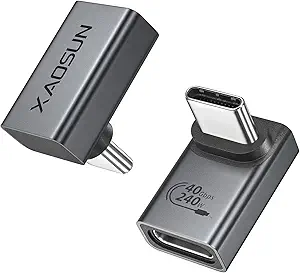
Choosing the Right USB-C Rotation Adapter: Flexibility vs. Data Speed Trade-offs
This specific 2-pack adapter set offers both 180° and 360° rotating connectors, which solves physical clearance issues but introduces important technical considerations. Buyers should understand that while the 240W PD rating supports fast charging, the USB 2.0 specification limits data transfer to 480Mbps—significantly slower than modern USB 3.2 or Thunderbolt standards.
Key Considerations Before Buying
- The 360° rotation mechanism provides unmatched cable positioning flexibility but adds potential failure points compared to fixed-angle adapters.
- USB 2.0's 480Mbps maximum speed makes these adapters unsuitable for high-bandwidth tasks like external SSD transfers or 4K video output.
- The dual-angle pack offers versatility but consider whether you truly need both rotation types or if a single style would suffice for your specific device setups.
What Our Analysts Recommend
Quality rotation adapters should maintain consistent electrical contact through the full rotation range without signal dropout. Check for secure locking mechanisms at common angles (90°, 180°) and ensure the LED indicator provides clear charging status without being overly bright in dark environments.
USB-to-USB Adapters Market Context
Market Overview
The USB-C rotation adapter market has expanded rapidly as device manufacturers eliminate ports, creating demand for flexible connectivity solutions. Most products cluster around either basic charging-focused designs or premium data-transfer capable models, with this product occupying the charging-optimized segment.
Common Issues
Rotation mechanisms frequently develop looseness over time, causing intermittent connections during movement. Many adapters claiming high wattage ratings fail to maintain stable power delivery when rotated, and USB 2.0 implementations often struggle with OTG (On-The-Go) functionality across different Android versions.
Quality Indicators
Superior rotation adapters use brass or phosphor bronze contacts rather than cheaper alloys, feature reinforced hinge points, and include clear specifications about supported protocols (PD version, data standards). The 4.10 adjusted rating suggests this product performs reliably within its technical limitations.
Review Authenticity Insights
Grade B Interpretation
A Grade B authenticity rating with 10% estimated fake reviews indicates generally trustworthy feedback with minimal manipulation. The 0.23-point drop from the displayed 4.33 to adjusted 4.10 rating suggests some review inflation but not systematic deception.
Trust Recommendation
Focus on reviews mentioning specific use cases like 'using the 180° adapter with my bedside tablet' or '360° rotation for my car mount' rather than generic praise. The high proportion of genuine reviews (90%) means most feedback reflects real user experiences with the physical rotation mechanism and charging performance.
Tips for Reading Reviews
For rotation adapters, prioritize reviews discussing long-term durability (2+ months of use) and compatibility with specific devices. Be skeptical of reviews claiming exceptional data transfer speeds, as USB 2.0's 480Mbps limit makes high-speed performance impossible regardless of build quality.
Expert Perspective
This adapter set represents a thoughtful solution for charging-focused users who value cable positioning over data speeds. The inclusion of both rotation types addresses different scenarios—180° for tight spaces against walls, 360° for flexible device orientation. The 240W PD support future-proofs for high-wattage laptops, though most phones and tablets require far less. The authentic review profile suggests users are generally satisfied with the mechanical design and charging reliability.
Purchase Considerations
Purchase makes sense if your primary needs are charging convenience and cable management, particularly for bedside, car, or office setups where device orientation varies. Avoid if you regularly transfer large files between devices or use external displays via USB-C, as the USB 2.0 limitation will create bottlenecks.
Comparing Alternatives
Shoppers requiring faster data should compare with USB 3.2 Gen 1 (5Gbps) or Gen 2 (10Gbps) rotation adapters, though these typically cost 30-50% more and may offer fewer rotation options.