
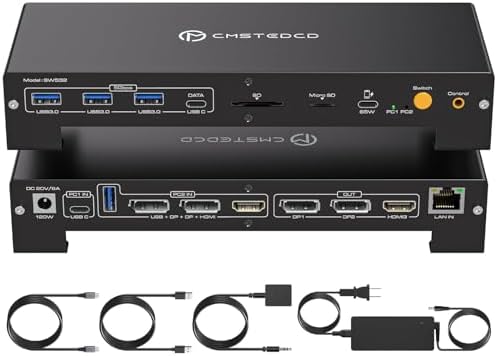
Choosing a high-performance KVM dock requires balancing display modes, power delivery, and switching reliability
This specific 15-in-1 USB-C KVM docking station promises a unique hybrid display configuration: triple 4K monitors at 60Hz or dual monitors at a high 144Hz refresh rate. Buyers should understand that achieving these specs depends heavily on their computer's graphics capabilities and the specific DisplayPort/HDMI combination used. The integrated 100W PD supply is designed to power demanding laptops while maintaining single-cable connectivity.
Key Considerations Before Buying
- Verify your computer's GPU supports the desired output mode (triple 4K60 or dual 4K144) via DisplayPort 1.4 or HDMI 2.0 before purchase, as performance varies by source.
- The 100W power delivery is sufficient for most premium laptops, but ensure your device negotiates PD correctly through the KVM's upstream USB-C port.
- Assess your need for peripheral sharing across two systems; this dock consolidates USB-A devices, Ethernet, and audio, but switching latency can affect workflow.
What Our Analysts Recommend
Quality indicators include consistent EDID emulation to prevent display resolution drops during computer switching, and robust thermal management for sustained 100W PD delivery. Genuine reviews often mention the physical switch button responsiveness and firmware stability for multi-monitor setups.
KVM Switches Market Context
Market Overview
The market for USB-C KVM docking stations has expanded rapidly, with products now targeting hybrid work setups requiring high-resolution multi-monitor support. This model sits in a competitive niche by offering both high refresh rate (144Hz) and multi-monitor (triple display) configurations in one device, which is less common than standard dual-4K60 offerings.
Common Issues
Users frequently report display handshake problems when switching between computers with different graphics drivers, and some docks struggle to maintain stable power delivery while driving multiple high-resolution displays. Cable quality and length for the upstream connections also significantly impact signal integrity.
Quality Indicators
Look for mentions of consistent plug-and-play performance without requiring driver installations, and check if the manufacturer provides firmware update capabilities. Products using reputable controller chips (like DisplayPort MST hubs) for display splitting tend to offer better compatibility than proprietary solutions.
Review Authenticity Insights
Grade B Interpretation
A Grade B authenticity rating with an estimated 15% fake review rate suggests generally reliable feedback, but warrants careful scrutiny of overly enthusiastic 5-star reviews. The adjusted rating of 4.10/5 (down from 4.44) indicates some review inflation, but the core positive sentiment appears genuine.
Trust Recommendation
Focus on reviews that detail specific setup scenarios, like connecting a MacBook Pro and a Windows PC with discrete GPUs, or those mentioning firmware version numbers. Be skeptical of reviews that don't mention monitor models, cable types, or specific computer models used in testing.
Tips for Reading Reviews
Prioritize reviews discussing the hybrid display modes—especially experiences achieving 144Hz—and notes on peripheral switching reliability. Technical troubleshooting posts often provide more authentic insight than generic praise.
Expert Perspective
This dock addresses a clear need for professionals running two high-performance systems who want a single docking solution without compromising on display refresh rates or resolution. The 4.10 adjusted rating from authentic reviews suggests it largely delivers on its core promises, though the display mode limitations (triple 4K60 OR dual 4K144) require careful planning. The integration of 100W PD, multiple USB ports, and Ethernet in a KVM switch represents solid value if your workflow matches its design.
Purchase Considerations
Weigh your daily use case: if you require both high refresh rates for gaming or design work AND multiple extended displays for productivity, this hybrid approach is compelling. However, if your needs are consistently in one camp (always triple monitors or always high refresh rate), a more specialized dock might offer better stability.
Comparing Alternatives
Shoppers should compare this hybrid model against dedicated high-refresh-rate KVMs and dedicated multi-display KVMs to see which aligns better with their primary use case.


