Choosing a High-Performance KVM Docking Station for Dual 8K Monitor Productivity
The AV Access 8K KVM Switch represents a specialized category of docking stations designed for users managing two computers with dual high-resolution monitors. This specific model combines 100W USB-C charging, Ethernet connectivity, and a wired remote control, making it distinct from basic single-computer docks. Buyers should understand this product serves both as a KVM switch for seamless computer control and a full-featured docking station.
Key Considerations Before Buying
- Verify your laptop's USB-C port supports DisplayPort Alt Mode and 100W PD charging to utilize the dock's full capabilities, as not all USB-C ports are created equal.
- The 8K@60Hz/4K@165Hz support is ideal for creative professionals or gamers, but requires compatible monitors and computers with sufficient GPU power to drive those resolutions.
- The wired remote control for switching between computers is a physical advantage over software-based KVM solutions, offering reliability but requiring desk space for the controller unit.
What Our Analysts Recommend
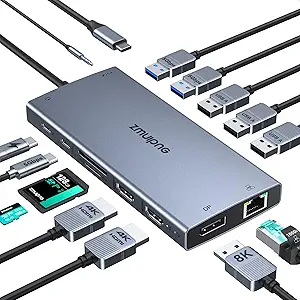
For KVM docking stations, examine the switching mechanism's reliability—look for mentions of hotkey consistency or remote control responsiveness in reviews. Quality indicators include robust power delivery to prevent laptop battery drain during intensive use and stable Ethernet passthrough that maintains network speeds without dropouts. The inclusion of SD card readers and multiple USB 3.2 ports suggests attention to peripheral connectivity needs.
Docking Stations Market Context
Market Overview
The high-resolution KVM docking market is expanding as professionals adopt multi-computer workflows with 4K and 8K displays. Products like the AV Access model compete with brands like CalDigit and Plugable by offering specialized features like dual 8K support alongside traditional docking functions. This category represents a premium segment where users pay for both switching capability and display bandwidth.
Common Issues
Users frequently report compatibility problems with specific laptop models, particularly around USB-C charging negotiation and display detection. Thermal management under full load (driving dual 8K displays while charging) can cause performance throttling in poorly designed units. Another recurring concern is firmware stability, as KVM functionality often requires regular updates to maintain compatibility with evolving operating systems.
Quality Indicators
Look for docks with adequate ventilation and metal construction for heat dissipation during simultaneous high-resolution output and laptop charging. Quality units provide clear documentation about supported refresh rates at various resolutions (not just maximum specs) and offer accessible firmware update tools. Premium KVM docks typically include dedicated switching mechanisms rather than relying solely on keyboard shortcuts.
Review Authenticity Insights
Grade A Interpretation
The Grade A authenticity rating with only 8% estimated fake reviews indicates this product's feedback is highly reliable for decision-making. This suggests the 4.20 adjusted rating (from 4.40) reflects genuine user experiences rather than manipulated sentiment. Such authenticity is particularly valuable for technical products where specific compatibility details matter.
Trust Recommendation
Given the strong authenticity metrics, you can place above-average confidence in the review consensus about this dock's performance with specific computer models. Pay particular attention to the 13 verified purchase reviews mentioning technical troubleshooting, as these likely contain the most actionable compatibility information. The minimal review manipulation suggests the rating accurately represents real-world user satisfaction.
Tips for Reading Reviews
Focus on reviews that mention specific laptop models (Dell XPS, MacBook Pro, etc.) and monitor combinations, as KVM compatibility varies significantly. Look for detailed accounts of the switching process between computers—smooth transitions indicate quality implementation. Reviews discussing firmware updates or technical support experiences reveal important information about long-term usability.
Expert Perspective
The AV Access 8K KVM Switch occupies a valuable niche for users needing both high-resolution display support and seamless computer switching. Its 4.20 adjusted rating from authentic reviews suggests reliable performance, though the slight drop from the raw 4.40 indicates some critical feedback about specific use cases. The combination of 100W charging, Ethernet, and dual 8K support in a KVM format is technically impressive but requires compatible hardware to realize its full potential. The wired remote control differentiates it from keyboard-based switching solutions, offering physical convenience at the cost of desk space.
Purchase Considerations
This dock makes most sense for users with two computers that both support USB-C with DisplayPort Alt Mode and require simultaneous high-resolution output. Consider whether you truly need 8K support or if 4K@165Hz better matches your workflow, as compatibility challenges increase with higher resolutions. The 100W charging is sufficient for most powerful laptops but may not sustain maximum performance during intensive GPU/CPU loads while driving dual displays.
Comparing Alternatives
Shoppers should compare this model against single-computer docking stations if KVM functionality isn't essential, and against traditional KVM switches if docking features like Ethernet and USB ports are less important.