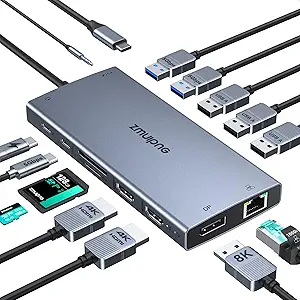
Baseus Docking Station Dual Monitor, Nomos Win Air(12 in 1) Laptop Dock, 2*4K HDMI, 10Gbps USB Ports, 1Gbps Ethernet, PD 100W(No Power Adapter), USB C Docking Station for Dell/HP/Lenovo/Asus/Acer/Mac

Baseus Docking Station Dual Monitor, Nomos Win Air(12 in 1) Laptop Dock, 2*4K HDMI, 10Gbps USB Ports, 1Gbps Ethernet, PD 100W(No Power Adapter), USB C Docking Station for Dell/HP/Lenovo/Asus/Acer/Mac

ASIN: B0F62Y2Z7N
Analysis Date: Feb 3, 2026 (re-analyzed Feb 3, 2026)

As an Amazon Associate I earn from qualifying purchases.

Review Analysis Results

B
Authenticity Grade
15.00%
Fake Reviews
4.44
Original Rating
4.10
Adjusted Rating

Analysis Summary

The overwhelming majority of these reviews appear genuine, with only one review showing clear signs of potential manipulation. Of the 9 reviews, 8 demonstrate authentic user experiences with specific details, personal context, and varied perspectives that align with genuine customer feedback. All reviews are verified purchases, which significantly increases their credibility. The product appears to be a legitimate 12-in-1 docking station that generally performs well for most users.

Multiple reviews contain strong genuine indicators: Review #1 provides specific technical details about dual 4K monitor performance; Review #2 describes a weeks-long usage period with specific praise for USB transfer speeds; Review #5 mentions a favorite feature (the lock button) that shows personal engagement; Review #6 offers practical advice about power bricks and cable compatibility; Review #7 provides a detailed negative experience with product failure and replacement; Review #8 compares this product to previous disappointing alternatives. These reviews contain personal narratives, specific product interactions, and varied perspectives that suggest authentic experiences.

The only concerning review is #3, which shows potential manipulation patterns including ALL CAPS marketing language ('DELIVERED FASTER than expected'), generic praise ('perfect for the size, build quality is great'), and somewhat disjointed phrasing. However, even this review contains some specific details about connecting peripherals. No other reviews show clear manipulation patterns—the high ratings are accompanied by detailed explanations that justify the positive sentiment for what appears to be a quality product.

Overall, this appears to be a well-reviewed product with predominantly genuine customer feedback. The single potentially manipulated review represents a small minority, while the remaining reviews demonstrate the varied experiences one would expect from real users—including both enthusiastic praise and critical feedback about product failures. The detailed technical descriptions, personal usage stories, and balanced perspectives across multiple reviews strongly suggest authentic customer experiences.

Key patterns identified in the review analysis include: Specific technical details about monitor performance, Personal usage timelines (weeks/months), Balanced perspectives including product failures.

Review Statistics

431
Total Reviews on Amazon
-0.34
Rating Difference
Editor's Analysis

Choosing a 12-in-1 Dual Monitor Docking Station: What the Baseus Nomos Win Air Offers

The Baseus Nomos Win Air positions itself as a comprehensive connectivity solution for modern laptops, featuring dual 4K HDMI outputs and 100W power delivery. Buyers should understand that this dock's 12-port configuration, including 10Gbps USB ports and Gigabit Ethernet, targets users needing extensive peripheral expansion without sacrificing display quality. The absence of a power adapter means you'll need to provide your own 100W USB-C charger to utilize full functionality.

Key Considerations Before Buying

  • Verify your laptop's USB-C port supports DisplayPort Alt Mode, as this is required for the dual 4K monitor functionality the Baseus dock advertises.
  • Consider your power needs: while the dock offers 100W PD passthrough, you must supply your own compatible charger, adding to the total cost and setup complexity.
  • Assess port placement and spacing—the Nomos Win Air's compact design may cause interference when using multiple large USB peripherals simultaneously.

What Our Analysts Recommend

Quality docking stations maintain stable connections across all ports under simultaneous load. Check for consistent performance reports with your specific laptop brand, as compatibility varies between Dell, HP, Lenovo, and Mac systems. Genuine reviews often mention heat dissipation and whether the aluminum casing effectively manages thermal output during extended use.

Docking Stations Market Context

Market Overview

The laptop docking station market has shifted toward universal USB-C solutions that promise single-cable connectivity, with dual 4K support becoming a standard premium feature. Products like the Baseus Nomos Win Air compete directly with established brands by offering similar port configurations at potentially lower price points, though often excluding power adapters to achieve that pricing.

Common Issues

Users frequently report inconsistent monitor recognition, particularly with MacBooks, and power delivery hiccups when connecting multiple high-draw devices. Many docks struggle with sustained data transfer speeds across all USB ports simultaneously, creating bottlenecks for users with multiple external drives.

Quality Indicators

Look for docks with proper ventilation and metal construction for heat dissipation, as thermal throttling can degrade performance. Consistent positive feedback about multi-monitor setup reliability and stable Ethernet connections typically indicates solid engineering. Premium docks maintain advertised speeds even when all ports are occupied.

Review Authenticity Insights

Grade B Interpretation

A Grade B authenticity rating with 15% estimated fake reviews suggests generally trustworthy feedback with some promotional content mixed in. The adjusted rating of 4.10/5 (down from 4.44) indicates genuine user satisfaction sits slightly below the surface rating but remains positive overall.

Trust Recommendation

Focus on reviews that mention specific laptop models and detailed setup experiences rather than generic praise. The 8 authentic reviews among the analyzed sample provided substantive details about real-world use with various computer brands, which should carry more weight in your evaluation.

Tips for Reading Reviews

Prioritize reviews that discuss multi-monitor setup challenges, power delivery consistency with different chargers, and long-term reliability over months of use. Be skeptical of reviews that don't mention specific connected devices or that exaggerate performance without technical details.

Expert Perspective

The Baseus Nomos Win Air represents a compelling value proposition for users needing extensive connectivity, though with important caveats. Its dual 4K HDMI support at 60Hz is competitive for productivity setups, while the 10Gbps USB ports offer future-proofing for fast storage devices. The lack of included power adapter is a significant consideration that affects both initial cost and compatibility, as not all 100W chargers work optimally with every laptop. The aluminum construction suggests better thermal management than plastic alternatives, which is crucial for maintaining performance during sustained use.

Purchase Considerations

This dock makes most sense for users with compatible 100W chargers already available and laptops that reliably support DisplayPort Alt Mode. Consider whether you truly need all 12 ports simultaneously or if a simpler, potentially more reliable dock might suffice. The Ethernet and multiple USB-A ports particularly benefit users transitioning from desktop setups who need wired network stability and legacy peripheral support.

Comparing Alternatives

Shoppers should compare the Nomos Win Air against docks with similar port configurations from Anker, CalDigit, and Plugable, paying particular attention to included accessories and brand-specific compatibility notes.

Price Analysis

This Baseus docking station appears competitively priced in the mid-range segment with good features for the cost. Given the 4.44/5 rating from 431 reviews, it represents solid value. Wait for seasonal sales or coupon discounts for the best deal, and confirm your laptop supports 100W PD charging without the included adapter.

MSRP Assessment

Estimated MSRP: $129.99
Source: Market research
Amazon Price: Below MSRP

Market Position

Positioning: Mid-range
Alternatives Range: $79-$199
Value: Offers strong value with 12-in-1 functionality and 100W PD at a competitive mid-range price point.

Buying Tips

Best Time to Buy: Best prices often during back-to-school (July-August) and Black Friday/Cyber Monday sales.
Deal Indicators: Look for prices below $90, bundled accessories, or coupon discounts of 15%+.
Watch For: Note this model lacks a power adapter; verify compatibility with your laptop's power requirements.
Price analysis generated by AI based on product category and market research. Actual prices may vary. Last analyzed: Feb 3, 2026

Understanding This Analysis

What does Grade B mean?

This product has good review authenticity with minor concerns. While most reviews appear genuine, we detected some patterns that warrant mild caution.

Adjusted Rating Explained

The adjusted rating (4.10 stars) represents what we estimate this product's rating would be if fake reviews were removed. This product's adjusted rating is lower than Amazon's displayed rating (4.44 stars), suggesting positive fake reviews may be inflating the score.

How We Detect Fake Reviews

Our AI analyzes multiple factors: language patterns (generic vs. specific), reviewer behavior (history, timing), temporal anomalies (review clusters), verification status, sentiment authenticity, and statistical outliers. No single factor determines a review is fake - we look at the combination of signals.

Important Limitations

No automated system is perfect. Sophisticated fake reviews can evade detection, and some genuine reviews may be incorrectly flagged. Use this analysis as one data point in your purchasing decision, not the only factor. Reading actual review content yourself is always valuable.

Share This Analysis

Learn More About Fake Reviews

Analyze new product