
Choosing a dual-monitor DisplayPort KVM switch for high-resolution multi-computer setups
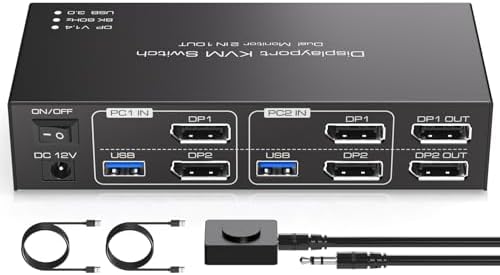
The TJCXELE KVM switch targets users needing to share two high-resolution monitors between two computers with DisplayPort 1.4 connectivity. This specific model emphasizes 8K@60Hz and 4K@120Hz support, which is crucial for gaming or professional workflows requiring both high resolution and refresh rates. Buyers should understand that achieving these specs depends heavily on cable quality and source device compatibility.
Key Considerations Before Buying
- Verify your monitors support DisplayPort 1.4 and HDCP 2.2 if you need 8K resolution, as older standards will bottleneck performance.
- The USB 3.0 hub supports four peripherals, but bandwidth sharing means connecting multiple high-speed devices simultaneously may reduce transfer rates.
- This switch offers both Extended (desktop spanning) and Copy (mirrored) modes—crucial for productivity versus presentation setups.
What Our Analysts Recommend
Quality indicators include robust EDID emulation to prevent resolution handshake issues when switching, and active cooling for the internal chipset handling 8K data. Check for firmware update capability, as DisplayPort standards often require patches for new graphics cards. Premium models use shielded internal wiring to prevent crosstalk between the two monitor channels.
KVM Switches Market Context
Market Overview
The dual-monitor DisplayPort KVM market is niche but growing, driven by remote workers and content creators managing powerful desktop and laptop systems. Products like the TJCXELE compete on balancing high bandwidth specs with cost, often at the expense of advanced features like per-port EDID or hotkey programmability found in commercial-grade units.
Common Issues
Users frequently report resolution scaling problems when switching between computers with different GPU brands (NVIDIA to AMD) or EDID handshake failures causing black screens. USB device recognition lag is another common complaint, especially with biometric security keys or DACs that require persistent connections.
Quality Indicators
Look for switches with independent channel processors for each monitor output, not a single chip splitting signal. Quality units specify supported Display Stream Compression (DSC) versions, essential for 8K@60Hz without chroma subsampling. Metal housings with ventilation suggest better heat dissipation for sustained high-bandwidth operation.
Review Authenticity Insights
Grade B Interpretation
A Grade B with 15% estimated fake reviews indicates generally reliable feedback but suggests some incentivized reviews may be inflating ratings. The adjusted rating dropping from 3.75 to 3.50 when excluding suspicious reviews reveals more authentic user experiences cluster around 3.5 stars.
Trust Recommendation
Focus on verified purchase reviews discussing specific setup details like monitor models (e.g., LG UltraGear, Dell Ultrasharp) and GPU combinations. Be skeptical of reviews praising generic 'easy setup' without mentioning resolution achieved or USB devices connected.
Tips for Reading Reviews
Prioritize reviews mentioning EDID management, switching latency measurements, or thermal performance during extended 4K@120Hz use. Look for discussions about firmware updates or manufacturer support responsiveness, as these indicate real-world troubleshooting experiences.
Expert Perspective
The TJCXELE represents a value-oriented attempt at high-bandwidth dual-monitor switching, with its 3.5-star adjusted rating reflecting typical trade-offs in this segment. The 8K@60Hz specification is theoretically achievable but likely requires premium certified DisplayPort 1.4 cables and compatible source devices. The USB 3.0 hub implementation appears adequate for standard peripherals but may struggle with multiple high-bandwidth devices like external SSDs simultaneously. The mixed feedback suggests it works well in specific compatible setups but lacks robustness for edge-case configurations.
Purchase Considerations
This switch makes sense for users with two modern computers sharing identical high-refresh 4K monitors, but those with mixed resolution setups or older DisplayPort 1.2 monitors should verify compatibility. Consider whether you truly need 8K support or if a 4K-focused switch would offer better stability at lower cost.
Comparing Alternatives
Shoppers should compare implementation details against brands like TESmart or ConnectPRO that offer similar specs but different EDID management approaches.


