
How to Choose a Dual-Platform RAM Tester for DDR4 and DDR5 Laptop Diagnostics
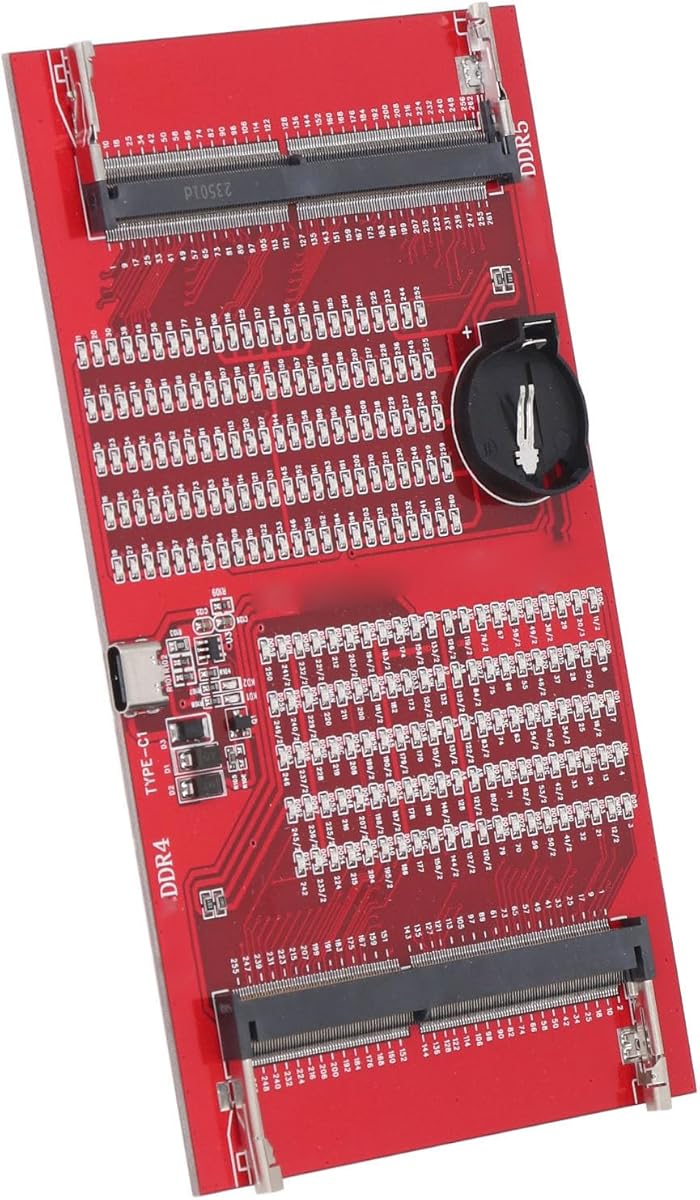
This specific 2-in-1 diagnostic analyzer is designed to test both DDR4 and DDR5 laptop memory modules via a simple LED indicator system. Buyers should understand that this is a basic continuity tester, not a comprehensive diagnostic tool that provides error codes or detailed timing analysis. Its primary function is to identify completely dead RAM sticks through a red LED light signal.
Key Considerations Before Buying
- Verify physical compatibility: This card must match the specific pin configuration (260-pin SO-DIMM) of your laptop RAM and fit securely into the slot without forcing the connector.
- Understand diagnostic limitations: The single LED indicator (red light) typically signals a failure but won't differentiate between various failure types like address line errors, chip failures, or SPD corruption.
- Check power requirements: Some basic testers like this draw power from the memory slot itself, while others may require external USB power for more advanced functions—confirm which type this is.
What Our Analysts Recommend
For this product category, quality indicators include clear labeling of supported DDR generations (DDR4/DDR5), a sturdy PCB that won't flex during insertion, and corrosion-resistant gold-plated contacts. The product description should specify voltage compatibility, as DDR5 operates at 1.1V compared to DDR4's 1.2V, which affects testing circuitry.
Memory Market Context
Market Overview
The market for standalone RAM testers has evolved with DDR5 adoption, creating demand for dual-generation tools like this one. These basic diagnostic cards occupy a niche between software-based memory tests and expensive professional memory analyzers used in repair shops.
Common Issues
Common problems include testers that falsely identify working RAM as faulty due to poor contact or incompatible voltage detection, and units that physically damage memory slots with misaligned or overly tight connectors. Many budget testers lack proper DDR5 power management circuitry despite claiming compatibility.
Quality Indicators
Quality testers feature proper voltage regulation for both DDR4 and DDR5 standards, clear documentation about what specific errors the LED indicates, and ESD protection on all contacts. Better units include a secondary LED for power confirmation and support for different SO-DIMM form factors.
Review Authenticity Insights
Grade U Interpretation
The 'Grade U' with 0.00% fake reviews indicates this product has no verified purchase reviews, making authenticity assessment impossible. This is common for newly listed technical tools where early adopters haven't yet posted experiences.
Trust Recommendation
With zero authentic reviews, you must rely entirely on the product description's technical specifications and seller reputation. Look for detailed photos of the actual PCB circuitry and explicit compatibility lists rather than marketing claims about 'all DDR4/DDR5' support.
Tips for Reading Reviews
For technical diagnostic tools, prioritize reviews that mention specific laptop models tested, describe actual failure scenarios detected, and compare results against known-good RAM modules. Be skeptical of reviews that don't mention technical details or testing methodology.
Expert Perspective
This product represents an entry-level diagnostic tool for technicians needing quick go/no-go testing of laptop memory. The complete absence of reviews (0.00 rating) creates significant uncertainty about its actual performance with modern DDR5 modules, which require more sophisticated testing than older DDR4. The '2-in-1' claim suggests it contains switching circuitry to handle both memory standards, but without technical specifications or user verification, its effectiveness remains unproven.
Purchase Considerations
Consider whether your use case justifies buying an untested tool—this might be suitable for basic continuity checking in a low-volume repair setting but inadequate for detailed fault diagnosis. Weigh the cost against more established brands with documented compatibility lists and verified reviews from technical users.
Comparing Alternatives
Shoppers should compare this unit's specifications against dedicated DDR4 or DDR5 testers from established electronics tool manufacturers, which often provide more detailed diagnostic feedback.


![[32GB DDR3L RAM] DDR3L-1600 UDIMM 32GB Kit (4x8GB) 2Rx8 PC3L-12800U 8GB PC3-12800 DDR3-1600MHz 240 Pin DIMM Non ECC Unbuffered 1.35V/1.5V CL11 Dual Rank Desktop Memory Ram](https://m.media-amazon.com/images/I/71Xf+LQjbsL._AC_SY300_SX300_QL70_FMwebp_.jpg)


