Choosing a 10Gbps USB-C Hub: What the BENFEI 4-Port Adapter Gets Right
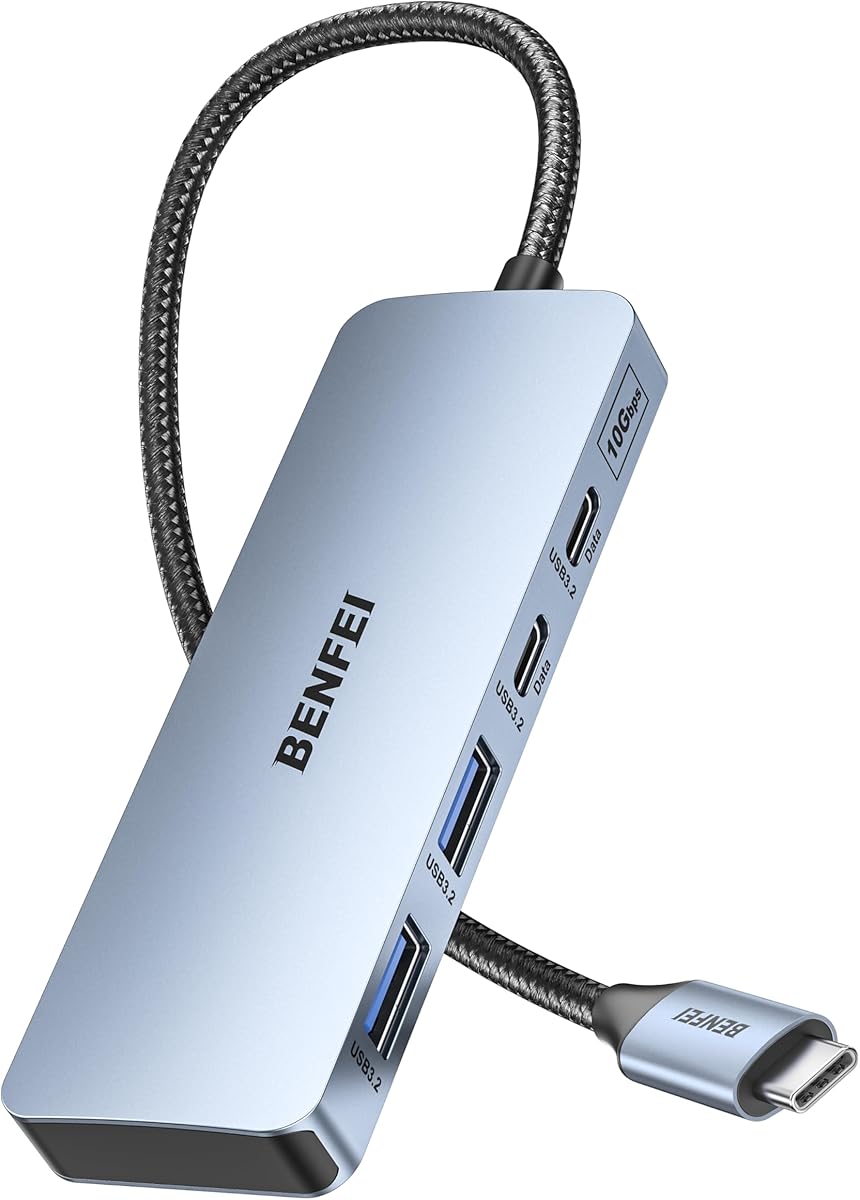
The BENFEI 10Gbps hub offers a specific port configuration—two USB-C and two USB-A 3.2 ports—that caters to users transitioning to newer devices while retaining legacy peripherals. This product's explicit lack of video output makes it a dedicated data-transfer hub, a distinction buyers should understand before purchasing. Its compatibility list, focusing on MacBooks with M-series chips, iPads, and specific PC brands, indicates a targeted design rather than universal support.
Key Considerations Before Buying
- The 10Gbps speed is the theoretical maximum for USB 3.2 Gen 2; real-world performance will depend on the host device's capabilities and the connected drives, making it ideal for fast SSDs but overkill for basic keyboards or mice.
- With no charging pass-through or video output, this hub is purely for expanding data ports, so you'll need a separate solution if you want to connect a monitor or power your laptop through the same dock.
- The dual USB-C ports are valuable for connecting modern peripherals like external NVMe drives or newer Android phones, but ensure your host device has adequate power delivery to support multiple high-speed devices simultaneously.
What Our Analysts Recommend
For a data-only hub like this, check for consistent reports of sustained transfer speeds without drop-offs. Quality indicators include robust heat dissipation mentioned in reviews and a compact, non-slip design that doesn't block adjacent ports on a laptop. Look for mentions of stable performance with both M-series Macs and Windows PCs to gauge true cross-compatibility.
USB Hubs Market Context
Market Overview
The USB-C hub market is saturated with multi-function docks, making dedicated data hubs like this BENFEI model a niche for users who need port expansion without paying for unused HDMI or Ethernet ports. There's a growing segment of hubs emphasizing 10Gbps speeds to match the capabilities of newer laptops and fast external storage.
Common Issues
Common problems include overheating during sustained data transfers, which can throttle speeds, and compatibility quirks with specific device models despite broad claims. Many hubs also struggle with providing stable power to multiple bus-powered devices like external SSDs simultaneously.
Quality Indicators
Look for hubs that specify chipset brands (like VIA or Realtek) in technical details, as this often correlates with better driver support. A metal housing is a good sign for heat dissipation. Genuine reviews that test simultaneous data transfers across all ports are more valuable than those testing a single device.
Review Authenticity Insights
Grade B Interpretation
A Grade B with a 15% estimated fake review rate suggests the overall rating of 4.44 is slightly inflated but still reflects generally positive authentic feedback. The adjusted rating of 4.10/5 is a more reliable indicator of real user satisfaction for this specific adapter.
Trust Recommendation
Focus on the verified purchase reviews that detail specific use cases, like transferring large video files between an M2 MacBook Air and two external drives. Be slightly more skeptical of reviews that only praise generic 'fast speed' without context or that mention unrelated products.
Tips for Reading Reviews
Prioritize reviews that mention the exact device model they're using (e.g., 'MacBook Air M1') and describe multi-device setups. For this data hub, pay special attention to reviews discussing long-term reliability over several months, not just initial setup impressions.
Expert Perspective
The BENFEI hub's value proposition is clear: it's a streamlined, speed-focused data expansion tool. The high authentic rating (4.10 adjusted) indicates it reliably delivers on its core promise of adding four 10Gbps ports. Its specific incompatibility with monitor output is a deliberate design choice that lowers cost and complexity, making it a specialist tool rather than a universal dock. The analysis suggests genuine users appreciate its focused functionality, particularly with Apple's port-limited laptops.
Purchase Considerations
This hub makes the most sense if your primary need is connecting multiple high-speed storage devices and modern peripherals, and you already have separate solutions for charging and video. Consider your host laptop's power output; some thinner models may struggle to power four active high-speed devices through a single bus-powered hub.
Comparing Alternatives
Shoppers should compare this model against other data-centric hubs, noting differences in warranty length, included cables, and whether the USB-C ports support full 10Gbps data or dual-purpose protocols.