Choosing a 9-in-1 USB-C Hub: Balancing Port Selection, Power Delivery, and Build Quality
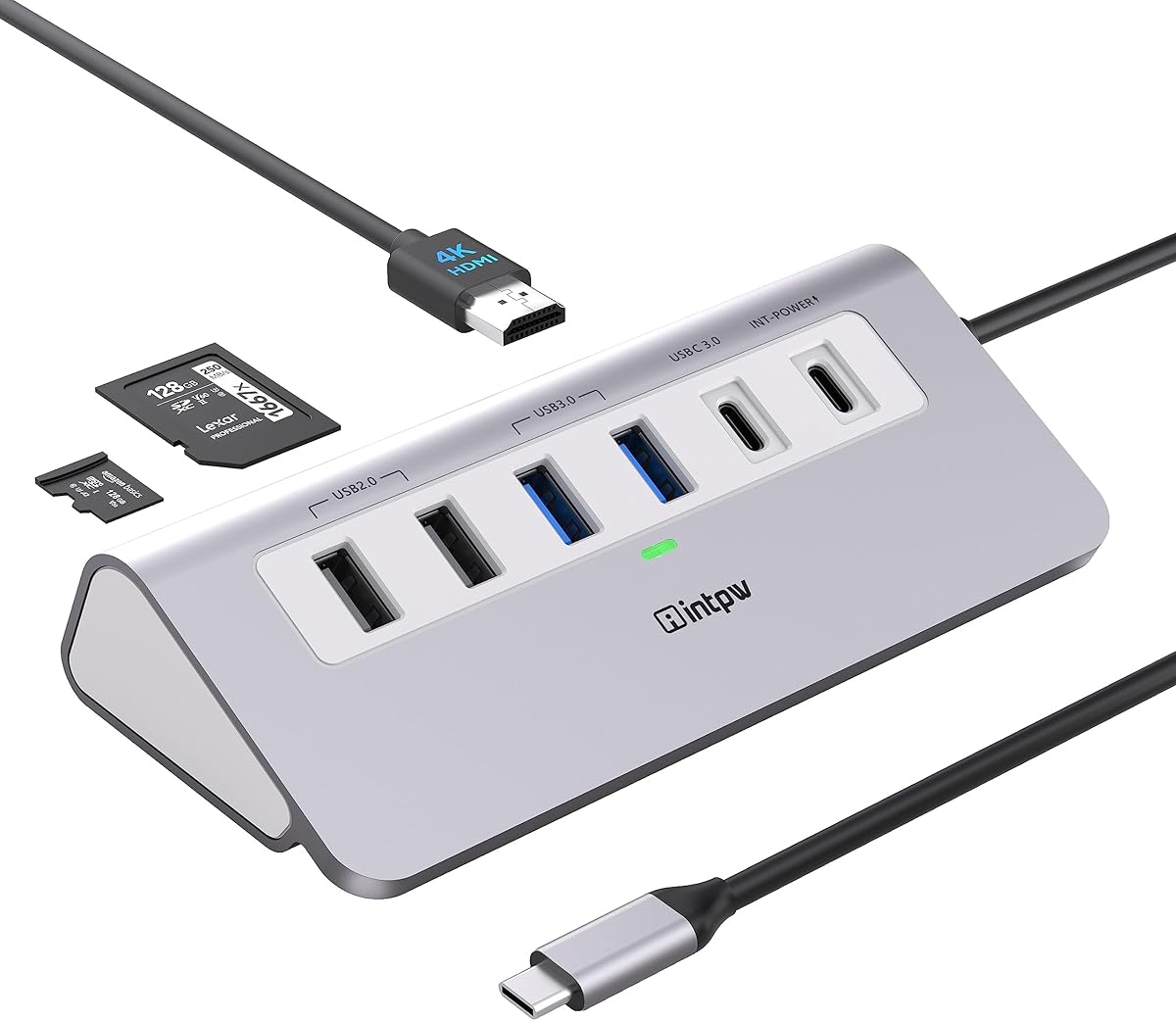
The INTPW 9-in-1 hub exemplifies the modern USB-C adapter designed for thin laptops and tablets, offering a specific combination of legacy USB-A ports, video output, and card readers. Buyers should evaluate whether its 100W PD charging and mix of USB 3.0 and 2.0 ports align with their workflow needs. The aluminum construction suggests a focus on heat dissipation, a key factor for multi-port hubs under load.
Key Considerations Before Buying
- Power Delivery (PD) 100W: Verify your laptop's maximum charging input; a 100W PD port can charge most high-performance laptops but may be overkill for ultraportables that cap at 65W.
- Port Speed Mix: This hub includes both 5Gbps USB 3.0 and slower 480Mbps USB 2.0 ports—strategically use the 3.0 ports for external SSDs and the 2.0 ports for keyboards or mice to avoid bandwidth congestion.
- Simultaneous Use Limitations: Running the 4K HDMI output, reading SD cards, and transferring data via multiple USB ports simultaneously may exceed the hub's shared bandwidth, potentially slowing transfers or causing disconnections.
What Our Analysts Recommend
For hubs with this many ports, check for reviews mentioning stable performance under multi-device load and consistent 4K@60Hz HDMI output. A quality indicator is clear documentation on bandwidth allocation, such as whether the HDMI and USB 3.0 share a single lane, which is common but can limit performance.
USB Hubs Market Context
Market Overview
The USB-C hub market is saturated with compact multi-port adapters, with 9-in-1 models like this one targeting users needing a complete desk setup replacement. Current trends favor hubs with at least one 4K HDMI port, 100W PD pass-through charging, and a blend of legacy and modern ports for peripheral compatibility.
Common Issues
Frequent problems include overheating during sustained use, voltage drops on the PD port causing slow laptop charging, and HDMI signal dropouts when multiple high-bandwidth devices are connected. Many hubs also struggle with consistent SD/TF card reader detection across different card brands and formats.
Quality Indicators
Look for hubs with aluminum alloy bodies for better heat management, over-current and short-circuit protection chips, and VMM7100 or similar recognized controller chips for stable HDMI conversion. Quality manufacturers often specify the exact HDMI standard (e.g., HDMI 2.0) and PD protocol version supported.
Review Authenticity Insights
Grade C Interpretation
A 'C' authenticity grade and 28% estimated fake reviews indicate a moderately manipulated review set. This is concerning but not uncommon for competitive electronics categories on Amazon, where some sellers incentivize positive early reviews.
Trust Recommendation
Place more weight on the adjusted 4.00/5 rating than the displayed 4.67/5. Specifically seek out 3-star reviews for balanced perspectives on performance limitations, as these are less likely to be incentivized and often detail real-world usage scenarios.
Tips for Reading Reviews
For technical products like this, prioritize reviews that mention specific use cases (e.g., 'connected my MacBook Pro M2 to dual monitors' or 'used the SD reader for photography work') and detail performance over time, rather than generic praise about packaging or initial setup.
Expert Perspective
The INTPW hub's specification sheet is competitive, particularly its 100W PD and inclusion of both SD and microSD readers, which appeals to content creators. However, the authenticity analysis suggests caution; the gap between the displayed 4.67 and adjusted 4.00 rating is significant. The port selection is pragmatic, offering four USB-A ports for legacy devices, but the lack of a second USB-C data port limits connectivity for modern peripherals. The aluminum build is a positive signal for durability and thermal management compared to all-plastic competitors.
Purchase Considerations
Consider this hub if your primary needs are charging, single 4K display output, and connecting several older USB-A devices. Be cautious if you require consistent high-speed data transfer across all ports simultaneously or use high-wattage laptops that need the full 100W PD to charge under load, as real-world performance may vary.
Comparing Alternatives
Shoppers should compare the actual sustained performance and thermal reports of this model against similar 9-in-1 hubs from Anker, Satechi, or HyperDrive, which may have more established reliability data.