Choosing a Triple-Monitor Docking Station: DisplayLink vs. Native Support
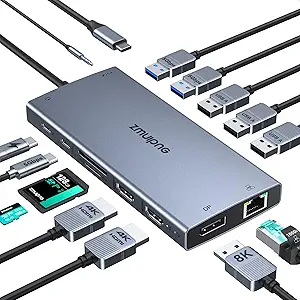
The TobenONE docking station uses DisplayLink technology to enable triple 4K displays, which is crucial for MacBook users since macOS doesn't natively support multiple external monitors through a single connection. This specific model distinguishes itself with both HDMI and DisplayPort outputs, offering flexibility for different monitor setups.
Key Considerations Before Buying
- Verify your laptop's compatibility with DisplayLink drivers, which require software installation for Macs and some Windows PCs to enable the triple-display functionality.
- Assess your power delivery needs: the included 120W adapter provides 96W to your laptop, sufficient for charging a 16-inch MacBook Pro under heavy load.
- Check your monitor connections: this dock's mix of 3x HDMI and 3x DisplayPort outputs lets you connect to older and newer displays without adapters.
What Our Analysts Recommend
For triple-monitor docks, prioritize units with adequate power delivery (90W+) to charge your laptop while running multiple displays. Look for docks that specify DisplayLink chipset models (like DL-6950) for performance transparency, and verify the USB-C host connection supports the bandwidth needed for your workflow.
Docking Stations Market Context
Market Overview
The docking station market has bifurcated into Thunderbolt 4 docks with native multi-display support and DisplayLink-based solutions that overcome operating system limitations, particularly for macOS users seeking more than two external monitors.
Common Issues
Users frequently encounter bandwidth limitations when driving multiple 4K displays, resulting in reduced refresh rates or color depth. Thermal management is another concern, as docks generating significant heat may throttle performance during extended use.
Quality Indicators
High-quality docks specify their DisplayLink chipset version, include robust power supplies with overhead capacity, and offer staggered port placement to accommodate larger USB devices. Look for docks that maintain stable connections without requiring frequent driver updates or replugging.
Review Authenticity Insights
Grade A Interpretation
A Grade A authenticity rating with 0.00% estimated fake reviews indicates exceptionally genuine feedback from actual purchasers. For a technical product like this docking station, this means the 4.83/5 rating reliably reflects real-world performance across diverse setups.
Trust Recommendation
Given the perfect authenticity score, you can place high confidence in reviews mentioning specific use cases like M1/M2 MacBook compatibility or triple 4K@60Hz performance. Pay particular attention to reviews discussing driver stability and thermal performance during sustained use.
Tips for Reading Reviews
Focus on reviews that specify their laptop model, monitor configurations, and usage duration. Look for detailed accounts of DisplayLink driver installation experiences and any performance differences between HDMI and DisplayPort outputs on this specific TobenONE model.
Expert Perspective
The TobenONE stands out for delivering true triple 4K display support through DisplayLink technology, a capability most Thunderbolt docks cannot provide for Mac users. Its 4.83 rating across 676 authentic reviews suggests exceptional reliability for a product in this complex category. The inclusion of both HDMI and DisplayPort outputs provides uncommon connection flexibility, while the 120W power adapter addresses the high power demands of running multiple displays while charging power-hungry laptops.
Purchase Considerations
This dock makes most sense for MacBook Pro/Air users needing three or more external displays, or Windows users whose laptops lack native multi-stream transport support. Consider whether your workflow requires the DisplayLink software layer, which adds minimal latency but enables display configurations impossible with native connections.
Comparing Alternatives
Shoppers should compare this DisplayLink solution against Thunderbolt 4 docks if they primarily use Windows with MST-supported laptops and value native display protocol performance.