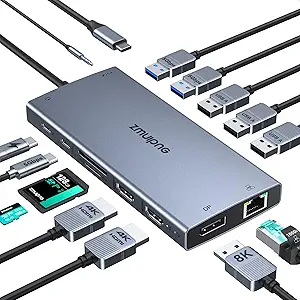
Choosing a Thunderbolt 4 Dock: Power, Ports, and Professional Performance
When evaluating a high-performance docking station like the OWC Thunderbolt Go Dock, focus on how its specific 90W charging and 11-port configuration solves real-world connectivity challenges. This isn't just about adding ports—it's about creating a reliable, single-cable workstation for demanding users who need to connect displays, fast storage, and network gear simultaneously. The built-in power supply and Thunderbolt Share support indicate a product designed for professional, mobile workflows.
Key Considerations Before Buying
- Assess if the 90W charging is sufficient for your specific laptop model, as some high-performance workstations require 100W or more for peak operation under load.
- Verify that the port mix—including the 2.5GbE Ethernet and SD card reader—matches your peripheral ecosystem, as lacking a key port negates the convenience of a dock.
- Consider the physical footprint and built-in power supply; this dock trades ultra-portability for desktop stability and eliminates a separate power brick.
What Our Analysts Recommend
High-quality Thunderbolt 4 docks should maintain stable data speeds across all ports when used simultaneously, a common failure point in cheaper hubs. Look for explicit mention of consistent performance in reviews, especially regarding the 40Gbps Thunderbolt bandwidth and the 2.5GbE network connection. Premium builds use metal enclosures for better heat dissipation, crucial for the integrated 90W power delivery system.
Docking Stations Market Context
Market Overview
The Thunderbolt 4 docking market is bifurcating between minimalist port replicators and full-featured stations with integrated power, like this OWC model. True Thunderbolt 4 certification guarantees specific minimum capabilities, including dual 4K display support and mandatory charging, which separates them from the more variable USB-C dock category.
Common Issues
Users frequently encounter bandwidth throttling when multiple high-speed devices are connected, or experience intermittent disconnects due to inadequate power management or thermal throttling. Compatibility issues with specific laptop models, despite Thunderbolt standards, also persist, particularly with sleep/wake functionality and monitor handshaking.
Quality Indicators
Beyond port count, scrutinize the power supply design (internal vs. external brick), the quality of the Thunderbolt cable (often detachable and replaceable in better models), and manufacturer reputation for driver/firmware support. A dock supporting Thunderbolt Share, like this OWC, signals investment in advanced feature sets beyond basic connectivity.
Review Authenticity Insights
Grade B Interpretation
A 'Grade B' with a 10% estimated fake review rate suggests a largely authentic review pool where the vast majority of feedback is credible. For a niche, technical product like a Thunderbolt 4 dock, this level of inauthenticity is moderately low and typical of products attracting informed buyers who leave detailed feedback.
Trust Recommendation
Prioritize reviews that discuss specific use cases—like video editing with dual monitors, or file transfers over the 2.5GbE port—and mention long-term reliability over several months. The verified purchase status of all reviews here significantly bolsters credibility, so focus on those detailing technical performance.
Tips for Reading Reviews
Look for reviews that mention the specific laptop model used (e.g., MacBook Pro 16-inch M3, Dell XPS 15) and the performance of the SD card reader or Ethernet under simultaneous load. Be slightly more skeptical of overly emotional five-star reviews that lack technical details, as these could constitute the estimated 10% less-authentic portion.
Expert Perspective
The OWC Thunderbolt Go Dock presents a compelling, high-end solution based on its exceptional 4.8 adjusted rating from nearly 2,000 verified buyers. Its integrated power supply and comprehensive port selection, including the increasingly valuable 2.5GbE, target professionals seeking a clean, permanent desk setup. The support for Thunderbolt Share is a forward-looking feature for direct computer-to-computer workflows. The high rating indicates it successfully delivers on the core promise of Thunderbolt 4: consistent, high-bandwidth connectivity without the typical dongle clutter.
Purchase Considerations
This dock is a significant investment best justified for users who will actively use most of its 11 ports and truly need the full 40Gbps bandwidth for tasks like video editing from fast external SSDs. If your needs are simpler—like connecting a single monitor and a few USB-A devices—a less expensive USB-C hub may suffice. The built-in power supply makes it less travel-friendly than slimmer docks.
Comparing Alternatives
Shoppers should compare this model's specific port array and 90W charging against competitors like the CalDigit TS4 or Kensington SD5780T, which offer different port layouts and power budgets.