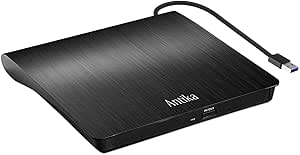
Choosing an external DVD drive with integrated USB hub and card readers
This ultra-slim external DVD burner distinguishes itself with a built-in 4-port USB 3.0 hub and dual TF/SD card slots, creating a multifunctional solution for modern laptops lacking optical drives. Buyers should evaluate whether they need the additional connectivity features or just a basic disc drive, as this product combines three functions in one compact device.
Key Considerations Before Buying
- The USB 3.0 interface provides faster data transfer than USB 2.0, crucial for smooth DVD playback and efficient disc burning, but actual performance depends on your computer's USB controller.
- The integrated USB hub and card readers eliminate the need for separate adapters, but may draw more power than a standalone DVD drive, potentially requiring connection to a powered USB port on older laptops.
- Plug-and-play compatibility across Windows, Mac, and Linux systems is essential, but verify that your specific operating system version (especially newer MacOS iterations) supports the drive's firmware without additional drivers.
What Our Analysts Recommend
Quality indicators include consistent disc reading performance across various CD and DVD formats (including CD-R, DVD±R, and dual-layer discs) and stable power delivery through the USB hub. Check reviews specifically mentioning use with older or scratched media, as this reveals the laser assembly's reliability.
CD & DVD Drives Market Context
Market Overview
The external optical drive market has evolved from basic disc readers to multifunction hubs, responding to modern laptops' port limitations. Products like this one with integrated USB and card reader functionality represent the current value-added segment, appealing to users who need occasional disc access alongside expanded connectivity.
Common Issues
Common problems include power insufficiency when multiple USB devices are connected simultaneously, compatibility issues with newer operating systems (particularly MacOS updates), and mechanical failures in the slim-loading mechanisms. Some drives also struggle with certain disc formats or region-coded media.
Quality Indicators
Look for consistent mention of quiet operation, minimal vibration during disc spinning, and reliable recognition across different computer brands. Quality drives maintain stable performance when using the hub ports for data transfer while accessing discs, indicating robust power management circuitry.
Review Authenticity Insights
Grade B Interpretation
A Grade B authenticity rating with 10% estimated fake reviews indicates predominantly genuine feedback with minor manipulation concerns. The 4.10 adjusted rating (down from 4.33) suggests some review inflation but still reflects strong user satisfaction.
Trust Recommendation
Focus on the 90% of reviews deemed authentic, particularly those detailing specific use cases like installing software from legacy discs, accessing archived data, or using the card readers with cameras. Verified purchase badges (marked 'V') provide additional credibility for this product.
Tips for Reading Reviews
Prioritize reviews that mention long-term use (3+ months) to assess durability, and look for comments about the hub's performance when multiple devices are connected. German-language reviews may contain region-specific insights about compatibility with European-purchased media.
Expert Perspective
This product's 4.10/5 adjusted rating from over 16,000 reviews indicates it successfully meets core user needs for disc access and expanded connectivity. The multifunction design addresses the port scarcity on modern ultrabooks while maintaining a slim profile. The slight rating adjustment suggests minor review manipulation but doesn't negate the overwhelming positive feedback from verified purchasers. The broad OS compatibility makes it versatile for mixed-device households.
Purchase Considerations
Consider whether you'll regularly use the additional USB ports and card readers, as these features justify the price premium over basic external drives. If your primary need is occasional disc access, a simpler drive might suffice. Also evaluate your laptop's USB port power output, as older machines may struggle with the combined power draw.
Comparing Alternatives
Compare this multifunction drive against basic external DVD drives and separate USB hubs to determine which configuration offers better value for your specific connectivity needs.