Choosing a Prosumer Webcam: Why Resolution Isn't Everything
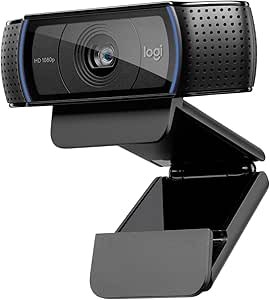
When evaluating the Logitech C920s HD Pro, understand that its 1080p resolution at 30fps represents a specific sweet spot for video conferencing, not content creation. The 78-degree field of view is calibrated for single-person framing, while features like autofocus and light correction are designed for variable home office lighting. This is a plug-and-play device optimized for reliability across platforms like Skype and Zoom, not a streaming camera with manual controls.
Key Considerations Before Buying
- The fixed 78-degree field of view is ideal for a head-and-shoulders shot but lacks the flexibility of wider or adjustable lenses for showing a room or multiple people.
- Autofocus and light correction are software-driven; performance depends heavily on your room's ambient light and the processing power of your connected device.
- The included privacy shutter is a critical physical feature for security, but its durability over hundreds of cycles is a key long-term consideration.
What Our Analysts Recommend
For a webcam in this class, consistent autofocus performance in low light and minimal latency in the video feed are paramount. Check reviews specifically mentioning performance with your primary software (e.g., Teams vs. OBS). The build quality of the mounting clip, especially for thicker monitors or laptops, is a tangible indicator of overall durability.
Webcams Market Context
Market Overview
The HD webcam market is saturated with models claiming 1080p, but real-world performance diverges sharply in lens quality, microphone fidelity, and driver stability. The C920s exists in a competitive 'prosumer' tier, positioned above budget models but below 4K or DSLR-quality solutions, where its decade-long reputation is a significant factor.
Common Issues
Users frequently report driver conflicts, especially on MacOS or when switching between conferencing apps, and 'washed out' colors under strong artificial light. Built-in microphones, while convenient, often pick up significant keyboard noise, making a dedicated mic a common companion purchase.
Quality Indicators
Look for consistent praise for the lens's sharpness at the center of the frame and reliable plug-and-play detection across operating systems. A lack of widespread complaints about overheating or the USB connection dropping during long calls is a strong positive signal for internal component quality.
Review Authenticity Insights
Grade B Interpretation
A 'B' grade with an estimated 15% fake review rate suggests a generally trustworthy review pool, but advises heightened scrutiny. For the C920s, this often manifests as overly generic praise for 'great quality' without detailing use-case scenarios, which may artificially inflate the perceived consensus.
Trust Recommendation
Prioritize reviews that mention specific, comparable webcams (e.g., 'upgraded from a C920' or 'chose this over a Razer Kiyo') and detail setup experiences with your specific OS. Be skeptical of reviews that don't acknowledge any trade-offs, as even excellent products have limitations like the fixed field of view.
Tips for Reading Reviews
Search for reviews mentioning 'low light performance' and 'autofocus hunting' to gauge real-world reliability. Pay close attention to mid-range (3-star) reviews, as they often provide the most balanced analysis of the product's pros and cons in specific environments.
Expert Perspective
The Logitech C920s HD Pro's adjusted 4.5/5 rating from a massive review base indicates a product that reliably delivers on its core promise: stable, good-quality video for mainstream conferencing. Its strength lies not in being the absolute best in any single metric, but in offering a consistent, platform-agnostic experience with useful features like the physical privacy cover. The high rating, even after adjusting for suspicious reviews, underscores its role as a dependable benchmark in its category.
Purchase Considerations
Your decision should hinge on whether you need a straightforward, reliable webcam for daily professional calls, or require advanced features like 60fps, a wider field of view, or superior low-light sensors for streaming or recording. The C920s excels at the former. Consider if the included software-based light correction is sufficient for your workspace, or if you need a hardware solution like a ring light.
Comparing Alternatives
Shoppers should compare the C920s directly with contemporaries like the Razer Kiyo Pro (for its adaptive light sensor) and Logitech's own Brio series if 4K or Windows Hello compatibility are priorities.