Budget Android Tablets: What to Know Before You Buy
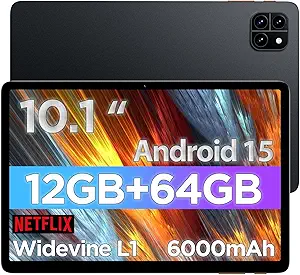
Android tablets like this 10.1-inch model with 32GB RAM and 512GB ROM promise desktop-like multitasking and massive storage at a fraction of flagship prices. But in the budget tablet space, advertised specs often don't tell the full story — you need to dig into real-world performance and build quality.
Key Considerations Before Buying
- The 32GB RAM claim is a major red flag: most mainstream tablets top out at 8–16GB, so this figure likely reflects virtual memory (storage used as RAM), which is far slower. Verify actual physical RAM before expecting smooth multitasking.
- 512GB ROM is unusually large for a budget tablet, but check whether it's eMMC or UFS storage — eMMC is significantly slower for app loading and file transfers, which can make the device feel sluggish despite the capacity.
- Android 16 is the latest OS version, which is a plus for app compatibility, but budget tablets often ship with minimal update support. Confirm the manufacturer's commitment to security patches and future Android upgrades.
What Our Analysts Recommend
Prioritize tablets with a known brand, verified physical RAM (not virtual), and a reputable chipset like MediaTek Helio or Snapdragon. Look for reviews that mention real-world battery life and display brightness, as budget tablets often cut corners there. A 10.1-inch screen is ideal for media consumption, but check resolution — 1280x800 is common and acceptable, while 1920x1200 offers sharper text.
Tablets Market Context
Market Overview
The budget Android tablet market is booming, driven by remote work, online learning, and streaming. Brands like Samsung, Lenovo, and Amazon dominate, but a wave of lesser-known manufacturers offer aggressive specs at low prices — often with inflated claims. Consumers can find capable 10-inch tablets for $100–$200, but quality varies wildly.
Common Issues
Common complaints include exaggerated RAM/storage specs, poor build quality, dim displays, and short battery life. Many budget tablets also lack widevine L1 certification, meaning streaming services like Netflix won't play in HD. Software updates are another pain point, with some devices stuck on older Android versions.
Quality Indicators
A trustworthy budget tablet will list a specific chipset model, physical RAM (not virtual), and display resolution. Check for Widevine L1 support if you stream, and look for brands with a US warranty and customer support. Reviews that mention actual performance benchmarks or battery tests are more reliable than vague praise.
Review Authenticity Insights
Grade B Interpretation
A Grade B authenticity rating with 15% estimated fake reviews means the majority of reviews are likely genuine, but you should still be cautious. The 5.00/5 average rating from only 20 reviews is suspiciously perfect and may include incentivized or fake positive reviews. The adjusted rating of 4.60/5 is more realistic and still positive.
Trust Recommendation
Given the small number of reviews and the perfect rating, treat the 5-star average with skepticism. Focus on the adjusted 4.60 rating and read the detailed reviews, especially the critical ones, to get a balanced view. Look for reviews that mention specific use cases and long-term performance.
Tips for Reading Reviews
For budget electronics, prioritize reviews that include photos or videos of the device in use, as they're harder to fake. Pay attention to complaints about performance, battery, or durability — these often reveal systemic issues. Be wary of reviews that only praise the price or use generic language.
Expert Perspective
This tablet's advertised 32GB RAM and 512GB ROM are likely exaggerated, a common tactic among budget manufacturers to attract spec-focused shoppers. The 10.1-inch form factor and Android 16 are appealing, but without a known brand or chipset details, performance and longevity are uncertain. The high adjusted rating suggests some buyers are satisfied, but the small sample size and 15% fake review estimate mean you should proceed with caution.
Purchase Considerations
Weigh the low price against the risk of poor build quality, limited updates, and potential spec inflation. If you need a basic device for media consumption or light browsing, it might suffice, but for productivity or gaming, consider a more reputable brand. Check the return policy and warranty before buying.
Comparing Alternatives
Before purchasing, compare this tablet with similarly priced models from Samsung, Lenovo, or Amazon — they often offer better build quality, guaranteed updates, and more transparent specs.