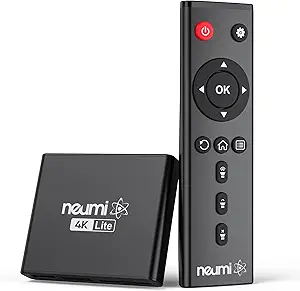
Local 4K Playback: What to Know Before Buying a USB/SD Media Player
This 4K media player is designed for a specific job: playing video files from USB drives or SD cards on your TV via HDMI, with AV output for older displays and auto-resume for picking up where you left off. Unlike streaming sticks, it doesn't depend on apps or internet—so the key questions are format support, codec handling, and how reliably it resumes and navigates large files.
Key Considerations Before Buying
- Confirm codec and container support before buying—4K H.265/HEVC in MKV or MP4 is common, but some players choke on 10-bit color, high-bitrate H.264, or audio formats like DTS-HD. Check the listing for a supported-formats list and look for reviews that mention your specific file types.
- The Auto Resume feature is only useful if it works consistently across power cycles and file types. Reviews mentioning resume behavior on long movies and TV episodes are more informative than generic 'works great' comments.
- HDMI and AV outputs serve different setups: HDMI for modern 4K TVs, AV (composite) for older or secondary displays. If you need 4K, verify the HDMI output actually supports 4K resolution and not just 1080p upscaling.
What Our Analysts Recommend
Prioritize listings that specify supported video codecs, maximum bitrate, and file system compatibility (exFAT, NTFS, FAT32), since these determine whether your files will play. A clear remote layout, on-screen file browser, and firmware update history are stronger quality signals than glossy marketing images.
Streaming Media Players Market Context
Market Overview
Dedicated local-media players occupy a niche between smart TV apps and full home-theater PCs: they appeal to people with large offline libraries, spotty internet, or older TVs. The market is crowded with low-cost generic boxes, so brand transparency and documented format support matter more than spec-sheet claims.
Common Issues
Frequent complaints in this category include stuttering on high-bitrate 4K files, missing or poorly synced audio codecs, clunky file navigation, and remotes with weak range or confusing buttons. Auto-resume features often fail after firmware updates or when switching between drives.
Quality Indicators
Look for detailed format lists, stated chipset or decoding support, and reviews that test real 4K files rather than just 1080p content. Responsive menus, stable firmware, and clear documentation of file system support separate better players from bargain-bin boxes.
Review Authenticity Insights
Grade B Interpretation
A Grade B with an estimated 10% fake review rate suggests most reviews are genuine, but a small share may be incentivized or low-effort. The adjusted rating of 4.00/5 versus the displayed 4.22/5 means the product still scores well after filtering, though the gap hints that some glowing reviews may be inflated.
Trust Recommendation
Trust the detailed, verified-purchase reviews that mention specific files, codecs, or resume behavior over short five-star comments. With only 17 reviews, treat the rating as directional and look for patterns—such as repeated mentions of a specific limitation—rather than a single standout complaint or praise.
Tips for Reading Reviews
For media players, focus on reviews that describe the reviewer's setup (TV model, file types, drive size) and whether the player handled them. Skip reviews that only praise 'easy setup' without mentioning playback performance, and weigh mid-range ratings (3–4 stars) heavily since they often contain balanced pros and cons.
Expert Perspective
This player targets a real need—simple, offline 4K playback with resume support—and its adjusted 4.00/5 rating from a small review base suggests it performs adequately for many buyers. However, the lack of a detailed description means format compatibility is unverified, which is the single biggest risk in this category. The inclusion of AV output adds flexibility for older TVs, but buyers should confirm 4K HDMI output is genuine rather than upscaled.
Purchase Considerations
Weigh your file library against the player's documented format support, and check return policies in case your specific codecs or bitrates don't play smoothly. If Auto Resume is a priority, look for reviews confirming it works across power cycles and multiple drives.
Comparing Alternatives
Compare with other USB/SD media players that publish detailed codec lists and firmware support, as well as streaming devices with USB playback if you also want apps.