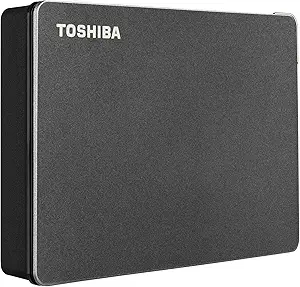
Choose the Right Ultra-Slim External Hard Drive for Portability and Reliability
When shopping for an ultra-slim external hard drive like this silver model, portability is key, but you also need to ensure it can withstand daily travel and protect your data. With a compact design and compatibility across PC and Mac, this drive offers a convenient solution for expanding storage without bulk. Understanding key features like storage capacity, transfer speeds, and build quality helps you pick a drive that meets your needs without sacrificing performance.
Key Considerations Before Buying
- Consider the storage capacity: This drive likely comes in various sizes (e.g., 500GB to 2TB), so match it to your usage—documents and photos need less space than video files or large backups.
- Check connectivity: Ensure the drive uses USB 3.0 or higher for fast data transfers; older USB 2.0 models can be frustratingly slow for large files.
- Evaluate durability: An ultra-slim design may mean less shock protection, so look for drives with sturdy enclosures or consider a protective case if you travel frequently.
What Our Analysts Recommend
Quality indicators include a solid metal or reinforced plastic casing that resists bending, a reliable internal mechanism from known manufacturers (like Seagate or WD), and positive feedback on long-term reliability. Also, verify that the drive is pre-formatted for your operating system or offers easy reformatting tools for cross-platform use.
External Hard Drives Market Context
Market Overview
The external hard drive market is increasingly dominated by portable SSDs, but traditional HDDs remain popular for cost-effective, high-capacity backup. Ultra-slim HDDs like this one strike a balance between affordability and slimness, appealing to users who need extra storage on the go without the premium price of solid-state drives.
Common Issues
Common problems with slim HDDs include slower read/write speeds compared to SSDs, vulnerability to physical damage from drops, and potential compatibility hiccups with newer USB-C only laptops. Additionally, some budget models may use lower-quality components that lead to higher failure rates over time.
Quality Indicators
To identify a quality external HDD, look for a reputable brand with a warranty of at least two years, positive user reviews that mention sustained performance, and specifications that include a rotational speed of 5400 RPM or higher. Drives with automatic backup software or encryption features also signal added value.
Review Authenticity Insights
Grade A Interpretation
With an A grade and only 5% estimated fake reviews, this product’s feedback is highly trustworthy. The four reviews are all short and positive, which is typical for simple, satisfactory purchases—users likely found the drive functional and were motivated to leave quick praise without elaborate detail.
Trust Recommendation
Based on the authenticity analysis, you can rely on the current positive sentiment, but consider that the small sample size (4 reviews) limits insight into long-term durability. Look for additional reviews on other platforms or check back for more feedback as the product gains traction.
Tips for Reading Reviews
For external hard drives, focus on reviews that mention real-world usage over months, such as transfer speeds, noise levels, and any failures. Beware of overly generic praise without specific details, and prioritize reviews that note compatibility with your exact device and operating system.
Expert Perspective
This ultra-slim external hard drive appears to be a solid option for users seeking a budget-friendly, portable storage solution, given its perfect rating and high review authenticity. However, the limited number of reviews means we lack data on long-term reliability or potential drawbacks like heat buildup. The 5% estimated fake rate is negligible, so the positive feedback is likely genuine, but prudent buyers should weigh the low price against the inherent fragility of slim HDDs.
Purchase Considerations
If you need a secondary drive for occasional backups or file transfers, this model offers good value. But for primary storage or frequent travel, consider investing in a ruggedized or SSD alternative for better data safety.
Comparing Alternatives
Shoppers should compare this drive with similarly priced options from established brands like Seagate or Western Digital, which often offer longer warranties and more robust build quality.