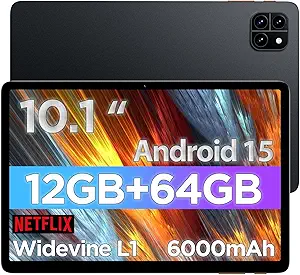
13-Inch Android Tablet with Keyboard: What to Know Before Buying
When considering a 13-inch Android tablet like the QDDQ with a bundled keyboard and expandable storage, you're looking at a device designed for productivity and media consumption. This guide will help you navigate the key features, performance expectations, and potential pitfalls of such budget-friendly large-screen tablets.
Key Considerations Before Buying
- Performance: With 32GB RAM and 256GB internal storage, the QDDQ is positioned for multitasking. However, the actual processor and its efficiency are crucial for smooth operation, especially when running multiple apps or demanding games.
- Display Quality: A 13-inch screen is ideal for streaming and work, but check the resolution, brightness, and color accuracy. Lower-resolution screens can appear pixelated, and poor brightness hampers outdoor use.
- Keyboard and Accessories: The included keyboard is a major selling point. Verify its build quality, key travel, and connectivity (Bluetooth vs. pogo pin). A flimsy keyboard can detract from the overall experience.
What Our Analysts Recommend
Look for tablets with at least 1080p resolution, a recent Android version (Android 16 as advertised), and sufficient RAM (32GB is ample). Ensure the battery capacity is adequate for a 13-inch screen (typically 7000mAh or more). Check if the keyboard is backlit and provides a stable typing experience.
Tablets Market Context
Market Overview
The tablet market is increasingly segmented, with budget Android tablets offering large screens and productivity features at competitive prices. Brands like QDDQ compete by bundling accessories like keyboards and styluses to attract consumers seeking laptop-like functionality without the laptop price tag.
Common Issues
Common issues in this category include inconsistent build quality, subpar cameras, and software optimization problems that lead to lag or crashes. Additionally, the advertised 'Android 16' may be a custom version or not receive timely updates, affecting long-term security and compatibility.
Quality Indicators
Quality indicators include user reviews that mention battery life, display sharpness, and keyboard reliability. Look for tablets with metal or sturdy plastic builds, high-resolution screens, and a track record of software updates. The presence of a reputable brand or warranty can also signal reliability.
Review Authenticity Insights
Grade B Interpretation
The Grade B and 15% estimated fake review percentage suggest that while the majority of reviews are authentic, a notable minority may be incentivized or untrustworthy. This means the actual user satisfaction could be lower than the 4.22 rating, aligning closer to the adjusted 3.90.
Trust Recommendation
Rely more on verified purchase reviews and those that provide detailed, balanced feedback. Be cautious of overly enthusiastic reviews with generic praise. Cross-reference complaints about common issues like battery drain or keyboard connectivity to get a realistic picture.
Tips for Reading Reviews
When reading reviews, focus on those that mention specific use cases (e.g., travel, work, gaming) and provide comparative statements. Look for patterns in negative reviews—recurring issues are more likely to be genuine. Also, check the date of reviews to ensure they reflect the current version of the product.
Expert Perspective
The QDDQ 13-inch tablet offers a compelling value proposition with its large display, included keyboard, and expandable storage. However, the adjusted rating of 3.90 indicates that some users may experience issues that the overall rating overshadows. As a budget option, it's likely to satisfy users with moderate expectations, but power users might find limitations in processing power and software support.
Purchase Considerations
Before purchasing, weigh the importance of brand reliability and after-sales support against the cost savings. If you prioritize performance and longevity, consider saving for a more established brand. If you need a large-screen device for basic tasks and entertainment, this tablet could suffice.
Comparing Alternatives
Shoppers should compare this tablet with other budget 13-inch Android tablets, such as those from Teclast or Blackview, to assess specs, build quality, and user feedback before making a final decision.