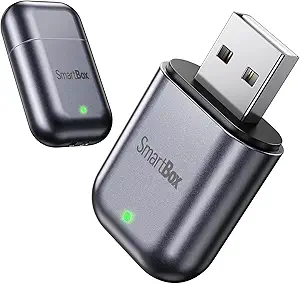
Upgrade Your Ride: Wireless CarPlay Adapter Buyer's Guide
For iPhone users with 2016 or newer vehicles, a wireless CarPlay adapter like this tiny Bluetooth dongle promises to eliminate cable clutter and deliver a seamless, zero-lag connection. Before you buy, understand the key factors that separate a reliable upgrade from a frustrating gadget.
Key Considerations Before Buying
- Vehicle compatibility is critical—while this adapter supports most 2016+ cars with wired CarPlay, double-check your specific make and model, as some systems (e.g., certain Ford or Honda variants) may require firmware updates or have unique quirks.
- Setup ease varies; a true plug-and-play dongle should auto-connect after initial pairing, but ensure the adapter’s Bluetooth and Wi-Fi handshake works with your iPhone’s latest iOS version to avoid repeated pairing loops.
- Latency and GPS performance matter for navigation apps like Apple Maps or Waze—look for adapters that promise 'zero-lag' and maintain accurate GPS tracking, as some budget units introduce audio delays or map stuttering.
What Our Analysts Recommend
Prioritize adapters with verified 'auto-connect' functionality and positive feedback on GPS accuracy from owners of your car model. A compact, matte-black design is ideal for dashboards, but ensure the dongle doesn’t block adjacent USB ports or interfere with wireless charging pads.
Global Positioning Systems Market Context
Market Overview
The wireless CarPlay adapter market has exploded since 2020, driven by iPhone users seeking to retrofit older vehicles with modern convenience. Prices range from $30 to $100, with performance varying widely based on chipset quality and firmware updates.
Common Issues
Common complaints include intermittent disconnections, slow boot times (30+ seconds), and GPS lag that causes navigation to lose your position. Some adapters also fail to support wired-only apps like certain video streaming services due to licensing restrictions.
Quality Indicators
Quality adapters use robust chipsets (e.g., Broadcom or Qualcomm), receive regular firmware updates, and include clear setup instructions. Verified reviews that mention specific car models and iOS versions are strong signals of reliability.
Review Authenticity Insights
Grade B Interpretation
A Grade B with an estimated 10% fake review rate indicates that while the vast majority of feedback is genuine, a small fraction may be inflated or non-representative. This is typical for popular automotive electronics, where competition drives some sellers to game the system.
Trust Recommendation
Focus on the 81 reviews with detailed, verified-purchase badges—these are your most reliable indicators. Scrutinize any review that lacks specifics about car model or setup experience, as these are more likely to be fabricated.
Tips for Reading Reviews
When reading reviews, look for patterns: repeated mentions of 'zero-lag' or 'auto-connect' success from owners of your car brand (e.g., Toyota, BMW) build confidence. Highly rated reviews that only praise the product without discussing installation or first-time use should be treated with caution.
Expert Perspective
This wireless CarPlay adapter earns a strong 4.80/5 adjusted rating from mostly authentic reviews, making it a credible option for iPhone users with 2016+ vehicles. Its matte-black, compact design and promise of zero-lag GPS performance align with top-tier competitors, though the 10% fake review rate warrants a careful check of fitment for your specific car. The high authenticity grade (B) and detailed user experiences (e.g., mentions of Ford F-150, Subaru Outback) suggest this dongle delivers on its core promise of a hassle-free wireless conversion.
Purchase Considerations
Weigh the convenience of wireless CarPlay against the cost—if you frequently use navigation or music streaming, this adapter likely justifies its price. However, if your car’s USB port is in a tight spot, confirm the dongle’s dimensions (e.g., length, width) to avoid fitment issues.
Comparing Alternatives
Shoppers should compare this adapter with models from brands like CPLAY2air or Ottocast, which offer similar features but may have different update policies or customer support responsiveness.