
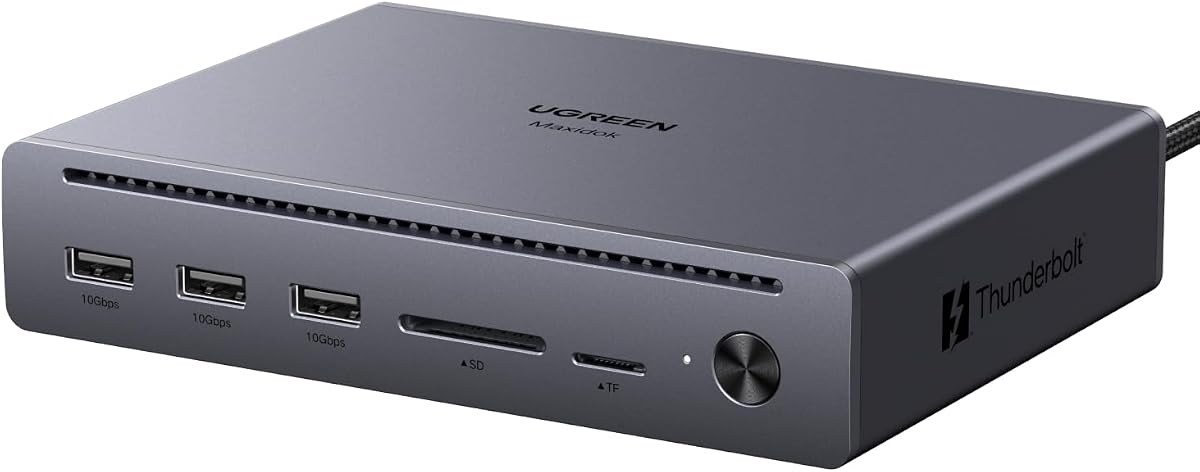
Thunderbolt 5 Docking: What to Know Before You Buy
The UGREEN Maxidok Thunderbolt 5 Docking Station is a high-end dock built for users who need triple 4K displays at 144Hz, made possible by its three Thunderbolt 5 ports. With a 4.78/5 rating from 251 reviews, it's clearly popular, but understanding the nuances of Thunderbolt 5 and your own setup is key to a successful purchase.
Key Considerations Before Buying
- Thunderbolt 5 compatibility: Ensure your laptop or desktop supports Thunderbolt 5 to unlock the full 120Gbps bandwidth. While it's backward compatible with Thunderbolt 4 and USB4, you won't achieve triple 4K@144Hz without a Thunderbolt 5 host.
- Display requirements: To drive three 4K monitors at 144Hz, you'll need monitors that support high refresh rates over DisplayPort or Thunderbolt, and the right cables. The dock's triple TBT5 ports are ideal, but confirm your monitors have compatible inputs.
- Power delivery: This dock likely provides substantial power to charge your laptop, but check the exact wattage to ensure it meets your device's needs. High-power laptops may require more than the dock can supply, so verify before buying.
What Our Analysts Recommend
Look for docks that specify exact resolution and refresh rate support per port, as marketing terms like 'triple 4K' can be misleading. Quality indicators include certified Thunderbolt 5 chipsets, robust build materials, and a clear warranty. Also, check for additional ports like USB-A, Ethernet, and SD card slots to ensure it meets all your connectivity needs.
Docking Stations Market Context
Market Overview
The docking station market is rapidly evolving with Thunderbolt 5 and USB4, offering unprecedented bandwidth for multi-display and high-speed data. Premium docks like the UGREEN Maxidok cater to professionals and enthusiasts who need reliable, high-performance connectivity. As remote work and high-resolution displays become standard, demand for such docks is surging.
Common Issues
Common issues include insufficient power delivery, compatibility problems with certain laptops, and misleading claims about display support. Some docks also suffer from overheating or driver issues, leading to dropped connections. It's crucial to research real-world performance, not just specs.
Quality Indicators
High-quality docks use certified controllers from Intel or other reputable brands, offer firmware updates, and have positive reviews from users with similar setups. Look for metal casings for heat dissipation, clearly labeled ports, and a comprehensive warranty. Brands with strong customer support are also a good sign.
Review Authenticity Insights
Grade B Interpretation
The B authenticity grade and 12% estimated fake reviews suggest that while most reviews are genuine, there's a notable minority of suspicious ones. This is common for popular electronics, where incentivized reviews can inflate ratings. The adjusted rating of 4.50/5 still indicates high satisfaction among real users.
Trust Recommendation
Trust the adjusted rating more than the overall 4.78/5, as it filters out likely fakes. Focus on reviews from verified purchasers that detail specific use cases, especially those mentioning Thunderbolt 5 performance and multi-display setups. Be cautious of overly enthusiastic reviews with no negatives.
Tips for Reading Reviews
When reading reviews for docking stations, look for mentions of compatibility with specific laptop models, long-term reliability, and customer service experiences. Pay attention to reviews that discuss heat, power delivery, and display quirks. Reviews with photos or videos of setups are often more credible.
Expert Perspective
The UGREEN Maxidok Thunderbolt 5 Docking Station appears to be a solid choice for users with Thunderbolt 5 laptops who need triple 4K@144Hz displays. The high adjusted rating and mostly genuine reviews suggest it delivers on its promises. However, the 12% fake review percentage means you should approach with a critical eye. Overall, it's a premium dock that justifies its price for the right user.
Purchase Considerations
Before buying, confirm your laptop supports Thunderbolt 5 and that your monitors can handle 4K@144Hz. Consider whether you need all three TBT5 ports or if a cheaper Thunderbolt 4 dock would suffice. Also, check the power delivery wattage to ensure it charges your laptop at full speed.
Comparing Alternatives
Compare with similar Thunderbolt 5 docks from brands like CalDigit, Kensington, or Plugable, as they may offer different port configurations or better pricing. Read expert reviews and user comparisons to find the best fit for your specific needs.




