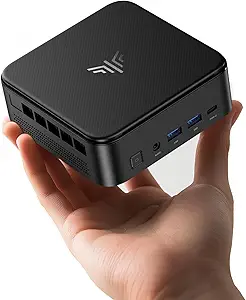
Twin Lake N150 Mini PCs: Performance, Value, and Authenticity Unveiled
When shopping for a mini PC like the Intel Twin Lake N150 model, you're looking at a compact powerhouse designed for everyday computing, media streaming, and light productivity. This guide highlights what to consider before buying, focusing on the N150's performance leap over its predecessor, the N95, and the importance of RAM and storage configurations.
Key Considerations Before Buying
- Performance vs. N95: The N150 processor offers a significant boost in multi-core performance and efficiency, reaching up to 3.6GHz. If you're upgrading from an N95 or older Celeron, expect smoother multitasking and faster app launches, but don't expect gaming or heavy video editing capabilities.
- RAM and Storage: 16GB of RAM is ample for most home and office tasks, ensuring smooth operation with multiple browser tabs and office applications. The 512GB SSD provides fast boot times and quick file access, but consider your storage needs—if you store large media libraries, check for an extra M.2 slot or 2.5-inch bay for expansion.
- Thermals and Noise: Mini PCs often sacrifice cooling for size. Look for models with adequate heatsinks or fan control to avoid thermal throttling during sustained loads. The N150's low TDP helps, but user reviews can reveal if the unit runs quiet or becomes noisy under stress.
What Our Analysts Recommend
In a mini PC, quality indicators include the build material (metal chassis dissipates heat better than plastic), the number of USB ports (ideally USB 3.2 Gen 2 for high-speed data transfer), and support for dual displays via HDMI and DisplayPort. Also, verify if the device supports Wi-Fi 6 and Bluetooth 5.0 for modern connectivity, and whether it comes with VESA mount compatibility for easy monitor attachment.
Minis Market Context
Market Overview
The mini PC market has seen a surge in popularity for home offices, media centers, and digital signage, driven by energy-efficient processors like Intel's N-series. These compact desktops offer a balance of performance and affordability, making them attractive alternatives to traditional towers, especially for users with limited desk space or those seeking a low-power always-on machine.
Common Issues
Common issues in this category include insufficient cooling leading to fan noise, limited upgradeability (RAM often soldered), and inconsistent quality control across lesser-known brands. Also, some models may ship with bloatware or outdated BIOS, affecting performance, so checking recent reviews for potential software quirks is wise.
Quality Indicators
Quality in a mini PC can be identified by the use of a solid-state drive (SSD) rather than a hard drive, the presence of a warranty (at least 1 year), and the reputation of the processor brand. Additionally, models that offer easy access to RAM slots or storage bays for future upgrades are generally considered more versatile and better engineered.
Review Authenticity Insights
Grade B Interpretation
With a Review Authenticity Grade of B, indicating an estimated 10% fake review rate, this mini PC's review landscape is largely trustworthy but not flawless. The adjusted rating of 4.40/5 (down from 4.67/5) suggests that while most reviews are genuine, a small fraction may be incentivized or unverified, so a slight discount in the overall score is prudent.
Trust Recommendation
Given the moderate fake review percentage, rely more on detailed written reviews that mention specific use cases (e.g., 'used as Plex server') and provide photos or videos. Verified purchase badges are present on all reviews, which is a positive sign, but cross-reference any overly glowing reviews with critical ones to get a balanced view.
Tips for Reading Reviews
When reading reviews for this type of product, focus on those that discuss thermals, noise levels, and performance in real-world tasks such as 4K video playback or running Linux. Look for patterns—if multiple users report the same issue (e.g., Wi-Fi dropouts), it's likely a genuine problem. Also, check the date of reviews to ensure they reflect the current hardware revision.
Expert Perspective
The Intel Twin Lake N150 mini PC with 16GB RAM and 512GB SSD appears to be a solid choice for budget-conscious consumers seeking a reliable, compact desktop. Its performance is a noticeable step up from the N95, and the RAM/storage combo is well-suited for typical office and home tasks. The authenticity analysis suggests that the high rating is mostly earned, though the 10% fake review estimate warrants some caution. Overall, this product likely delivers on its promises, offering good value in the mini PC segment.
Purchase Considerations
Before purchasing, consider your specific needs: if you plan to use it for demanding applications like photo editing or light virtualization, the N150 may suffice, but for heavy workloads, a more powerful processor might be necessary. Also, factor in the cost of any additional accessories like a monitor, keyboard, or mouse, as these are not included. Ensure the seller offers a reasonable return policy, as with any electronics purchase.
Comparing Alternatives
Shoppers should compare this model with other mini PCs featuring AMD Ryzen or Intel Core i3 processors, which offer higher performance at a higher price point, to ensure the N150 meets their performance expectations.