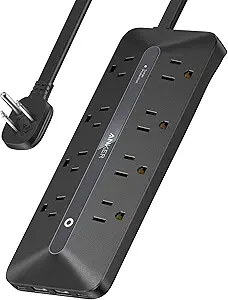
12 Outlets, 4 USB Ports: What to Know Before Buying a Tower Power Strip
Tower-style power strips like this 12-AC-outlet, 4-USB model (including two USB-C) solve a common problem: too many devices, too few outlets, and a tangle of cords. But not all towers are built to handle the same loads or fit the same spaces, so understanding a few key specs will save you from a disappointing purchase.
Key Considerations Before Buying
- Check the joule rating and clamping voltage: a higher joule rating (e.g., 1000+) and lower clamping voltage (under 400V) mean better protection for sensitive electronics like laptops and monitors. This tower's surge protection is a core feature, but the exact rating isn't specified in the listing—verify it before relying on it for expensive gear.
- Consider the footprint and cord length: a 6ft flat plug cord lets you push furniture flush against the wall, and the vertical tower design saves desk space compared to traditional strips. However, measure your intended spot—towers can be top-heavy and may not fit under low shelves.
- USB-C ports are a major plus, but check power output: two USB-C ports (likely 15–20W each) can charge phones and tablets, but may not fast-charge laptops. If you need high-wattage USB-C, confirm the specs or use the AC outlets with your own charger.
What Our Analysts Recommend
Look for a clear surge protection rating (joules), a resettable circuit breaker, and a sturdy base to prevent tipping. Also check whether the outlets are spaced to accommodate bulky adapters—some tower designs crowd them, making it hard to use all 12 at once.
Power Strips Market Context
Market Overview
The power strip market is flooded with options, from basic $10 strips to smart strips with app control. Tower designs are a niche but growing segment, appealing to home office and dorm users who want to consolidate charging in a small footprint. Prices for 12-outlet towers with USB typically range from $25 to $50.
Common Issues
Common complaints in this category include outlets that are too close together, USB ports that charge slowly, and surge protection that fails after a single large spike. Some users also report that tower strips can be unstable if bumped, especially when many cords are plugged in.
Quality Indicators
A quality tower strip will list its joule rating, have a UL or ETL certification, and use a heavy-duty cord (14 AWG or thicker). Brand reputation and clear warranty terms (e.g., connected equipment warranty) are also good signs. Avoid no-name strips with vague specs or no safety certifications.
Review Authenticity Insights
Grade B Interpretation
A Grade B authenticity score with an estimated 15% fake reviews means most reviews are likely genuine, but a noticeable minority may be incentivized or fabricated. The adjusted rating of 4.50/5 (down from 4.89) suggests that after removing suspicious reviews, the product still holds up well—but it's not perfect.
Trust Recommendation
Trust the overall sentiment but be skeptical of overly enthusiastic five-star reviews that lack detail. Focus on reviews that mention specific use cases (e.g., 'used in my dorm room for a semester') or that include photos. If you see a cluster of short, generic praise, discount those.
Tips for Reading Reviews
For power strips, pay attention to reviews that discuss durability over time, heat buildup, and whether the USB ports actually deliver advertised speeds. Look for mentions of customer service experiences, as that can indicate how the seller handles defects.
Expert Perspective
This tower power strip offers a compelling combination of 12 AC outlets and 4 USB ports (2 USB-C) in a space-saving vertical design, which is ideal for desks, dorms, or home offices with many devices. The 4.50 adjusted rating from 354 reviews indicates strong satisfaction, though the 15% fake review estimate means you should read critically. The 6ft flat plug cord is a thoughtful touch for tight spaces. However, the lack of specified surge protection rating is a potential red flag for those needing robust protection.
Purchase Considerations
Weigh your need for surge protection versus just outlet expansion: if you're plugging in expensive electronics, confirm the joule rating and warranty. Also consider whether the tower's footprint and stability suit your space. If you need fast charging for laptops via USB-C, check the wattage or plan to use the AC outlets.
Comparing Alternatives
Compare with other tower strips from brands like Anker, Belkin, or APC that publish detailed surge ratings and offer connected equipment warranties. Also consider traditional flat strips if stability is a concern.