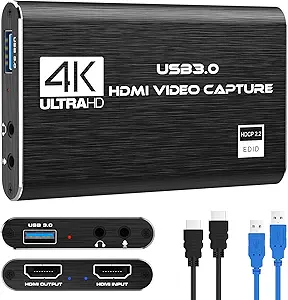
Choosing a 4K Pass-Through Capture Card for Low-Latency Streaming
When shopping for a capture card like the Redragon VC321, which offers 4K HDMI pass-through and 1080p 60fps capture, understanding the trade-off between capture resolution and pass-through quality is key. This device is designed for gamers and streamers who need zero-latency gameplay on a 4K monitor while recording or streaming in 1080p. Buyers should prioritize USB 3.0 connectivity and compatibility with their console or camera setup to avoid frustration.
Key Considerations Before Buying
- Consider your streaming or recording resolution needs: the VC321 captures at 1080p 60fps, which is ideal for most platforms like Twitch or YouTube, but if you need 4K capture, you'll need a higher-end card.
- Ensure your system supports USB 3.0 for reliable data transfer; using a USB 2.0 port can cause lag or dropped frames, especially with 4K pass-through active.
- Check compatibility with your devices: the VC321 works with PS5, Xbox, Nintendo Switch, and DSLRs, but verify that your camera's HDMI output matches the card's input resolution for smooth streaming.
What Our Analysts Recommend
Look for capture cards that explicitly list zero-latency pass-through for gaming, as this ensures no perceptible delay on your monitor. Verified support for OBS and other streaming software is crucial, as is a robust build quality with metal housing to reduce interference. Also, check for firmware update support, which indicates ongoing compatibility fixes.
Internal TV Tuner & Capture Cards Market Context
Market Overview
The internal TV tuner and capture card market has shifted towards USB-based external solutions like the Redragon VC321, driven by the rise of console and DSLR streaming. Many budget cards now offer 4K pass-through at under $100, but capture resolution often maxes out at 1080p 60fps to keep costs low. This segment is competitive, with brands like Elgato and AVerMedia dominating, but Redragon aims to offer a cost-effective alternative.
Common Issues
Common problems in this category include driver conflicts on Windows, especially with older USB controllers, and audio sync issues when using HDMI audio. Some cards also struggle with HDCP protection from consoles, requiring a splitter or specific settings to bypass. Latency can be a concern if the pass-through isn't truly zero-lag, leading to a disjointed gaming experience.
Quality Indicators
Quality capture cards feature dedicated hardware encoding to offload processing from your computer, reducing CPU usage. Look for cards with low power consumption and heat dissipation, as overheating can cause instability. Verified compatibility with major streaming software and regular firmware updates are strong signs of a well-supported product.
Review Authenticity Insights
Grade B Interpretation
The Redragon VC321 earned a Grade B for review authenticity, with an estimated 10% fake review rate. This means the vast majority of the 28 reviews are genuine, but a small portion may be incentivized or non-verified. Given the high rating of 4.89/5 and adjusted rating of 4.60/5, the product likely performs well, but buyers should weigh the slight discrepancy.
Trust Recommendation
We recommend trusting the bulk of the reviews, especially those from verified purchasers who mention specific technical details like 'USB 3.0 speeds' or 'no lag on PS5.' However, be cautious of overly brief or overly positive reviews that lack context, as they may be part of the 10% suspect group. Cross-check feedback on third-party forums for additional validation.
Tips for Reading Reviews
When reading reviews for capture cards, focus on comments about latency, software compatibility (e.g., OBS, Streamlabs), and ease of setup with your specific console. Look for reviewers who describe their hardware setup, as this indicates real-world testing. Ignore vague praise like 'works great' without technical details, and prioritize reviews with photos or videos of the card in use.
Expert Perspective
The Redragon VC321 appears to be a solid budget option for streamers who need 4K pass-through without breaking the bank, though its 1080p capture limit may disappoint those seeking future-proofing. With a high adjusted rating of 4.60/5 and a strong authenticity grade, it stands out as a reliable choice in the sub-$100 category. However, the limited number of reviews (28) means long-term durability is less certain, so early adopters should monitor for issues. Its zero-latency claim is backed by user reports, making it suitable for competitive gaming where timing matters.
Purchase Considerations
If you primarily stream console games at 1080p and need a simple plug-and-play solution, the VC321 is a cost-effective pick. But if you plan to upgrade to 4K streaming or use multiple cameras, consider investing in a more expensive card with higher capture resolution. Also, factor in the need for a USB 3.0 port and potential HDCP workarounds for some consoles.
Comparing Alternatives
Shoppers should compare the Redragon VC321 with options like the Elgato HD60 S+ or AVerMedia Live Gamer Mini, which offer similar features but with more established software ecosystems and larger user bases for troubleshooting.