Choose the Right USB-C Hub: Speed, Power, and Ports Matter
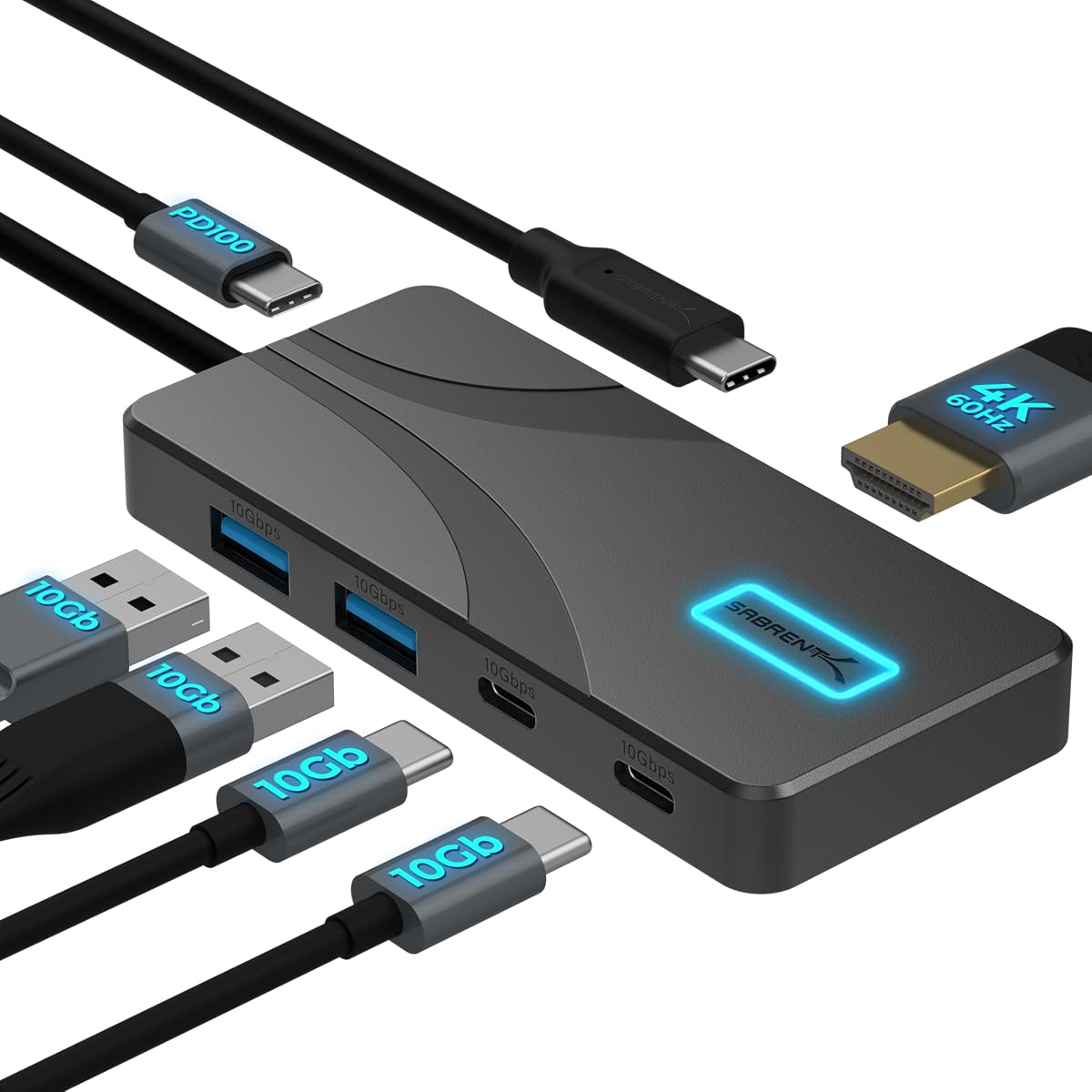
When selecting a USB-C hub for your MacBook, iPad, or laptop, factors like data transfer speeds, power delivery, and build quality are crucial. The SABRENT HB-TG5P offers 10Gbps ports and 100W PD input, making it a strong contender for users needing reliable expansion.
Key Considerations Before Buying
- Data transfer speed: Look for hubs with 10Gbps USB-A and USB-C ports to avoid bottlenecks when moving large files or connecting fast SSDs. The HB-TG5P supports this, ensuring smooth performance for creative professionals.
- Power delivery passthrough: Ensure the hub can charge your laptop at full speed—this model provides 80W laptop charging, but verify it matches your device's requirements, especially for high-power laptops like MacBook Pro 16-inch.
- HDMI output capability: For 4K@60Hz output, the hub must support HDMI 2.0 or higher. The HB-TG5P delivers this, making it ideal for connecting to external monitors for presentations or dual-screen setups.
What Our Analysts Recommend
Quality hubs often feature an aluminum chassis for heat dissipation and durability, as seen in the HB-TG5P. Also, check for verified user feedback on long-term reliability and compatibility with your specific device model.
USB Hubs Market Context
Market Overview
The USB-C hub market has exploded with the shift to thinner laptops, offering everything from basic port replicators to advanced docking stations. Many models now compete on speed, power delivery, and compact design, with the 5-in-1 form factor being popular for on-the-go users.
Common Issues
Common problems include overheating under load, intermittent connectivity, and insufficient power delivery for larger laptops. Some hubs also fail to support full 4K@60Hz due to bandwidth limitations, leading to blurry or laggy displays.
Quality Indicators
High-quality hubs typically use premium chipsets (e.g., from Realtek or Via Labs), have robust warranty policies, and maintain high user ratings with detailed, balanced reviews. Aluminum construction and compact size also signal better thermal management and portability.
Review Authenticity Insights
Grade B Interpretation
With a Grade B and an estimated 10% fake review rate, the SABRENT HB-TG5P's review pool is mostly trustworthy but warrants caution. Genuine reviews highlight specific technical details like 10Gbps performance and 4K@60Hz stability, while fake ones may lack depth.
Trust Recommendation
Trust the overall 4.89-star rating, but focus on verified purchase reviews that mention real-world use cases, such as connecting to an M1 MacBook Air or iPad Pro. Cross-check any overly generic praise with critical feedback for balance.
Tips for Reading Reviews
Look for reviews that describe specific scenarios—like transferring large video files or charging under load—as these are harder to fake. Also, prioritize reviews with photos showing the hub in use, which adds authenticity.
Expert Perspective
The SABRENT HB-TG5P stands out for its combination of 10Gbps speed, 100W PD input, and 4K@60Hz HDMI in a compact aluminum body, backed by a very high user rating. The B-grade authenticity suggests most feedback is genuine, though the 10% fake rate means some exaggeration exists. This hub is a solid choice for MacBook and iPad users who need reliable port expansion without sacrificing charging speed.
Purchase Considerations
Consider your specific port needs—if you require Ethernet or SD card slots, this 5-in-1 may be limiting. Also, verify that your laptop supports USB-C with DisplayPort Alt Mode for full HDMI functionality.
Comparing Alternatives
Shoppers should compare with similar 5-in-1 hubs from Anker or Belkin, which may offer different port configurations or warranty terms, but often at a higher price point.