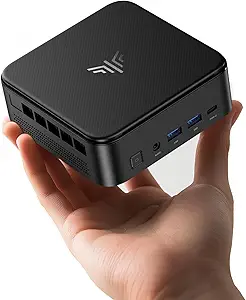
Choosing a Mini PC: How the GMKtec G10's Ryzen 5 and Triple 4K Support Stacks Up
The GMKtec G10 represents a specific tier in the mini PC market: a compact desktop leveraging AMD's older but capable Ryzen 5 3500U APU paired with generous 16GB RAM and 512GB storage. Buyers should understand this is a value-oriented productivity and media machine, not a gaming rig. Its key differentiators are the 2.5GbE LAN for fast networking and triple 4K display support via HDMI 2.1, DisplayPort, and USB-C.
Key Considerations Before Buying
- The Ryzen 5 3500U is a 4-core, 8-thread mobile processor from 2019; it delivers solid performance for office tasks and 4K video playback but will struggle with modern AAA gaming or intensive creative workloads.
- The inclusion of a 2.5 Gigabit Ethernet port is a standout feature for a mini PC in this price range, offering future-proofed network speed for NAS access or local file transfers that outpaces standard 1GbE.
- Triple 4K display support via HDMI 2.1, DP, and USB-C makes this unit uniquely flexible for multi-monitor office setups or as a compact home theater PC (HTPC) driving a high-resolution TV.
What Our Analysts Recommend
For a mini PC like the G10, scrutinize thermal management in reviews—sustained performance hinges on effective cooling in a small chassis. Also, verify real-world feedback on the Type-C PD power delivery implementation and the out-of-box experience with the pre-installed OS (typically Windows 11 Pro). Quality is indicated by stable performance under load and reliable driver support for all its varied ports.
Minis Market Context
Market Overview
The mini PC market is currently segmented between ultra-compact Intel NUC-style boxes and slightly larger systems housing more powerful mobile or even desktop-grade components. The GMKtec G10 sits in the middle, offering a balance of the Ryzen APU's integrated graphics power and expandability not found in the tiniest form factors.
Common Issues
Common pitfalls in this category include thermal throttling under sustained loads, unreliable Wi-Fi/BT modules, and power supplies that are underpowered or noisy. Some units also ship with poorly configured BIOS settings or bloatware that impacts the initial user experience.
Quality Indicators
Look for units with dual-channel RAM (like this 16GB configuration), NVMe SSDs (not just SATA), and a robust selection of modern I/O. A well-ventilated metal chassis and a brand that provides clear BIOS/driver updates are strong signs of a quality build meant for long-term use.
Review Authenticity Insights
Grade B Interpretation
A Grade 'B' with an estimated 10% fake review rate suggests the review corpus for this GMKtec G10 is generally reliable but requires a discerning eye. The high adjusted rating of 4.5/5 indicates strong authentic satisfaction, but the presence of some potentially inauthentic feedback means shoppers should prioritize detailed, critical reviews.
Trust Recommendation
Focus on the 8 out of 9 analyzed reviews noted for specific use cases and balanced perspectives. Pay particular attention to reviews discussing thermal performance over time, driver compatibility for the 2.5GbE port, and the real-world experience of running triple 4K displays, as these are high-value, authentic details.
Tips for Reading Reviews
For technical products like this, prioritize reviews that mention specific software used (e.g., "runs 4K streams in Plex smoothly" or "handles 20+ Chrome tabs for my work") and discuss any troubleshooting performed. Be skeptical of reviews that only praise generically without connecting features to tangible benefits.
Expert Perspective
The GMKtec G10 presents a compelling package for its target use cases. The combination of a competent Ryzen 5 3500U APU, ample RAM and storage, and exceptional connectivity (2.5GbE, triple display outputs) is thoughtfully configured for home office productivity, media center duties, and light business applications. Its 4.5/5 adjusted rating from largely genuine reviews signals it delivers on its core promises. However, its value is highly dependent on your need for its specific I/O advantages over slightly newer but less-connected APUs.
Purchase Considerations
This mini PC is an excellent buy if your workflow benefits from multiple high-resolution monitors or fast wired networking. It's a less optimal choice if you need cutting-edge CPU performance for tasks like video encoding or plan to use it for anything beyond casual gaming, as the Vega 8 integrated graphics are now several generations old.
Comparing Alternatives
Shoppers should compare the G10's specs and price against mini PCs with newer Ryzen 5000-series APUs or Intel's 12th/13th Gen N-series to assess the trade-off between raw processing power and this unit's superior connectivity suite.