

Smart projectors with Google TV require balancing brightness, smart features, and setup convenience
The WiMiUS K13 represents a new category of budget-friendly smart projectors that integrate Google TV directly into the hardware. Unlike traditional projectors requiring external streaming devices, this model combines projection technology with a full Android TV experience, making it essential to evaluate both its display capabilities and smart platform performance. Buyers should understand that '4K Supported' typically means the projector accepts 4K input signals but displays them at its native resolution, which is often lower.
Key Considerations Before Buying
- Auto focus and keystone correction are crucial for this portable projector since you'll likely move it between rooms or outdoors—look for how quickly and accurately these features work in real-world conditions.
- The integrated Google TV experience differs significantly from basic Android TV—verify that Netflix, Prime Video, and other streaming services run smoothly without constant buffering or app crashes.
- WiFi and Bluetooth connectivity quality determines whether this functions as a true smart hub—test both 2.4GHz and 5GHz band performance for streaming and peripheral connections.
What Our Analysts Recommend
For Google TV projectors, examine the interface responsiveness and app loading times more critically than with standalone projectors. Genuine reviews will mention specific streaming performance details, not just 'picture looks good.' Quality indicators include consistent auto-focus performance across different surfaces and reliable voice control recognition in typical room environments with ambient noise.
Video Projectors Market Context
Market Overview
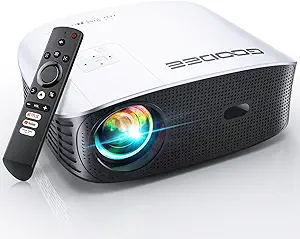
The budget smart projector market has exploded with models claiming '4K support' and integrated streaming, creating confusion about what features are actually functional versus marketing claims. Products like the WiMiUS K13 compete directly with brands like Vankyo and GooDee by offering Google TV integration at price points previously reserved for basic projectors.
Common Issues
Many budget smart projectors struggle with thermal management during extended streaming sessions, causing fan noise that interferes with audio. Another frequent problem is inconsistent WiFi performance despite dual-band claims, particularly with 5GHz networks at distances over 15 feet. 'Auto' features like focus and keystone often require manual adjustment in real-world use.
Quality Indicators
Look for mentions of the actual Google TV interface version and whether it receives regular updates—this indicates manufacturer support. Higher-quality budget projectors maintain consistent brightness across the entire screen area without noticeable hotspots. Genuine reviews will specify streaming duration before overheating issues occur.
Review Authenticity Insights
Grade B Interpretation
A Grade B authenticity rating with 15% estimated fake reviews suggests generally reliable feedback but requires careful filtering. The gap between the 5.00 Amazon rating and adjusted 4.60 rating indicates some review inflation, though less severe than many budget electronics products.
Trust Recommendation
Focus on reviews that mention specific use cases like outdoor movie nights or bedroom streaming, as these contain verifiable details. Be particularly skeptical of reviews praising 'perfect 4K' without mentioning native resolution or comparing it to known 1080p projectors. The 85% authentic review rate means most feedback is useful if you filter for technical specifics.
Tips for Reading Reviews
Prioritize reviews that discuss Google TV navigation specifics, app compatibility issues, or Bluetooth latency with external speakers. Look for mentions of the actual lumens rating in dark versus lit rooms, as this reveals more about real brightness than generic 'great picture' comments. Verified purchase reviews that mention firmware updates or customer support experiences carry more weight.
Expert Perspective
The WiMiUS K13's combination of Google TV integration, auto-focus, and keystone correction at this price point represents compelling value if the performance matches claims. The adjusted 4.60 rating from authentic reviews suggests solid satisfaction among informed buyers, though the perfect 5.00 displayed rating overstates quality. This projector's success hinges on whether its smart features work reliably versus being merely checkboxes on a specification sheet. The outdoor compatibility claim requires scrutiny of actual brightness output—many 'outdoor' projectors only work in complete darkness.
Purchase Considerations
Weigh the convenience of integrated Google TV against potentially better image quality from a traditional projector paired with a separate streaming device. Consider your tolerance for potential Android-related quirks like occasional app updates breaking functionality. The auto-focus feature adds significant value if you frequently move the projector, but test whether it works consistently on different surfaces.
Comparing Alternatives
Compare the K13's Google TV implementation against similar-priced projectors using basic Android TV or requiring external devices, as the interface experience varies significantly.

![CLOKOWE Mini Projector with WiFi and Bluetooth - [Built-in Apps] Smart Portable Projector with 180° Rotation, Auto Keystone, Support 1080P, Compatible with HDMI/USB/TV Stick/Smartphone/Laptop](https://m.media-amazon.com/images/I/71aHwv3EZ0L.__AC_SX300_SY300_QL70_FMwebp_.jpg)


