
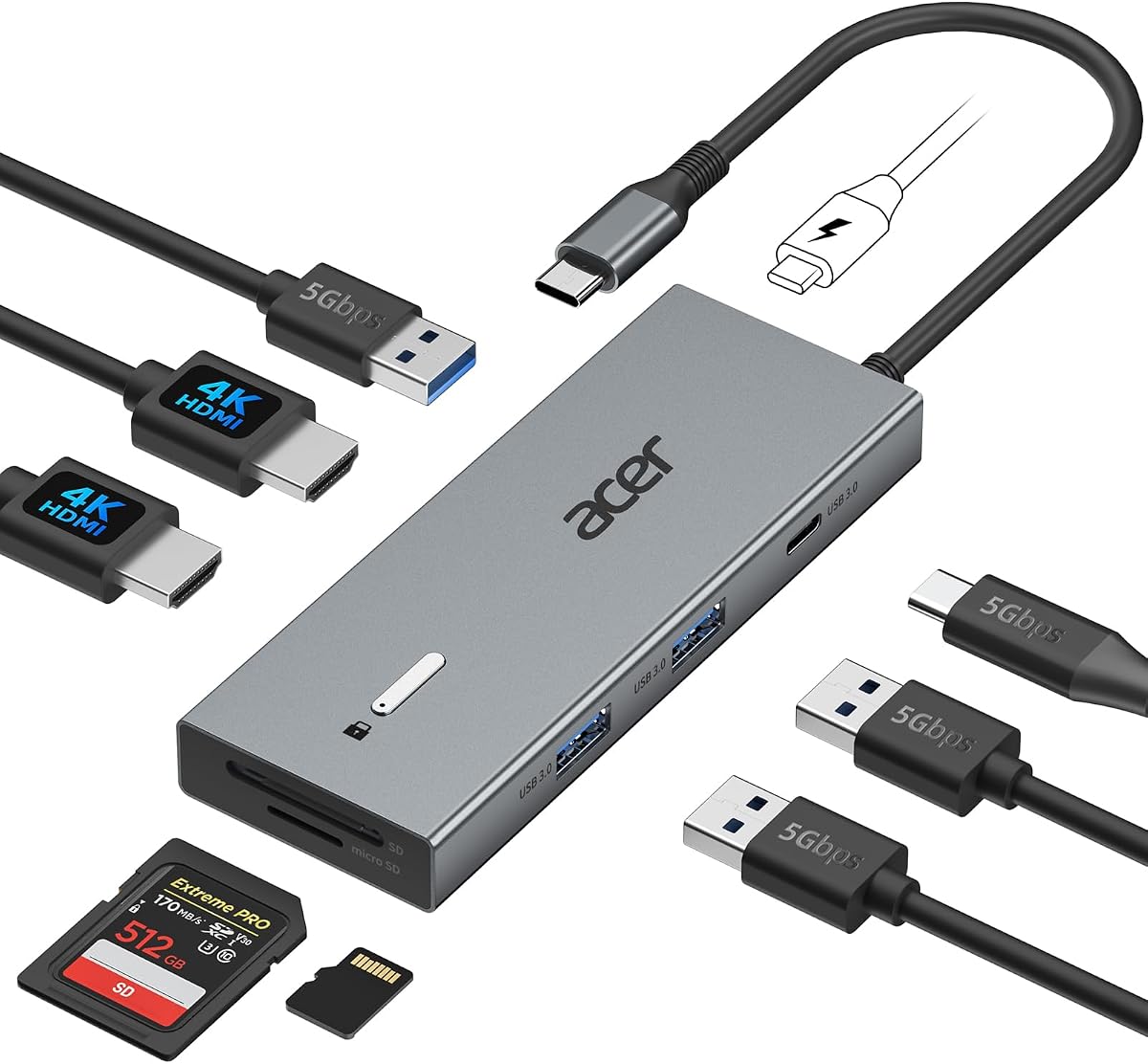
Acer's 9-in-1 Dual HDMI Dock: What Buyers Must Know Before Buying
Acer's USB-C docking station promises to turn a single laptop port into a dual-monitor workstation with nine functions, including two HDMI outputs. Understanding how its 9-in-1 design handles power delivery, display bandwidth, and port allocation is essential before you commit.
Key Considerations Before Buying
- Confirm your laptop's USB-C port supports DisplayPort Alt Mode and Power Delivery; without these, the dual HDMI outputs and pass-through charging won't work as intended.
- Check the dock's maximum resolution and refresh rate when both HDMI ports are active—many dual-monitor docks drop to 30Hz at 4K, which can feel sluggish for everyday use.
- Consider the 9-in-1 port mix: two HDMI, USB-A, USB-C data, SD/microSD, and Ethernet are common, but verify the exact layout matches your peripherals and whether the dock needs its own power adapter.
What Our Analysts Recommend
Look for explicit display specs (e.g., 4K@30Hz vs 4K@60Hz) and power delivery wattage—Acer's dock typically passes through up to 100W, but your laptop may cap charging lower. Also check whether both HDMI ports can run simultaneously or if one is limited to mirroring, and read reviews for heat and stability under load.
Docking Stations Market Context
Market Overview
USB-C docking stations have become essential as laptops shed ports, with dual-monitor models like this Acer 9-in-1 competing on price and port variety. The market is crowded with no-name brands, so established names like Acer offer a middle ground between budget docks and premium Thunderbolt stations.
Common Issues
Frequent complaints in this category include HDMI ports that won't output dual displays on certain laptops, flaky Ethernet, and docks that run hot or disconnect under load. Many issues stem from incompatible USB-C implementations rather than defective hardware.
Quality Indicators
Quality docks specify exact display resolutions and refresh rates, list supported power delivery profiles, and include clear compatibility notes. Build quality—metal housing, braided cable, and strain relief—also signals a dock that will survive daily plugging and unplugging.
Review Authenticity Insights
Grade A Interpretation
An A rating with an estimated 8% fake reviews is strong for this category, meaning most of the 2,563 ratings reflect real user experiences. The adjusted 3.90/5 rating, slightly below the 4.11/5 average, suggests genuine mixed feedback rather than inflated praise.
Trust Recommendation
Trust the overall sentiment but dig into the 1- and 2-star reviews for patterns—especially about dual HDMI compatibility and power delivery. These specific complaints are more informative than generic 5-star praise.
Tips for Reading Reviews
Focus on reviews that mention your laptop model and operating system, as dock compatibility varies widely. Look for comments on long-term reliability and whether the reviewer tested both HDMI ports simultaneously.
Expert Perspective
The Acer 9-in-1 dock is a solid mid-range option for users who need dual HDMI and a mix of legacy ports, backed by a mostly authentic review base. However, its 3.90/5 adjusted rating indicates that a meaningful minority encounter compatibility or performance issues. For the price, it's a reasonable choice if your laptop is confirmed compatible, but it's not a plug-and-play guarantee for every USB-C machine.
Purchase Considerations
Weigh the convenience of a single-cable setup against the risk of display limitations or charging conflicts. If you rely on dual 4K@60Hz monitors or need guaranteed Thunderbolt performance, this dock may fall short.
Comparing Alternatives
Compare with similar 9-in-1 docks from Anker, Plugable, and CalDigit, which may offer better display specs or warranty support for a similar price.



