9-Port USB 3.2 Hub: 10Gbps Speed and 45W PD Charging Decoded
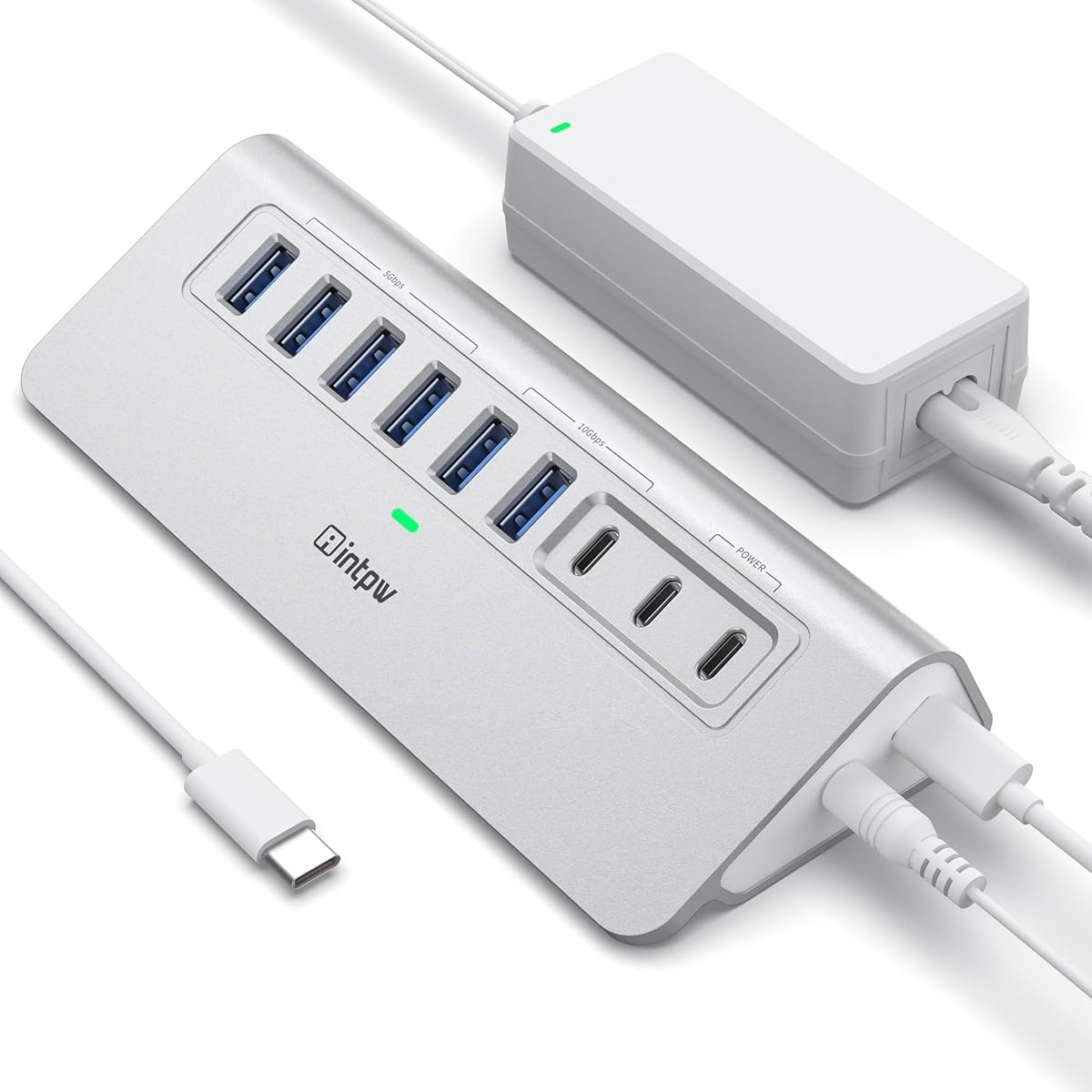
When your laptop's limited ports feel like a bottleneck, a powered USB hub like the intpw 9-Port USB 3.2 Hub can be a game-changer. This specific model offers a mix of USB-A and USB-C 3.2 ports (10Gbps each), plus two dedicated 45W Power Delivery charging ports, all powered by a 65W adapter—ideal for connecting peripherals to an iMac, Mac Mini, or PC without sacrificing speed or charging capability.
Key Considerations Before Buying
- Consider the number and type of ports you need: this hub includes 4 USB 3.0 ports (5Gbps) and 2 USB-C 3.2 ports (10Gbps), plus 2 PD 45W charging ports—great for simultaneously charging a phone and powering a LeapMotion or external drive, but ensure your devices match these speeds.
- Check the power delivery specs: with 45W PD and a 65W adapter, this hub can charge laptops and tablets (like iPhone 17/16/15) while running peripherals, but verify that your device's charging requirements align with the hub's output to avoid slow charging.
- Evaluate build and connectivity: the aluminum design and 3.3FT cable offer durability and flexibility for desk setups, but consider whether the cable length and port placement (e.g., under an iMac) suit your workspace without causing clutter.
What Our Analysts Recommend
Look for a powered hub with a robust power adapter (65W or higher) to ensure stable performance across all ports. Quality indicators include high-speed USB 3.2 Gen 2 (10Gbps) for fast data transfers, individual port ratings for PD charging, and a sturdy aluminum chassis that dissipates heat effectively during extended use.
USB Hubs Market Context
Market Overview
The USB hub market has evolved rapidly with the shift to USB-C and higher data transfer standards like USB 3.2 Gen 2 (10Gbps). Consumers increasingly demand hubs that balance multiple port types (USB-A, USB-C, and PD) for modern laptops that often have only one or two ports, making powered hubs essential for heavy peripherals.
Common Issues
Common problems include insufficient power from the hub, leading to devices disconnecting or failing to charge, and compatibility issues with specific operating systems or device firmware. Some hubs also suffer from overheating during high-data transfers, which can degrade performance over time.
Quality Indicators
Identify quality by checking for high wattage power adapters (65W+), support for USB 3.2 Gen 2 speeds (10Gbps), and positive reviews that mention specific devices like iMac or Mac Mini without generic praise. Aluminum construction and a warranty are also strong signs of durability.
Review Authenticity Insights
Grade B Interpretation
This product's Review Authenticity Grade B indicates a good but not perfect trust level, with an estimated 10% fake review rate. While the majority of the 910 reviews are genuine—evidenced by verified purchases and specific device mentions (e.g., iMac, LeapMotion)—the 10% suspicious reviews could inflate the overall rating slightly from its adjusted 4.40/5 to the displayed 4.67/5.
Trust Recommendation
Given the Grade B and 10% fake rate, you can generally trust the positive sentiment, but cross-check the adjusted rating of 4.40/5 as a more realistic benchmark. Focus on reviews that describe real-world usage (e.g., 'works with my Mac Mini under my desk') rather than short, vague praise.
Tips for Reading Reviews
When reading reviews for USB hubs, look for detailed accounts of data transfer speeds, charging performance with specific devices, and any issues with heat or connectivity. Ignore reviews that lack specifics about the hub's ports or power output, as these are more likely to be generic or fake.
Expert Perspective
The intpw 9-Port USB 3.2 Hub offers a compelling mix of high-speed data ports (10Gbps USB-C and USB-A) and dedicated 45W PD charging, backed by a 65W adapter that ensures stable power delivery. With a strong genuine review base and an adjusted rating of 4.40/5, it appears to be a reliable choice for users needing to expand connectivity for devices like iMacs or PCs, though the 10% fake review rate warrants slight caution. Its aluminum build and specific port configuration make it stand out for desk setups where both speed and charging are priorities.
Purchase Considerations
Weigh the hub's port count and speed against your specific needs: if you require multiple high-speed USB-C connections or simultaneous charging of laptops and phones, this model fits well. However, consider whether the 3.3FT cable is long enough for your setup and if the 45W PD ports meet your device's charging requirements (e.g., higher-wattage laptops may need more).
Comparing Alternatives
Shoppers should compare this hub with other powered USB 3.2 hubs offering similar port counts and PD wattage, such as those from Anker or Sabrent, to ensure the best fit for their device ecosystem and budget.