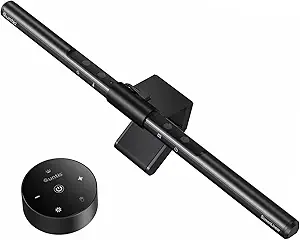
Monitor Light Bars: Illuminate Your Workspace Without Screen Glare
The YEELIGHT Monitor Light Bar is a 250-lumen LED lamp designed to mount on top of your monitor, providing focused illumination for your desk area while reducing screen glare. Unlike traditional desk lamps, it saves space and directs light downward, making it ideal for home offices and gaming setups.
Key Considerations Before Buying
- Monitor Compatibility: Ensure the light bar fits your monitor's thickness and curvature. This YEELIGHT model supports both flat and curved monitors, but check the clamp design to confirm it won't obstruct your webcam or monitor buttons.
- Light Quality and Adjustability: Look for stepless dimming and color temperature control. This model offers stepless dimming, but if you need adjustable color temperature, you may need a different model.
- Power Source and Controls: USB-powered lights are convenient but require an available USB port or adapter. The YEELIGHT features touch controls, which are intuitive but may require a learning curve for precise adjustments.
What Our Analysts Recommend
When choosing a monitor light bar, prioritize build quality, light uniformity, and ease of installation. Check for a sturdy clamp that won't damage your monitor and a diffuser that minimizes glare. Also, consider the light's color rendering index (CRI) if you do color-sensitive work; a CRI of 80+ is generally good, but 90+ is better for professional tasks.
USB Lamps Market Context
Market Overview
Monitor light bars have gained popularity as remote work and gaming have increased, offering a space-saving lighting solution that reduces eye strain. The market includes options from budget brands to premium names like BenQ, with prices ranging from $30 to over $200. Features vary widely, including adjustable color temperature, auto-dimming, and wireless controls.
Common Issues
Common complaints include light bars that are too heavy for thin monitors, causing them to tilt, or clamps that don't fit curved displays securely. Some users report glare on glossy screens despite anti-glare claims, and others find touch controls unresponsive or difficult to use in low light.
Quality Indicators
High-quality monitor light bars use metal housings for durability and heat dissipation, and feature asymmetric optical designs that direct light onto the desk without hitting the screen. Look for certifications like flicker-free and low blue light (e.g., TÜV Rheinland) to ensure eye comfort. A good warranty and responsive customer support are also signs of a reputable brand.
Review Authenticity Insights
Grade A Interpretation
With an authenticity grade of A and an estimated fake review percentage of just 5%, the reviews for this YEELIGHT monitor light bar are highly trustworthy. This means the 4.67-star rating (adjusted to 4.60) is likely a genuine reflection of customer satisfaction, with minimal manipulation.
Trust Recommendation
You can confidently rely on the review content to gauge real-world performance. However, as with any product, focus on reviews that mention specific use cases similar to yours, such as using it with a curved monitor or for gaming, to ensure it meets your needs.
Tips for Reading Reviews
When reading reviews for monitor light bars, pay attention to comments about fit, glare, and build quality. Look for reviewers who mention their monitor model and setup, as compatibility can vary. Also, note if multiple reviewers mention the same issue, as that may indicate a design flaw.
Expert Perspective
The YEELIGHT Monitor Light Bar appears to be a solid mid-range option, offering essential features like stepless dimming and broad monitor compatibility at a competitive price. Its high rating and authentic reviews suggest it performs well for typical home office and gaming setups. However, it lacks adjustable color temperature, which may be a drawback for users who need warm light for evening use. The 250-lumen output is adequate for desk illumination but may not suffice for larger workspaces.
Purchase Considerations
Before buying, measure your monitor's thickness and curvature to ensure a proper fit. Consider whether you need color temperature adjustment; if so, look for a model with that feature. Also, check the placement of your USB ports, as the light requires a power source. If you have a webcam, verify that the light bar won't block it.
Comparing Alternatives
Shoppers should compare this model with other monitor light bars that offer color temperature control or higher brightness, such as those from BenQ or Xiaomi, to find the best match for their needs.