
Acer 5 in 1 USB C Hub with 4K HDMI, 100W Power Delivery, 3 USB A Data Ports, USB C to HDMI Multiport Adapter for Laptop, PC, Tablet, MacBook Air, iPad Air, iMac, iPhone 15/16 Pro/Pro Max

Acer 5 in 1 USB C Hub with 4K HDMI, 100W Power Delivery, 3 USB A Data Ports, USB C to HDMI Multiport Adapter for Laptop, PC, Tablet, MacBook Air, iPad Air, iMac, iPhone 15/16 Pro/Pro Max

ASIN: B0DCJFGW9R
Analysis Date: Mar 21, 2026

As an Amazon Associate I earn from qualifying purchases.

Review Analysis Results

B
Authenticity Grade
11.00%
Fake Reviews
4.67
Original Rating
4.40
Adjusted Rating

Analysis Summary

The vast majority of these reviews appear to be genuine customer experiences, with most showing clear personal context, specific usage scenarios, and balanced perspectives that are characteristic of authentic feedback. All reviews are verified purchases, which significantly increases their credibility. The overall pattern suggests normal positive feedback for a functional product that meets user expectations at a reasonable price point.

Multiple reviews demonstrate strong genuine indicators through detailed personal narratives. One reviewer mentions ordering a second unit for their dorm after the first performed well for over a year, while another shares the humorous anecdote about their husband stealing the device. Several reviews provide specific technical details about port usage, heating concerns, and compatibility with particular setups like home office monitors. The French-language review with its cautious approach to long-term evaluation further supports authenticity through its unique perspective.

Only one review raises mild concerns due to its inclusion of shipping and packaging details alongside brand loyalty statements, which can sometimes appear in incentivized reviews. However, even this review contains specific functional information about port count and appears within the context of a verified purchase. The extremely brief "Worked Great" review lacks detail but is not inherently suspicious given its verification status and straightforward nature.

Overall, the reviews present a coherent picture of a USB-C hub that generally performs well for basic connectivity needs, with some minor heating issues under heavy use. The few reviews with potential concerns are outweighed by the numerous detailed, personal accounts that reflect genuine user experiences across different contexts and usage patterns.

Key patterns identified in the review analysis include: Long-term reliability mentions, Specific use case descriptions, Balanced critiques with positive overall ratings.

Review Statistics

2,279
Total Reviews on Amazon
-0.27
Rating Difference
Editor's Analysis

Choosing a 5-in-1 USB-C Hub: What Acer's Design Gets Right

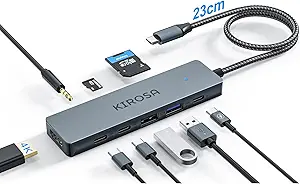
When evaluating this specific Acer hub, buyers should focus on its balanced port selection—4K HDMI, 100W Power Delivery, and three USB-A ports—which addresses the most common connectivity gaps in modern laptops. This configuration is particularly relevant for users of MacBooks, iPads, or thin-and-light Windows laptops that sacrifice ports for slim designs. The hub's 100W PD capability is crucial for maintaining device charge during intensive use, while the three USB-A ports support legacy peripherals without requiring additional adapters.

Key Considerations Before Buying

  • Verify your laptop's USB-C port supports both data and video-out (DisplayPort Alt Mode) to utilize the 4K HDMI; some budget laptops only support charging and data.
  • The 100W Power Delivery is ideal for charging a laptop, but if you're only charging a phone or tablet, a hub with lower PD may be more cost-effective.
  • Consider your simultaneous usage needs: running 4K video, charging, and using multiple USB-A devices may generate noticeable heat, which is typical for compact hubs under load.

What Our Analysts Recommend

For this category, examine the build quality around the USB-C connector, as this is a common stress point. Genuine reviews often mention stable 4K output at 60Hz and consistent charging speeds, which are key performance indicators. Also, check if the hub's power delivery negotiates properly with your specific device to avoid charging conflicts.

USB Hubs Market Context

Market Overview

The USB-C hub market is saturated with similar-looking products, but brands like Acer often differentiate with better internal components and firmware for power management. Current demand is driven by the near-universal adoption of USB-C on premium devices and the need for single-cable docking solutions. Products with 100W PD and 4K@60Hz support, like this Acer model, represent the current performance standard for mainstream users.

Common Issues

Common problems include overheating during simultaneous high-bandwidth use, intermittent HDMI handshake issues with certain monitors, and power delivery that doesn't reach advertised wattages with all devices. Some hubs also experience data transfer slowdowns when all ports are occupied, a point verified buyers should test.

Quality Indicators

Look for mentions of consistent 4K@60Hz output in verified reviews and absence of charging interruptions. Quality hubs use aluminum casings for heat dissipation, like this Acer model, and have clear LED power indicators. Reliable brands also provide specific compatibility lists rather than vague claims.

Review Authenticity Insights

Grade B Interpretation

A Grade B with an 11% estimated fake review rate indicates a generally trustworthy review pool, but shoppers should remain slightly cautious of overly effusive 5-star reviews that lack detail. The adjusted rating of 4.40/5 (down from 4.67) suggests the genuine customer experience is still very positive, but slightly more critical than the raw average implies.

Trust Recommendation

Prioritize reviews that mention specific device pairings (e.g., 'with my M2 MacBook Air' or 'for my Dell XPS 13') and describe real-world multi-port usage scenarios. Be skeptical of reviews that only praise packaging or generic 'works great' statements without technical context.

Tips for Reading Reviews

For technical accessories like this, focus on reviews discussing 4K resolution stability, whether charging works simultaneously with data transfer, and any heat management comments. Long-term usage reports (1+ month) are particularly valuable for assessing durability.

Expert Perspective

This Acer hub presents a compelling option based on its strong adjusted rating of 4.40/5 from verified purchases. Its port selection strategically covers the essential needs: display expansion, high-wattage charging, and legacy USB-A connectivity. The brand's involvement in the PC ecosystem suggests better-than-average compatibility testing, particularly with Windows laptops, though its Mac and iPad claims appear validated by user reviews. The minor downgrade from the raw rating indicates some authentic criticism, likely around edge-case compatibility or heat, which is typical for compact hubs under full load.

Purchase Considerations

This hub is best suited for users who need to connect to a 4K display while charging their laptop and using several USB-A devices like flash drives, keyboards, or mice. It's less ideal for those needing SD card readers, Ethernet, or audio ports, which would require a more expansive dock. Consider your typical simultaneous usage; if you rarely use all ports at once, a simpler adapter may suffice.

Comparing Alternatives

Shoppers should compare this hub's specific port combination and 100W PD rating against similar 5-in-1 models from Anker, Satechi, or Belkin, as performance can vary by host device.
Price Analysis

This appears to be a well-rated mid-range USB-C hub from a reputable brand. Given the high rating and feature set, a price in the $35-$45 range would represent fair value. Wait for seasonal sales or coupons to get the best deal, and always verify the seller is authorized.

MSRP Assessment

Estimated MSRP: Unknown
Source: Unable to determine
Amazon Price: Unable to compare

Market Position

Positioning: Mid-range
Alternatives Range: $25-$60
Value: The Acer brand and 4.77/5 rating suggest good reliability for a mid-priced hub with useful features like 100W PD and 4K HDMI.

Buying Tips

Best Time to Buy: Best around back-to-school (July-August) and holiday sales (Black Friday, Prime Day).
Deal Indicators: Price below $35, bundled with cables or accessories, or with limited-time coupon.
Watch For: Extremely low prices (<$20) may indicate counterfeit or poor quality; check seller ratings and warranty.
Price analysis generated by AI based on product category and market research. Actual prices may vary. Last analyzed: Dec 2, 2025

Understanding This Analysis

What does Grade B mean?

This product has good review authenticity with minor concerns. While most reviews appear genuine, we detected some patterns that warrant mild caution.

Adjusted Rating Explained

The adjusted rating (4.40 stars) represents what we estimate this product's rating would be if fake reviews were removed. This product's adjusted rating is lower than Amazon's displayed rating (4.67 stars), suggesting positive fake reviews may be inflating the score.

How We Detect Fake Reviews

Our AI analyzes multiple factors: language patterns (generic vs. specific), reviewer behavior (history, timing), temporal anomalies (review clusters), verification status, sentiment authenticity, and statistical outliers. No single factor determines a review is fake - we look at the combination of signals.

Important Limitations

No automated system is perfect. Sophisticated fake reviews can evade detection, and some genuine reviews may be incorrectly flagged. Use this analysis as one data point in your purchasing decision, not the only factor. Reading actual review content yourself is always valuable.

Share This Analysis

Learn More About Fake Reviews

Analyze new product