

Choosing a WiFi Portable Projector: Connectivity Matters More Than Specs
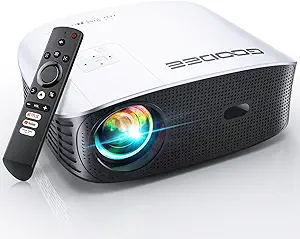
This specific projector emphasizes wireless connectivity through WiFi mirroring alongside traditional wired options, positioning it as a flexible entertainment hub rather than just a display device. Buyers should understand that its value lies in seamless smartphone/tablet integration rather than raw brightness or resolution specs.
Key Considerations Before Buying
- WiFi mirroring performance varies significantly by device and network conditions—test compatibility with your specific smartphone or tablet before relying on wireless streaming.
- The dual connectivity (WiFi and data cable) provides backup options when wireless lag occurs, making this suitable for both casual viewing and gaming with a PS console.
- Portability in this category often means trade-offs in native resolution and lumen output; prioritize devices that maintain clear image quality when scaled to larger screens.
What Our Analysts Recommend
Check for specific mentions of HDMI latency with gaming consoles and consistent WiFi mirroring without dropouts. Genuine reviews will detail setup complexity with TV sticks like Fire Stick or Roku, which indicates real-world testing beyond basic smartphone connections.
Video Projectors Market Context
Market Overview
The portable projector market is flooded with devices claiming universal compatibility, but actual performance with specific devices like newer smartphones or the PS5 varies dramatically. True 'smart' functionality through reliable wireless casting separates adequate products from frustrating ones.
Common Issues
Many budget portable projectors struggle with consistent WiFi mirroring, exhibiting lag, compression artifacts, or connection drops that undermine the wireless convenience. Others have weak built-in speakers requiring external audio solutions for movie nights.
Quality Indicators
Look for detailed user reports about specific device pairings (e.g., 'iPhone 14 Pro mirroring worked instantly' or 'Fire Stick 4K required adapter'). Consistent praise for the setup process and minimal input lag with gaming signals genuine plug-and-play functionality.
Review Authenticity Insights
Grade B Interpretation
A Grade B with 11% estimated fake reviews indicates generally trustworthy feedback, but shoppers should remain cautious of overly vague 5-star reviews that don't mention specific connectivity methods or device types. The adjusted rating of 3.90/5 (down from 4.11) suggests more realistic performance expectations.
Trust Recommendation
Focus on reviews that mention using the exact connectivity methods you plan to use—whether WiFi mirroring from an iPad, HDMI from a laptop, or USB media playback. The 11% fake rate means approximately 1 in 9 reviews might be inflated, so prioritize detailed critical feedback.
Tips for Reading Reviews
Search for reviews containing specific technical pain points like 'WiFi mirroring latency' or 'HDMI handshake issues with PS4.' Authentic experiences often mention screen size tested, ambient light conditions, and whether the included cables were sufficient for their setup.
Expert Perspective
This projector's positioning as a multi-connectivity hub is its strongest selling point, though the adjusted 3.90 rating suggests some users experience the wireless performance inconsistencies common in this price segment. The compatibility list spanning smartphones, tablets, laptops, TV sticks, and PS consoles indicates versatility, but real-world performance will depend heavily on your specific source device and content type. The B authenticity grade means most reviews reflect genuine experiences, making them valuable for identifying pattern failures versus isolated issues.
Purchase Considerations
Weigh your need for true wireless convenience against occasional reliability trade-offs. If you primarily plan wired connections with occasional WiFi mirroring, this device likely delivers good value. However, if flawless wireless streaming is essential, consider whether the connectivity consistency matches your tolerance for troubleshooting.
Comparing Alternatives
Compare specific wireless protocols (Miracast, AirPlay, DLNA support) and input lag measurements if gaming is a priority, as not all 'PS compatible' projectors perform equally.
![CLOKOWE Mini Projector with WiFi and Bluetooth - [Built-in Apps] Smart Portable Projector with 180° Rotation, Auto Keystone, Support 1080P, Compatible with HDMI/USB/TV Stick/Smartphone/Laptop](https://m.media-amazon.com/images/I/71aHwv3EZ0L.__AC_SX300_SY300_QL70_FMwebp_.jpg)


